
FLORA Academy
Master FLORA. Go beyond the fundamentals to the tools, techniques, models, and workflows behind professional creative work.
Nano Banana AI: Google’s Image Generation and Editing Model
Nano Banana is Google’s fast image model for generating and editing pictures, now spanning the original Gemini Flash Image release, Nano Banana 2, and Nano Banana Pro. Run all three on the FLORA canvas.
Want to try it? Nano Banana, Nano Banana 2 and Nano Banana Pro all run on the FLORA canvas, so you can compare the three on the same prompt before picking one. Start free on FLORA.
What is Nano Banana?
Nano Banana is the nickname for Google’s Gemini Flash Image models. It takes a text prompt, a reference image, or several images at once, and returns a new image. What sets it apart from most image models is that it is edit-first: you can hand it a photo and describe a change in plain language rather than regenerating from scratch.
Three versions matter today. The original, Gemini 2.5 Flash Image, is the fastest at around 20 seconds. Nano Banana 2 runs on Gemini 3.1 Flash Image and pushes quality up to 4K. Nano Banana pro is the premium tier, built for multi-image composition with up to 14 reference images. Google Nano Banana is proprietary, so there is no self-hosted option, and all three are available inside FLORA.
Quick facts
Modes: Text → Image · Image → Image (editing) · Images → Image (multi-image).
Speed: around 20s on the original, ~30s for edits, ~80s on Nano Banana 2, ~30 to 40s on Pro.
Resolution: 1K, 2K and 4K on 2 and Pro. The original defaults to 1024x1024.
Aspect ratios: Pro supports 21:9, 16:9, 5:4, 4:3, 3:2, 1:1, 2:3, 3:4, 4:5 and 9:16. The original inherits the ratio of the first image you connect.
Reference images: up to 14 on 2 and Pro.
Training / licensing: proprietary Google model. Text moderation follows Google’s usage policies.
What it’s great for
Fast photo edits and stylized generation.
Nano Banana image editing where you want a targeted local change, not a new picture.
Multi-image fusion, compositing several references into one frame.
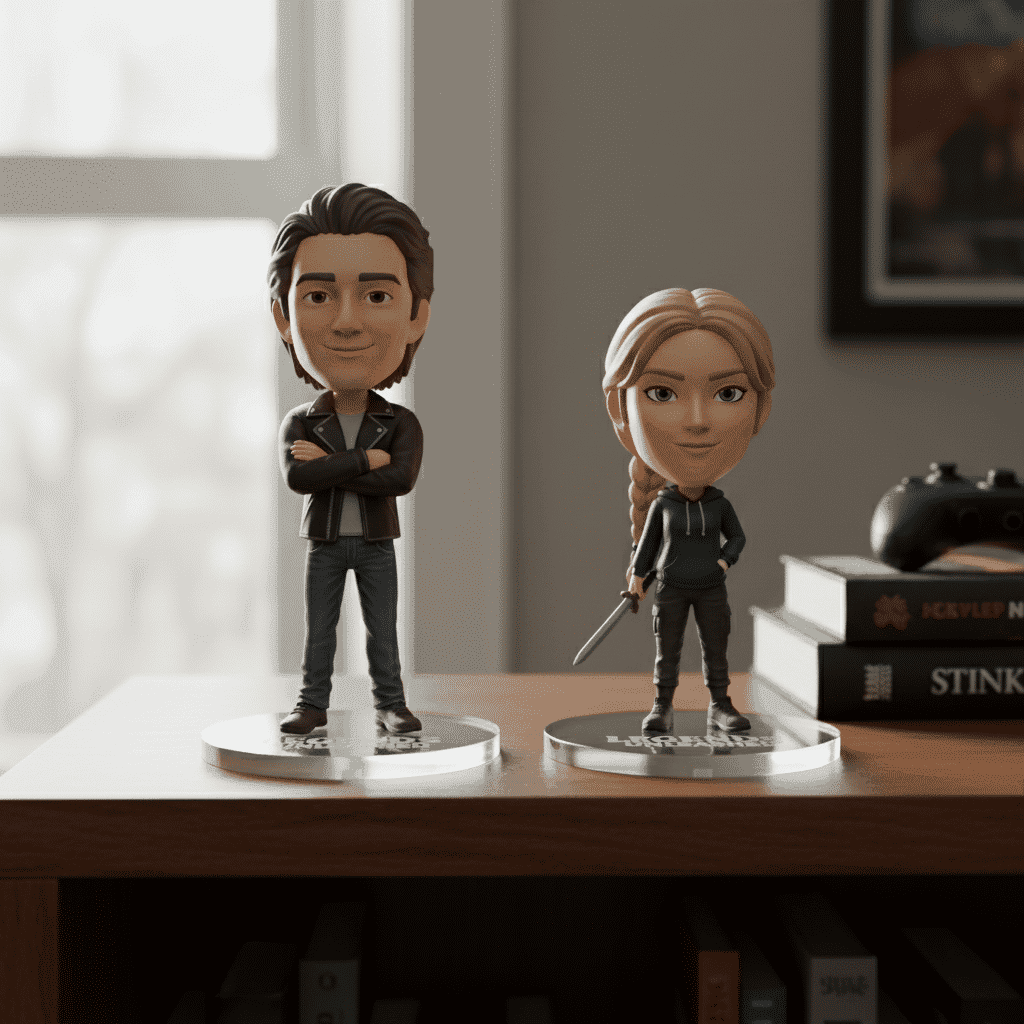
Turning photos into collectible or toy-style renders.
Nano Banana versions
Three builds are live. The original Gemini 2.5 Flash Image is the quickest, around 20 seconds, and still the best choice for a small edit. Nano Banana 2 runs on Gemini 3.1 Flash Image, pushes output to 4K and can ground a generation in a web search, with a lighter sibling for cheaper runs. Gemini 3 Nano Banana Pro is the quality tier: the same editing behaviour, ten aspect ratios and much stronger multi-image composition. All three are available in FLORA, and this page tracks whichever is current.
Example outputs

Figurine-style render

Edited render
Multi-image fusion example
Copy-and-paste prompts
Portrait photo retouched into collectible 3D figurine on acrylic base, studio lighting, crisp detail
Edit: remove background and add dramatic rim light, maintain subject skin tones, photoreal
Blend two product images into a single shelf display with natural shadows and reflections
Parameters
Name | Type | Default | Notes |
| text | required | Natural-language description |
| upload | none | Required for editing and fusion modes, up to 14 on 2 and Pro |
| dropdown | 1K | 1K, 2K, 4K. 4K costs 2x on Pro |
| dropdown | 1:1 | Pro only. The original inherits the first image’s ratio |
| toggle | off | Nano Banana 2 only, flat added cost |
| number | random | Fix it for repeatable results |
Modes
Mode | Estimated time | Required inputs | Typical use |
Text → Image | 20s original, ~80s on 2, ~30s on Pro |
| Generate from a description |
Image → Image (edit) | 30s original, ~80s on 2, ~35s on Pro |
| Local edits, background replacement |
Images → Image | 30s original, ~80s on 2, ~40s on Pro |
| Fusion and composites, up to 14 references |
Output options
Option | Values / notes |
Resolution | 1K, 2K, 4K on 2 and Pro. 1024x1024 default on the original |
Aspect ratio | Ten ratios on Pro, from 21:9 through 9:16. Inherited from the input image on the original |
Notes | Edit-first behaviour across all versions, strongest on targeted local changes |
Prompt tips
For edits, prefix with “Edit:” and describe pixel-accurate changes.
Use clear style tokens such as “photoreal”, “3D figurine” or “studio lighting”.
Add a seed when you need the same result twice.
On multi-image runs, say what each reference contributes rather than listing them.
Running Nano Banana in FLORA
On the FLORA canvas Nano Banana sits as an image block, so a prompt or a reference photo feeds it directly and the result flows onward without leaving the board. That is the difference from using a Nano Banana AI image generator on its own: the edit becomes one step in a workflow you keep.
Because it is edit-first, it pairs naturally with the techniques that clean an image up. Pull a subject out with the background remover, change colourways with product recolor or image recolor, swap materials using texture matchers, shoot a clean plate with studio shot, then finish with the image upscaler.
Models are interchangeable on the canvas, so you can run the same prompt through Nano Banana and a rival and compare. Try it against Seedream or Flux, or read our ranking of the best AI image generators. Specs live in the Nano Banana Pro docs, and you can open a canvas and try it free.
Nano Banana FAQs
Is Nano Banana free?
You can try it without paying by starting on FLORA’s free tier, which lets you run Nano Banana AI free alongside other image models before committing budget. Beyond that, cost scales with resolution and version: 4K on Pro costs twice a standard run, and Nano Banana 2’s web search adds a flat fee.
What is the difference between Nano Banana, 2 and Pro?
The original Gemini 2.5 Flash Image is fastest at about 20 seconds. Nano Banana 2 moves to Gemini 3.1 Flash Image with 4K output and optional web grounding. Pro is the quality tier, with ten aspect ratios and the strongest multi-image composition.
Who makes Nano Banana?
Google. It is the informal name for the Gemini Flash Image family, and gemini Nano Banana or Nano Banana Google both refer to the same models. It is proprietary, so there is no open-weights version.
How many reference images can it take?
Up to 14 on both 2 and Pro. That is what makes Nano Banana Pro AI image generator runs useful for composites, where several products or people need to share one frame and one lighting setup.
Is it better for editing or for generating from scratch?
Editing. Plenty of models generate a good first image, but Nano Banana is unusually good at changing one thing in a picture you already have while leaving the rest alone.
Safety
Text moderation follows Google’s usage policies.
Standard FLORA moderation applies to prompts and output.
Check rights for any reference image you upload before using output commercially.
"/><stop offset="1" stop-color="rgba(15, 15, 15, 0)"/></linearGradient></defs><path d="M 899.729 124.429 L 931.177 124.429 L 931.177 108.467 L 946.905 108.467 L 946.905 44.616 L 884.001 44.616 L 884.001 92.504 L 868.274 92.504 L 868.274 124.429 L 852.554 124.429 L 852.554 140.392 L 836.826 140.392 L 836.826 156.355 L 852.554 156.355 L 852.554 172.317 L 836.826 172.317 L 836.826 204.242 L 821.098 204.242 L 821.098 236.168 L 852.554 236.168 L 852.554 252.129 L 758.2 252.129 L 758.2 236.167 L 789.65 236.167 L 789.65 204.241 L 805.378 204.241 L 805.378 172.316 L 821.098 172.316 L 821.098 124.428 L 836.826 124.428 L 836.826 92.504 L 852.554 92.504 L 852.554 44.616 L 836.826 44.616 L 836.826 28.654 L 962.625 28.654 L 962.625 44.616 L 978.353 44.616 L 978.353 60.579 L 994.081 60.579 L 994.081 76.541 L 978.353 76.541 L 978.353 124.429 L 946.905 124.429 L 946.905 140.392 L 931.177 140.392 L 931.177 156.355 L 946.905 156.355 L 946.905 236.168 L 978.417 236.168 L 978.417 220.205 L 994.145 220.205 L 994.145 204.242 L 1009.865 204.242 L 1009.865 188.28 L 1025.593 188.28 L 1025.593 204.242 L 1009.865 204.242 L 1009.865 220.205 L 994.145 220.205 L 994.145 236.168 L 1025.593 236.168 L 1025.593 252.13 L 915.449 252.13 L 915.449 156.355 L 899.729 156.355 Z M 1135.672 172.317 L 1119.944 172.317 L 1119.944 76.541 L 1104.216 76.541 L 1104.216 92.504 L 1088.496 92.504 L 1088.496 108.467 L 1072.768 108.467 L 1072.768 92.504 L 1088.496 92.504 L 1088.496 76.541 L 1104.216 76.541 L 1104.216 60.579 L 1119.944 60.579 L 1119.944 28.654 L 1135.672 28.654 L 1135.672 60.579 L 1151.392 60.579 L 1151.392 236.168 L 1167.12 236.168 L 1167.12 252.13 L 1104.216 252.13 L 1104.216 236.168 L 1119.944 236.168 L 1119.944 188.28 L 1135.672 188.28 Z M 1072.768 124.429 L 1072.768 140.392 L 1057.041 140.392 L 1057.041 156.355 L 1041.321 156.355 L 1041.321 172.317 L 1025.593 172.317 L 1025.593 156.355 L 1041.321 156.355 L 1041.321 140.392 L 1057.041 140.392 L 1057.041 124.429 Z M 176.61 25.988 C 124.406 25.988 78.864 38.954 68.867 80.108 C 64.424 102.095 70.533 130.282 105.522 145.504 C 107.678 146.379 109.332 146.83 110.516 147.152 C 112.382 147.661 113.082 147.852 112.742 148.886 C 112.186 150.577 106.633 150.014 102.19 148.323 C 69.424 136.484 51.65 107.168 54.983 77.289 C 60.536 35.572 109.966 -1.636 179.387 0.056 C 202.713 0.056 238.812 5.692 273.246 15.276 C 293.795 20.914 321.009 28.243 346.555 34.444 C 369.881 24.86 392.096 18.659 411.534 18.659 C 425.628 18.659 438.846 21.919 444.414 28.654 L 537.86 28.654 L 537.86 44.616 L 506.41 44.616 L 506.41 60.579 L 490.685 60.579 L 490.685 92.504 L 474.959 92.504 L 474.959 124.429 L 459.233 124.429 L 459.233 172.317 L 443.508 172.317 L 443.508 220.205 L 427.783 220.205 L 427.783 236.168 L 522.135 236.168 L 522.135 220.205 L 537.86 220.205 L 537.86 204.242 L 553.586 204.242 L 553.586 172.317 L 569.311 172.317 L 569.311 204.242 L 553.586 204.242 L 553.586 236.168 L 537.86 236.168 L 537.86 252.13 L 364.881 252.13 L 364.881 236.168 L 396.332 236.168 L 396.332 220.205 L 412.058 220.205 L 412.058 172.317 L 427.783 172.317 L 427.783 140.392 L 443.508 140.392 L 443.508 92.504 L 459.234 92.504 L 459.234 44.616 L 444.157 44.616 C 437.338 52.415 419.206 55.303 394.318 55.303 C 379.323 55.303 357.108 53.048 349.333 51.92 C 337.67 63.196 325.452 77.853 314.9 90.82 C 305.307 102.032 297.996 111.856 290.818 121.501 C 284.281 130.284 277.855 138.919 269.914 148.323 C 283.798 148.886 298.794 147.759 309.901 143.812 C 320.454 129.155 333.783 122.39 342.669 124.645 C 351.554 126.9 350.444 135.92 337.67 145.504 C 335.4 147.26 333.256 148.887 331.193 150.453 C 322.659 156.932 315.515 162.356 306.569 171.436 C 304.66 173.374 302.994 175.312 301.571 176.968 C 299.269 179.646 297.602 181.584 296.572 181.584 C 293.24 182.148 294.351 172 296.572 166.363 C 299.349 159.597 302.126 154.524 304.903 150.577 C 295.462 153.396 284.91 154.524 266.026 154.524 C 264.938 155.812 263.791 157.222 262.545 158.751 C 259.978 161.904 256.993 165.569 253.253 169.745 C 204.381 225.557 123.85 256 71.645 256 C 29.993 256 0 239.087 0 212.591 C 0 193.987 12.774 175.947 34.99 175.947 C 53.317 175.947 61.092 188.349 60.537 200.188 C 59.981 208.644 57.204 213.718 51.651 219.92 C 47.763 224.429 44.431 228.376 44.431 234.013 C 44.431 243.597 52.762 249.798 68.867 250.362 C 111.631 253.181 142.177 234.013 176.61 195.678 C 190.494 180.456 200.491 168.054 210.488 153.96 C 198.27 153.96 186.607 153.96 179.943 154.524 C 172.902 154.799 168.37 155.744 165.639 156.313 C 162.768 156.912 161.886 157.096 162.17 155.652 C 162.726 153.396 167.724 149.45 184.385 148.323 C 188.537 147.94 196.791 148.077 204.443 148.204 C 208.052 148.264 211.528 148.323 214.375 148.323 C 222.151 137.611 231.037 125.772 242.7 113.37 C 264.915 89.128 294.35 65.451 323.23 47.411 C 307.124 45.719 281.021 40.645 263.804 37.263 C 239.923 32.753 203.268 25.988 177.166 25.988 L 176.61 25.988 Z M 365.438 39.518 C 386.542 45.156 403.204 46.847 413.2 46.847 C 427.64 46.847 440.969 42.336 441.524 36.136 C 442.08 29.37 428.751 24.296 410.979 24.296 L 410.423 24.296 C 394.317 24.296 375.435 32.753 365.438 39.518 Z M 711.023 252.129 L 616.672 252.129 L 616.672 236.167 L 600.946 236.167 L 600.946 220.204 L 585.221 220.204 L 585.221 108.466 L 600.946 108.466 L 600.946 76.54 L 616.672 76.54 L 616.672 60.578 L 632.396 60.578 L 632.396 44.616 L 663.847 44.616 L 663.847 28.654 L 758.2 28.654 L 758.2 44.616 L 773.924 44.616 L 773.924 60.579 L 789.65 60.579 L 789.65 172.317 L 773.924 172.317 L 773.924 188.28 L 758.2 188.28 L 758.2 220.205 L 742.474 220.205 L 742.474 236.168 L 711.023 236.168 Z M 663.847 44.616 L 663.847 60.579 L 648.122 60.579 L 648.122 76.541 L 632.396 76.541 L 632.396 108.467 L 616.672 108.467 L 616.672 220.205 L 632.396 220.205 L 632.396 236.168 L 695.298 236.168 L 695.298 220.205 L 711.023 220.205 L 711.023 204.242 L 726.749 204.242 L 726.749 188.28 L 742.474 188.28 L 742.474 156.355 L 758.2 156.355 L 758.2 60.579 L 742.474 60.579 L 742.474 44.616 Z" fill="url(%23k7ftP17bN-2050371890-linear-gradient)" height="255.9995555606772px" id="k7ftP17bN" width="1167.1199228535695px"/></svg>)