

Krea AI: Krea 2, Krea 3 and How to Use Them
Krea AI is a creative suite that also trains its own image models, which is the unusual part. Krea 2 and Krea 3 both run on the FLORA canvas, alongside the 50-plus other models you already use there.
Want to try it? Krea 3 and Krea 2 both run on the FLORA canvas, so you can put one prompt through both and see the difference in look before you commit to either. Start free on FLORA.
What is Krea AI?
Krea AI is a company that makes creative tools and, since 2026, its own foundation image models. That combination is rarer than it sounds. Most companies in this space do one or the other, so when people search for Krea AI they are sometimes looking for the product and sometimes for the models. This page is about the models, because those are the part that runs on the FLORA canvas.
Krea describes Krea 2 as its first foundation image model built from scratch, tuned around aesthetics, style transfer and creative control more than raw prompt compliance. Krea 3 followed and added image references, weighted styles and precise local edits. The company has also published open weights with Black Forest Labs under the FLUX.1 Krea name, and released a real-time video model, so the catalog is wider than the two image models most people mean.
Quick facts
- What runs on FLORA: nine Krea builds across Krea 2 and Krea 3.
- Krea 3: text to image, image to image and multi-image to image, about 10 seconds, about 0.063 US dollars a run.
- Krea 2 Large: text to image, about 30 seconds, about 0.072 US dollars.
- Krea 2 Turbo LORA: about 30 seconds, about 0.013 US dollars, the cheapest Krea run on the canvas.
- Krea 2 References: Large and Medium builds that take one or several reference images, from about 0.042 to 0.078 US dollars.
- Fastest: Krea 3, at roughly a third of the time Krea 2 takes.
- Provider: Krea. Proprietary, though Krea has released open weights for a separate FLUX collaboration.
What it is great for
- Work where the look matters more than literal prompt compliance. That is the trade Krea has openly made.
- Style transfer, where you want the feel of one image carried into another and a written description will not get you there.
- Reference-driven iteration, using the Krea 2 References builds to hold a subject or a palette across a set.
- Cheap volume exploration on Krea 2 Turbo LORA, where a run costs a little over a cent.
Krea 2 and Krea 3 compared
The two generations are different enough that it is worth running both before settling. Krea 3 is faster and cheaper and handles references and local edits. Krea 2 is the older foundation model, and in our side by side it leaned more toward a rendered, styled look where Krea 3 read as a photograph.
Krea 2 Large | Krea 3 | |
Modes on FLORA | Text to image | Text to image, image to image, multi-image to image |
Speed | ~30 seconds | ~10 seconds |
Cost | ~$0.072 | ~$0.063 |
References | Through the separate References builds | Built in |
Local edits | No | Yes |
Best for | Styled and illustrative work | Photoreal work and edits to an image you already have |
Example outputs
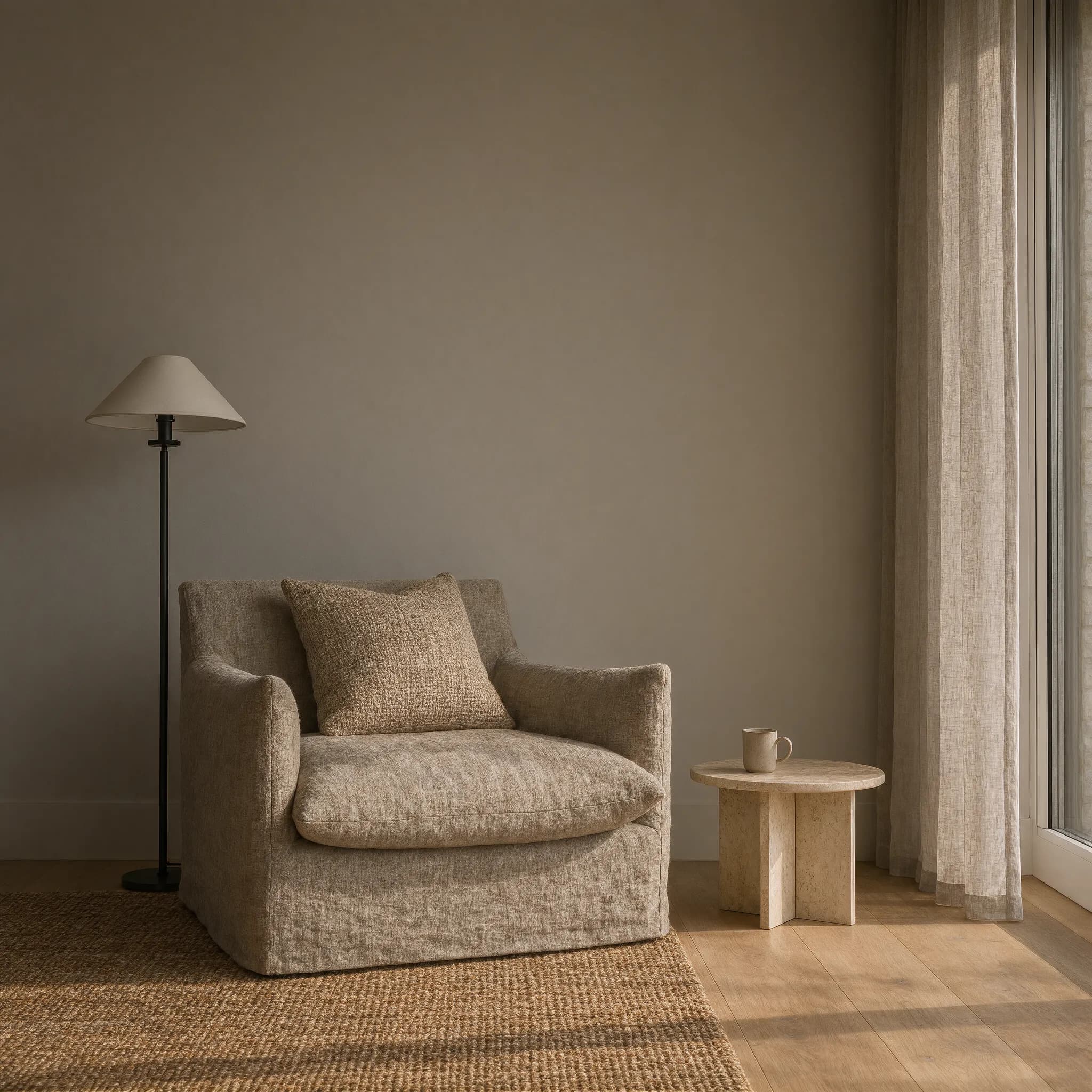
Krea 3. About 10 seconds to generate. Reads as a photograph.
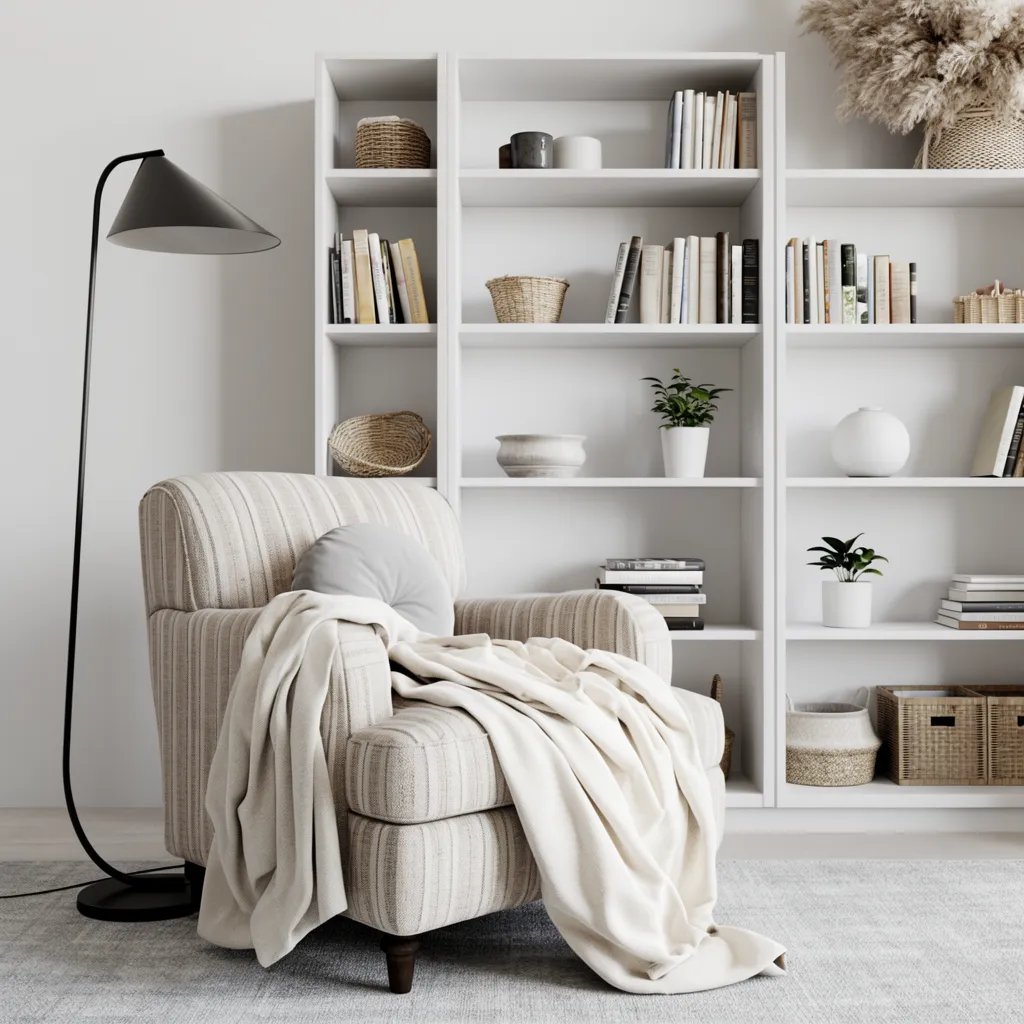
Krea 2 Large, same prompt. About 30 seconds to generate, three times longer. Leans rendered, where Krea 3 leans photographed.
Copy and paste prompts
Editorial interior photograph of a minimal reading corner, linen armchair, warm afternoon light, muted palette
The same room at dusk, lamp on, everything else held exactly as it is
Carry the palette and grain of the reference into a wide shot of the same room from the doorway
Parameters
Name | Type | Default | Notes |
prompt | text | required | Natural language description |
image_url | upload | none | Required for the image to image and References builds |
style_weight | slider | model default | How hard the style reference is applied, on the builds that take one |
aspect_ratio | select | 1:1 | Standard ratios |
seed | integer | none | Optional, for repeating a result |
Builds on the canvas
Build | Mode | Estimated time | Cost |
Krea 3 | Text to image | ~10s | ~$0.063 |
Krea 3 | Image to image | ~10s | ~$0.063 |
Krea 3 | Multi-image to image | ~10s | ~$0.063 |
Krea 2 Large | Text to image | ~30s | ~$0.072 |
Krea 2 Turbo LORA | Text to image | ~30s | ~$0.013 |
Krea 2 References Large | Image to image | ~30s | ~$0.078 |
Krea 2 References Medium | Image to image | ~30s | ~$0.042 |
Prompt tips
- Write for the look. Krea rewards a prompt that describes light, material and mood, and gives you less when you enumerate objects.
- Start on Krea 2 Turbo LORA while you are still deciding. At about a cent a run you can afford twenty attempts before you spend what one Nano Banana Pro run costs.
- Use Krea 3 when you want to change something in an image you already have, because the local editing is the thing Krea 3 added.
- Give the References builds a reference that carries the quality you want, not the subject you want. They read palette, grain and light more readily than content.
Running Krea AI in FLORA
On the FLORA canvas Krea sits as a block like any other model, so a prompt or a reference image feeds straight into it, and whatever comes back flows on to the next step. Krea also makes its own canvas product, so it is worth being plain about the difference. On FLORA you are using Krea's models next to Seedance, Veo, Nano Banana and everything else on one board, instead of moving between tools to reach each one.
The techniques pick up where a raw generation stops. Clean a subject up with the background remover, finish on the image upscaler, or recolor a scene with change background color. If the still needs to move, image to video AI takes it straight from the same canvas.
Models are interchangeable here, which makes comparison the cheapest thing you can do. Run one prompt through Krea 3, Nano Banana, Flux and Seedream and pick on the result in front of you instead of on a benchmark. Our ranking of the best AI image generators covers the wider field.
Krea AI FAQs
Who makes Krea AI?
Krea, a company that builds creative tools and, since 2026, trains its own foundation image models. Krea 2 and Krea 3 are both its own work rather than someone else's model with a new name on it.
What is the difference between Krea 2 and Krea 3?
Krea 3 is the newer one. It is roughly three times faster, slightly cheaper, and it handles image references and precise local edits that Krea 2 needs a separate References build for. Krea 2 tends toward a more styled, rendered look, which is sometimes exactly what you want.
Is Krea AI free?
You can run both Krea models on FLORA's free tier before committing budget. Beyond that they draw from workspace credits. Krea 2 Turbo LORA is about a cent a run, so exploration is cheap even once you are paying.
Can Krea AI edit an image I already have?
Yes. Krea 3 takes an image and a prompt and makes precise local changes, and the Krea 2 References builds take one or several reference images to carry a look across a set.
Is Krea AI better than Nano Banana or Flux?
They are tuned for different things. Krea is built around aesthetics and style control, Nano Banana around prompt accuracy and editing, Flux around range. All three run on the FLORA canvas, so send the same prompt to all three and judge the results instead of the claims.