

Ideogram: The Model That Gets Text Right
Ideogram is an image model built around a problem most models still get wrong, which is putting readable words into a picture. If you need a poster, a pack shot or a mockup with real typography on it, this is the block to reach for. Eight Ideogram builds run on the FLORA canvas.
Want to try it? Ideogram runs on the FLORA canvas next to Nano Banana, Flux and Recraft, so you can generate the layout here and take it straight into the rest of your workflow. Start free on FLORA.
What is Ideogram?
Ideogram is an image generation model from a company of the same name, and its reputation rests almost entirely on typography. Ask most image models for a sign that says a particular word and you get something that looks like letters from across a room but falls apart up close. Ideogram spells it, kerns it and places it where you asked.
The word itself has an older meaning, a written character that stands for an idea rather than a sound, which is why searching the name alone returns a mix of the model and dictionary entries. The company name is the deliberate pun. For anything to do with generating images, Ideogram means the model.
Beyond text, it carries a feature called Magic Prompt that expands a short brief into a fuller one before generating, and an Ideogram Character build that holds a person consistent across a set of images.
Quick facts
- What runs on FLORA: eight builds across Ideogram 3.0, 4.0 and 4.5, plus Precise Edit and Character.
- Modes: text to image, image to image and multi-image to image.
- Speed: about 18 to 30 seconds depending on the build.
- Cost on FLORA: about 0.07 US dollars for most builds, about 0.12 for Ideogram 4.5 text to image.
- Signature feature: accurate text rendering, including small type and italics.
- Magic Prompt: expands a short prompt into a detailed one before generating.
- Ideogram Character: holds a person consistent across several images.
- Provider: Ideogram. Proprietary, so there is no self hosted option.
What it is great for
- Posters, covers and any layout where the headline has to be spelled correctly and sit where you put it.
- Packaging and label mockups, where small print and a secondary line both have to read.
- Signage and environmental mockups, which is the classic case other models fail at.
- Keeping one character recognizable across a set, through the Character build.
Getting text to render cleanly
Ideogram's own documentation is unusually specific about this, and the rules make a visible difference. Four of them do most of the work.
- Quote the exact words. Anything inside quotation marks is treated as text to render, with your spelling and capitals preserved.
- Name the text early. Words mentioned near the start of a prompt come out more reliably than words added at the end.
- Say where it goes. A phrase like "curving along the bottom" or "centered on the label" gives the model a position to work to.
- Keep it short. Every extra word raises the chance of a typo or a dropped letter, so short phrases beat paragraphs.
If you leave the lettering style out, the model picks one that suits the scene, and Magic Prompt will add a fitting style when it expands your prompt. Describe the type yourself when the look matters.
Example outputs
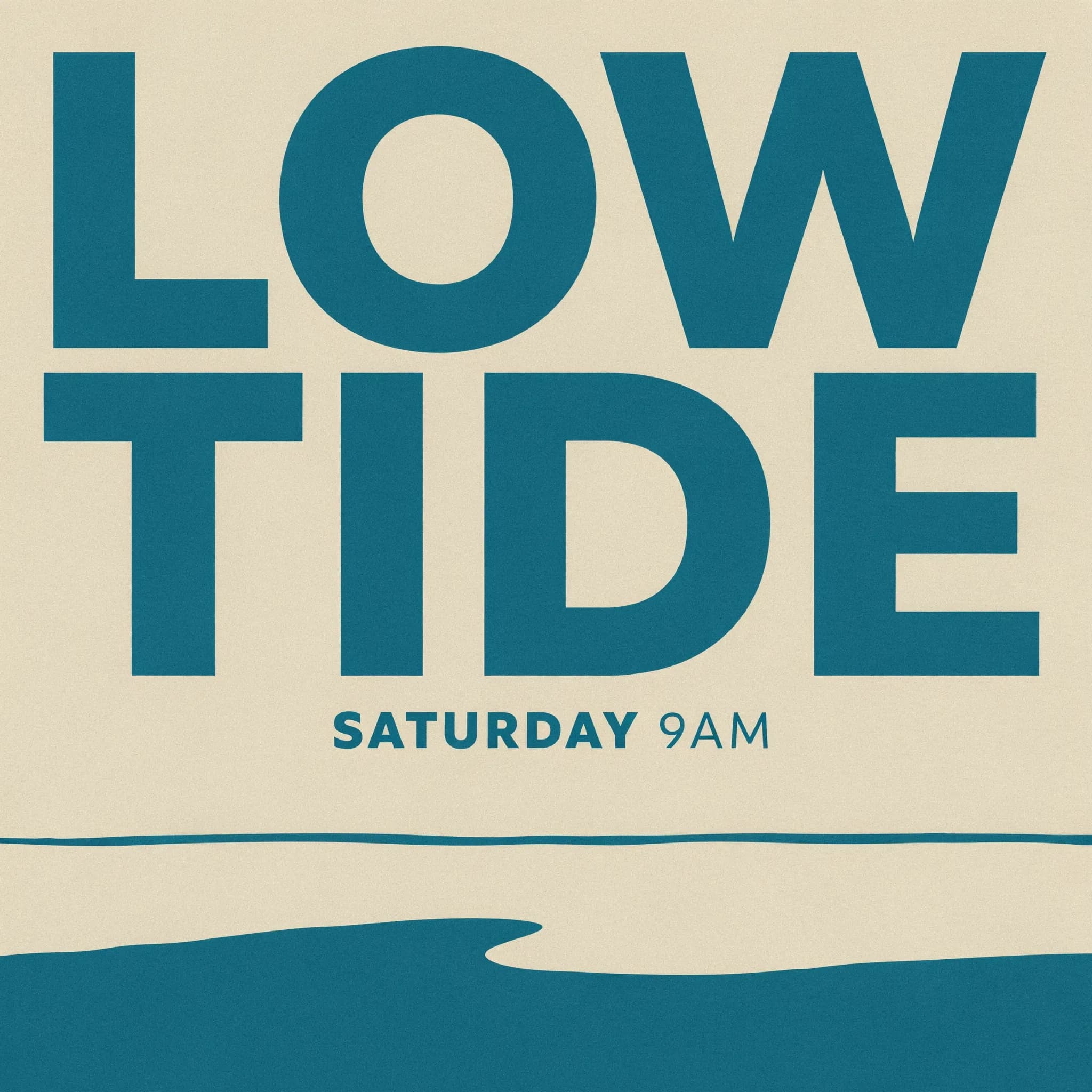
Ideogram 4.5. Both lines of type came back correctly spelled and correctly placed.
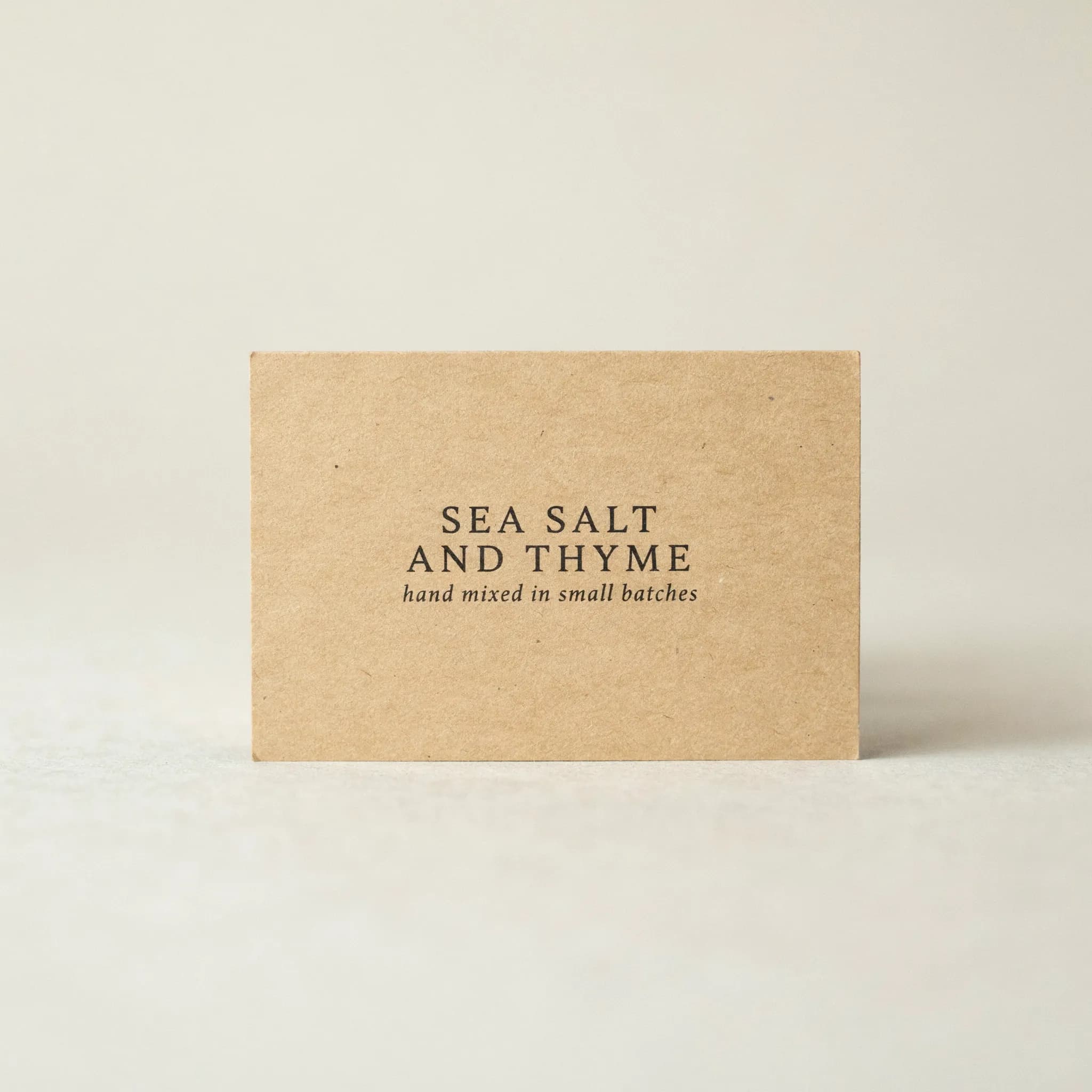
Ideogram 4.5 again. The small italic line underneath is the part most models get wrong.
Copy and paste prompts
Minimal travel poster, flat two-color design, pale sand and deep teal. Large condensed sans headline reading LOW TIDE across the upper third, smaller text beneath reading SATURDAY 9AM
Studio photograph of a kraft paper label, clean serif text reading SEA SALT AND THYME centered, small italic line beneath reading hand mixed in small batches
A hand-painted shop window, the words OPEN LATE curving along the top of the glass, evening light behind
Parameters
Name | Type | Default | Notes |
prompt | text | required | Put any text to render inside quotation marks |
magic_prompt | toggle | auto | Expands a short prompt before generating |
image_url | upload | none | Required for the image to image and Character builds |
aspect_ratio | select | 1:1 | Standard ratios |
style | select | auto | Steers the overall look |
Builds on the canvas
Build | Mode | Estimated time | Cost |
Ideogram 4.5 | Text to image | ~20s | ~$0.12 |
Ideogram 4.5 | Image to image | ~20s | ~$0.07 |
Ideogram 4.5 | Multi-image to image | ~20s | ~$0.07 |
Ideogram 4.5 Precise Edit | Image to image | ~30s | ~$0.07 |
Ideogram 4.0 | Text to image | ~18s | ~$0.07 |
Ideogram 3.0 | Text to image | ~18s | ~$0.07 |
Ideogram Character | Multi-image to image | ~30s | ~$0.09 |
Prompt tips
- Put the words in quotation marks and nothing else in them. Mixing instructions inside the quotes is the most common way to end up with instructions printed on the image.
- Ask for one line of text, then a second. A headline and a subhead render more reliably than a paragraph, and you can always generate a layout with both, which is usually what you wanted anyway.
- Turn Magic Prompt off when you know exactly what you want. It helps a loose brief and gets in the way of a tight one.
- Use Precise Edit to fix a word. If the layout is right and one letter is wrong, editing keeps everything that already worked.
- Describe the typeface in words the model can act on. "Condensed sans" and "high-contrast serif" steer it. "Nice font" does not.
Running Ideogram in FLORA
On the FLORA canvas Ideogram sits as a block, so a prompt goes in and the layout comes back ready to feed whatever is next. The pattern that works is to let Ideogram own the part with words in it and hand the rest off. Generate the poster or the label here, then composite, upscale or animate it elsewhere on the same board.
The techniques pick up from there. Lift the artwork off its background with the background remover, push it to print size on the image upscaler, adjust the setting with change background color, or set the finished layout moving through image to video AI.
Models are interchangeable on the canvas, which makes the comparison cheap. Put Ideogram against Nano Banana and Flux on the same prompt with text in it, or against Recraft when the layout needs to leave as a vector. Our ranking of the best AI image generators covers the wider field.
Ideogram FAQs
Who makes Ideogram?
Ideogram, a company building image generation models with a particular focus on typography. It is a proprietary model, so there is no open weights version and nothing to self host.
Why is Ideogram better at text than other image models?
It was built for it. Most image models treat letterforms as texture and produce something that reads as writing from a distance but falls apart up close. Ideogram renders the words you quote, with your spelling and capitals, and puts them where you say. The two examples on this page show small italic type and a two-line headline both rendering cleanly.
What is Magic Prompt?
A feature that expands a short prompt into a fuller one before generating, adding detail about style and composition you did not specify. It helps when your brief is loose and gets in the way when you already know exactly what you want, so it is worth turning off for precise work.
Can Ideogram keep the same character across several images?
Yes, through the Ideogram Character build, which takes reference images and holds a person recognizable across a set. It runs on the FLORA canvas at about 0.09 US dollars a run.
Should I use Ideogram or Recraft for a poster?
It depends on the file you need at the end. Ideogram is the stronger choice for rendering text accurately inside a finished image. Recraft is the one to use when the artwork has to leave as an editable vector, since it is the only model on the canvas that returns SVG. Both run on FLORA, so a poster that needs accurate type and a vector logo can use each one for the part it is good at.