
How do I turn one hero image into every ad size with AI?
Give an agent connected to the FLORA MCP your hero image and the sizes you need. The agent reframes the image once per aspect ratio with an image-to-image model, rebuilding the scene to fill each shape instead of cropping or adding bars. Our four reframes of a 16:9 sneaker hero cost $0.256 and came back in about 45 seconds.
Key takeaways
- Reframing rebuilds the scene at the new shape, so a 16:9 hero becomes a 9:16 story without losing the product.
- Our four sizes (1:1, 9:16, 3:4 and 21:9) cost $0.064 each, $0.256 in total, and ran in parallel in 25 to 44 seconds.
- 4:5 is not a native option; make 3:4 and trim it with FLORA's free pad and crop action.
- Name the product, props, background and light in the prompt, or the model may drop them.
- For artwork already signed off, pad instead of regenerating, since a reframe re-renders every pixel.
At a glance
| What it does | Reframes one image into several ad aspect ratios |
|---|---|
| Works in | Claude, ChatGPT, Claude Code, Cursor, Codex and other MCP clients |
| Model | GPT Image 2.5 Flare, image-to-image |
| Inputs | One hero image and a list of sizes |
| Outputs | 1:1, 9:16, 3:4, 21:9, 16:9, 4:3, 3:2, 2:3 and more |
| Typical cost | $0.064 per size |
| Typical time | About 45 seconds for the whole set |
What you need
- An agent with the FLORA MCP installed. Install steps are in the FLORA MCP docs.
- One hero image on a FLORA canvas or at a public link.
- The list of placements you are buying, so you know which ratios to ask for.
Best for
- Paid social teams launching one creative across every placement
- Turning a single shoot or render into a full ad set
- Ecommerce banners that need the same product in wide and tall shapes
- Agencies resizing client heroes without a retoucher
Step by step
Step 1: Map placements to aspect ratios
Most ad slots share a handful of shapes. List the placements and turn them into ratios before you ask, so the agent makes each shape once.
Step 2: Ask for every size in one message
Name the product and everything around it that must survive, and say where the new space should go. The agent sends one generation per ratio to FLORA together, with the hero as the reference for each.
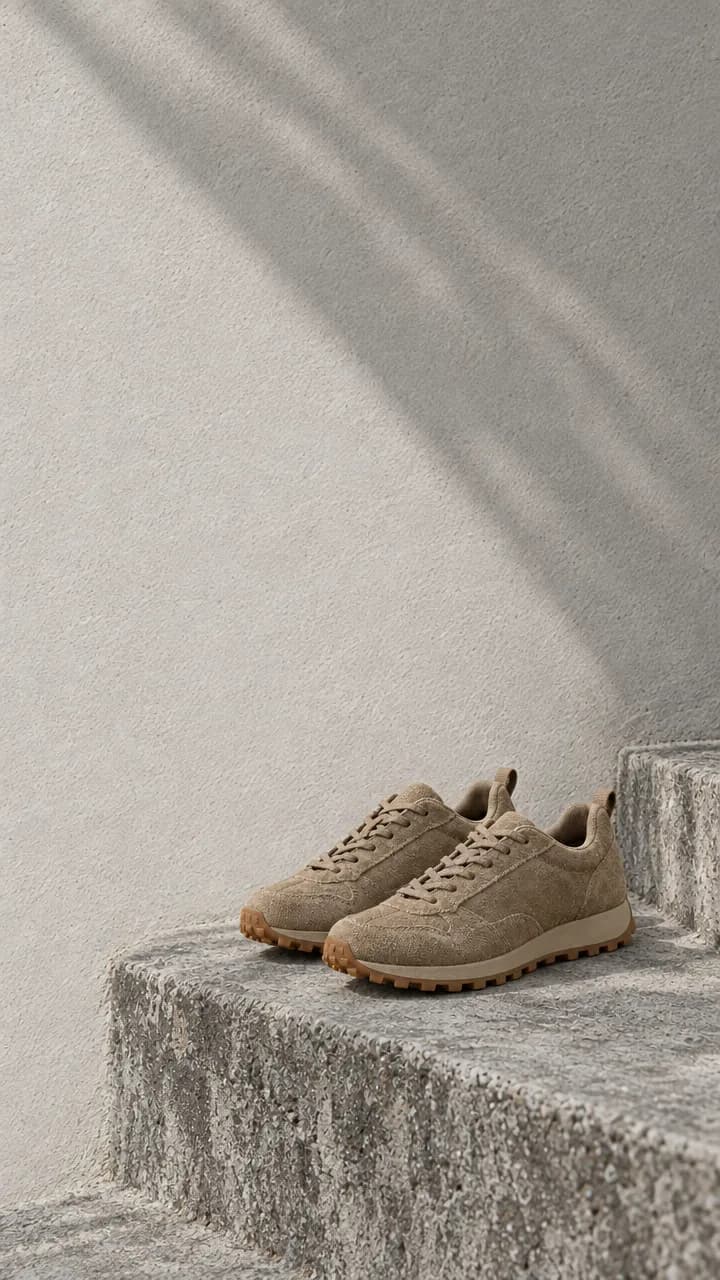
Reframe this hero image with FLORA into 1:1, 9:16, 3:4 and 21:9. Keep the tan suede sneakers with gum soles, the concrete step, the plaster wall, the morning shade and the color grade exactly as they are. Extend the wall and the steps into the new space and leave clear wall for a headline. Don't restyle or recolor the shoes. No text.Step 3: Check each size against the hero
Confirm the pixel size matches the ratio, tick off every prop, and check that the product kept its color and shape. Rerun only the size that drifts.
Step 4: Trim 4:5 and add your type
Ask the agent to trim the 3:4 to 4:5 with FLORA's pad and crop action, which costs nothing. Add headlines and logos in your design tool, not in the generation.
What happened when we resized one hero image into every ad size in FLORA?
On October 16, 2026, we made a 16:9 campaign hero with t2i-gpt-image-2-5-flare for $0.055: a pair of tan suede trail sneakers with gum soles on a weathered concrete step, a pale plaster wall behind, soft morning shade with a diagonal shadow, and empty wall on the left for a headline.
Following FLORA's flora-image-resize skill, the agent sent four items in one flora_create_generations call, all on i2i-gpt-image-2-5-flare at quality high and 1k, each with the hero's canvas node in reference_node_ids and its own aspect_ratio: 1:1, 9:16, 3:4 and 21:9. Each prompt opened with the transform, listed every prop to keep, and said where to extend the scene. The four finished in 25 to 44 seconds and cost $0.064 each, $0.256 for the set.
The outputs came back at 1024 x 1024, 720 x 1280, 864 x 1152 and 1520 x 656. In all four, the shoes kept their color, laces and gum soles, the step kept its texture and the diagonal shadow stayed on the wall. The 9:16 and 3:4 versions built more steps below and more wall above; the 21:9 version pushed the shoes to the right with a wide band of empty wall to the left.
What went wrong: the 21:9 came back at 1520 x 656, a 2.32 ratio, slightly wider than a true 21:9 (2.33) and short of common 3:1 leaderboard shapes. The shoes also sit a little smaller in each reframe than in the hero. The fix is to trim the final pixel size with a free pad and crop action, and to say "the shoes fill the same share of the frame as in the source" when scale matters.
- Model
- GPT Image 2.5 Flare (image-to-image)
- Skill
- flora-image-resize
- Cost
- $0.256 for 4 sizes
- Time
- 25 to 44 s, in parallel
| Aspect ratio | Typical placements | Our output |
|---|---|---|
| 1:1 | Feed posts, carousel cards, marketplace tiles | 1024 x 1024 |
| 9:16 | Stories, Reels, Shorts, TikTok | 720 x 1280 |
| 3:4 (trim to 4:5) | Portrait feed ads | 864 x 1152 |
| 21:9 | Wide web banners and site headers | 1520 x 656 |
| 16:9 | YouTube, display, landing page heroes | The 1280 x 720 hero |
Generative reframe or pad and crop: pros and cons
Pros
- Generative reframe: fills the new shape with real scene, no bars and no lost product.
- Generative reframe: each size can be composed for its placement, such as more headroom in 9:16.
- Pad and crop action: every original pixel survives, and it costs nothing.
- Pad and crop action: right for artwork already approved by legal or a client.
Cons
- Generative reframe: re-renders the frame, so text, logos and fine marks can shift.
- Generative reframe: $0.064 per size and a review pass for each.
- Pad and crop action: a big shape change leaves wide bars or a blurred fill.
Will the product look the same in every size?
In our run it did: color, laces, soles and texture all held. The model rebuilds the frame with your hero as the reference, so it can move or rescale the product, which is expected. Reject a size only if the product is cropped, restyled or duplicated, and rerun that one with the defect named.
What about text and logos on the ad?
Generate the sizes without type, then set the headline and logo on top in your design tool or with a FLORA action. A reframe re-typesets any text in the image, and small text drifts first. If the hero already has approved type on it, use the pad action instead of a reframe.
Can I do this for a whole campaign?
Yes. List several heroes and the same set of ratios, and the agent sends up to 20 reframes per batch. At $0.064 each, five sizes for ten heroes is about $3.20.
Frequently asked questions
How much does it cost to resize an image into ad sizes with FLORA?
Our run cost $0.064 per size on GPT Image 2.5 Flare, $0.256 for four sizes. FLORA's pad and crop action is free.
Can FLORA make a 4:5 image?
Make 3:4, the nearest native ratio, then trim it to 4:5 with FLORA's free resize or pad and crop action.
Does it crop my image?
No. A reframe rebuilds the scene at the new shape. If you want the exact original pixels with bars or a blurred fill, ask for the pad action instead.
Can it resize video ads too?
Yes. FLORA has a video resize workflow that reframes a clip into other aspect ratios with video-to-video models.