
How do I turn a creative brief into a full set of campaign assets with AI?
Give an agent connected to the FLORA MCP the brief and ask for a campaign set. The agent makes one master poster from the brief, waits for your approval, then places that exact artwork into four out-of-home sites and pads it to social sizes. Our set of one poster, four placements and two social sizes cost $0.311 and took under two minutes of generation.
Key takeaways
- Approve one master creative first; every other asset reproduces it, so a wrong master means a wrong set.
- Out-of-home placements are image-to-image generations that put the master into a real scene without redrawing it.
- Social sizes come from FLORA's free pad and crop action, so the headline and logo keep every pixel.
- Our set cost $0.311: $0.055 for the master and $0.064 for each of four placements; the two social sizes were free.
- The headline and wordmark read correctly in all four placements.
At a glance
| What it does | Turns a written brief into a master ad, placements and social sizes |
|---|---|
| Works in | Claude, ChatGPT, Claude Code, Cursor, Codex and other MCP clients |
| Models | GPT Image 2.5 Flare (text-to-image and image-to-image), plus the pad and crop action |
| Inputs | A brief: product, audience, headline, mood and where it will run |
| Outputs | A 2:3 master poster, four 3:2 placement photos, 9:16 and 1:1 social versions |
| Typical cost | $0.311 for the set in our run |
| Typical time | About 25 seconds for the master, about 30 seconds for the placements |
What you need
- An agent with the FLORA MCP installed. Install steps are in the FLORA MCP docs.
- A brief with the headline written out. The agent can draft one, but campaign copy is better decided by you.
- A list of where the campaign will run, so the set matches the media plan.
Best for
- Pitching a campaign to a client with the work shown in the world
- Small teams that need out-of-home and social versions from one idea
- Checking how a headline reads at distance before buying media
- Turning an approved key visual into a placement deck
Step by step
Step 1: Hand over the brief
Paste the brief and ask for the master creative first. Give the exact headline and brand name, the subject, the mood and the shape. Ask for flat poster artwork, not a photo of a poster, so it can be placed later.
Brief: launch Halden's new waxed-canvas rain jacket in the Pacific Northwest this autumn. Headline: "Made for the long drizzle." Wordmark: HALDEN. Mood: grey, misty, calm.
Make the master creative with FLORA first: a 2:3 out-of-home poster, flat artwork filling the frame, no mockup. Show it to me before you make anything else.
Step 2: Approve or redo the master
Read the headline letter by letter and check the product. Everything after this step copies the master, so this is the one image to get right. A redo costs one more image.
Step 3: Place it in the world
Ask for the out-of-home placements in one message. The agent sends each as an image-to-image generation with the master as the input and a scene line for the site: a gable wall, a station platform, a bus shelter, a construction hoarding.
The master is approved. Using FLORA's mockup deck workflow, place it exactly as it is into four out-of-home sites, square on, whole poster visible: a brick end wall, an underground platform panel, a backlit bus shelter and a construction hoarding. Overcast light, people in frame but never in front of the poster.Step 4: Make the social sizes without redrawing
Ask for 9:16 and 1:1 with the pad and crop action on the master. It adds a blurred fill around the poster instead of regenerating it, so the type stays exact. Then ask for any extra sizes your plan needs.
What happened when we turned a brief into campaign assets in FLORA?
On October 16, 2026, we ran FLORA's flora-mockup-deck skill from a written brief: Halden, a fictional outdoor brand, launching a waxed-canvas rain jacket with the headline "Made for the long drizzle." The master was one flora_create_generations call to t2i-gpt-image-2-5-flare at 2:3, quality high, 1k. It finished in 25 seconds for $0.055: a person seen from behind in a mustard rain jacket at a misty ferry railing, dark pines and grey water beyond, the headline in off-white across the top and HALDEN small at the bottom.
After we approved it, the agent sent four placements in one flora_create_generations call to i2i-gpt-image-2-5-flare at 3:2, each with the master's URL in params.image_url and the skill's fixed prompt block (reproduce the artwork exactly, square-on camera, whole poster visible, film grade) plus one scene line. All four finished in 29 seconds at $0.064 each. The agent then ran the change-image-ar-browser action twice with flora_run_action on the master, at 9:16 and 1:1 with fit pad and a blurred background. Those runs took 7 and 8 seconds and cost nothing.
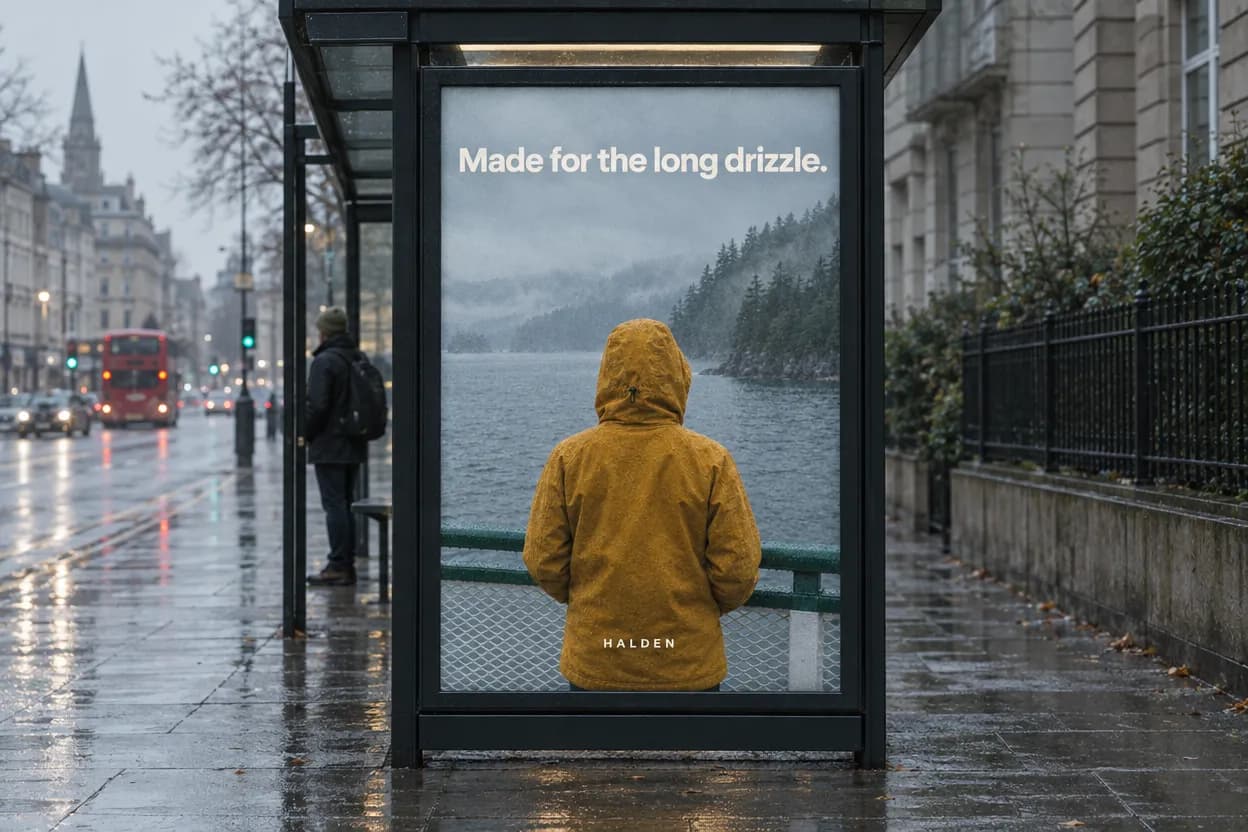
What came back: a paste-up on a brick end wall with a passer-by cropped at the left edge; a framed panel on a tiled underground platform with a commuter at the right edge; a backlit poster in a bus shelter on a wet street with a red bus in the distance; and three copies side by side on a green plywood hoarding with a cyclist passing below. In all four the headline and wordmark read correctly and the poster is square on. The social sizes came back at 832 x 1479 and 1248 x 1248.
What went wrong: the master came back at 832 x 1248, so the padded 9:16 version is only 832 pixels wide, below a 1080-wide story spec. The fix is to make the master at 2k or 4k before padding. The blurred fill in the 9:16 also shows a soft smeared band at the bottom edge; on a poster with a busy bottom edge, a solid pad color in the brand's grey reads cleaner.
- Skill
- flora-mockup-deck
- Models
- t2i-gpt-image-2-5-flare, i2i-gpt-image-2-5-flare
- Tools called
- flora_create_generations, flora_run_action, flora_list_generations
- Cost
- $0.311 for 5 images; 2 social sizes free
| Asset | How it was made | Size | Cost |
|---|---|---|---|
| Master poster | Text-to-image from the brief | 832 x 1248 | $0.055 |
| Gable wall | Image-to-image placement | 1248 x 832 | $0.064 |
| Platform panel | Image-to-image placement | 1248 x 832 | $0.064 |
| Bus shelter | Image-to-image placement | 1248 x 832 | $0.064 |
| Hoarding | Image-to-image placement | 1248 x 832 | $0.064 |
| Story 9:16 | Pad and crop action, blurred fill | 832 x 1479 | Free |
| Feed 1:1 | Pad and crop action, blurred fill | 1248 x 1248 | Free |
Placements as generations or social sizes as padding: pros and cons
Pros
- Placement generations: real scenes with light and texture on the poster, ready for a client deck.
- Placement generations: the artwork is an input, so it is reproduced rather than redrawn.
- Padded social sizes: every pixel of the type and logo survives, and the action is free.
Cons
- Placement generations: $0.064 each, and a person or object can still end up near the poster.
- Padded social sizes: a blurred or solid fill instead of extended scene.
- Both: only as good as the master, so a low-resolution master limits every size.
Why approve one master before anything else?
Every later asset reproduces the master. If the headline is misspelled or the product is wrong, every placement and every size inherits it. One image is cheap to redo; a full set is not.
Which out-of-home sites should I show?
Pick sites that are different media buys, not one wall from four angles. Shoot each one square on so the poster reads as a flat rectangle.
- Gable end wall: shows scale against windows and doors.
- Station platform panel: interior light, read up close.
- Bus shelter: backlit, at street level.
- Construction hoarding: pavement level, often repeated in a row.
Can the agent write the brief and headline too?
It can draft them, and it will say so. For a real campaign, write the headline yourself or approve the agent's draft before the master is made, since every asset carries those words.
Frequently asked questions
How much does a full campaign set cost in FLORA?
Our master, four placements and two social sizes cost $0.311 on GPT Image 2.5 Flare. The social sizes came from a free FLORA action.
Will the headline be spelled right on every asset?
In our run it was, on the master and all four placements. The placements use the master as an input, and the social sizes do not redraw it at all. Still read every asset before it ships.
Can I start from finished artwork instead of a brief?
Yes. Give the agent the artwork link and it skips the master step and goes straight to placements and sizes.
Can it lay the set out as a deck?
Yes. The mockup deck workflow can assemble the placements and sizes into an editable deck on the FLORA canvas or an annotated PDF.