
Can an AI agent make product detail page images from one product photo?
Yes. Connect the FLORA MCP to an agent such as Claude, ChatGPT or Cursor, give it one photo of the product, and ask for a product page set. The agent sends the photo to an image-to-image model as a reference and returns a white-background main image, an angle shot, a detail close-up, a lifestyle shot and a size flat lay, all of the same product.
Key takeaways
- One product photo is enough for a full product page set: main image, angle, detail, lifestyle and scale shots.
- The agent uses the photo as a reference for every shot, so the product stays the same across the set.
- Our five-shot set cost $0.32 and finished in about 35 seconds, with all shots running in parallel.
- Check logos, hardware and texture against the original; rerun only the shot that drifts.
- A coding agent can repeat the same shot list for every product in a catalog.
At a glance
| What it does | Turns one product photo into a product page image set |
|---|---|
| Works in | Claude, ChatGPT, Claude Code, Cursor, Codex and other MCP clients |
| Model | GPT Image 2.5 Flare, image-to-image |
| Inputs | One clear photo of the product and a shot list |
| Outputs | Five images: 1:1 main, angle, detail and scale shots, plus a 3:4 lifestyle shot |
| Typical cost | $0.064 per shot, $0.32 per five-shot set |
| Typical time | About 35 seconds for the whole set |
What you need
- An agent with the FLORA MCP installed: Claude, ChatGPT, Claude Code, Cursor or Codex. Install steps are in the FLORA MCP docs.
- A FLORA account. Your first generation through the MCP is free.
- One clear photo of the product. A phone photo on a counter is enough, as long as the whole product is in frame and in focus.
Key features
- Reference-locked shots: Every shot is generated from your photo, not guessed from text.
- Whole set in one call: The agent sends every shot to FLORA together and checks them as a batch.
- Single-shot reruns: Fix one drifting shot without paying for the rest again.
- Catalog scale: Coding agents loop over a spreadsheet or folder, up to 20 generations per batch.
- Reusable canvas: The set stays on a FLORA canvas, so a new season means new backgrounds, not a reshoot.
Best for
- Small shops launching products without a studio shoot
- Ecommerce teams filling gaps in an existing catalog
- Marketplaces and dropshippers that need a consistent shot list across many products
- Refreshing lifestyle and seasonal shots for products already photographed
Step by step
Step 1: Give the agent your product photo
In Claude Code, Cursor or Codex, point the agent at the file on your computer and it uploads the photo to FLORA. In Claude on the web or ChatGPT, paste a public link to the photo. The agent places it on a FLORA canvas so every shot that follows can reference it.
Step 2: Ask for the whole set in one message
List every shot your product page needs, with its aspect ratio. Say what must not change: the color, the material, the hardware, the proportions. The agent turns each line into its own generation and sends them to FLORA together.
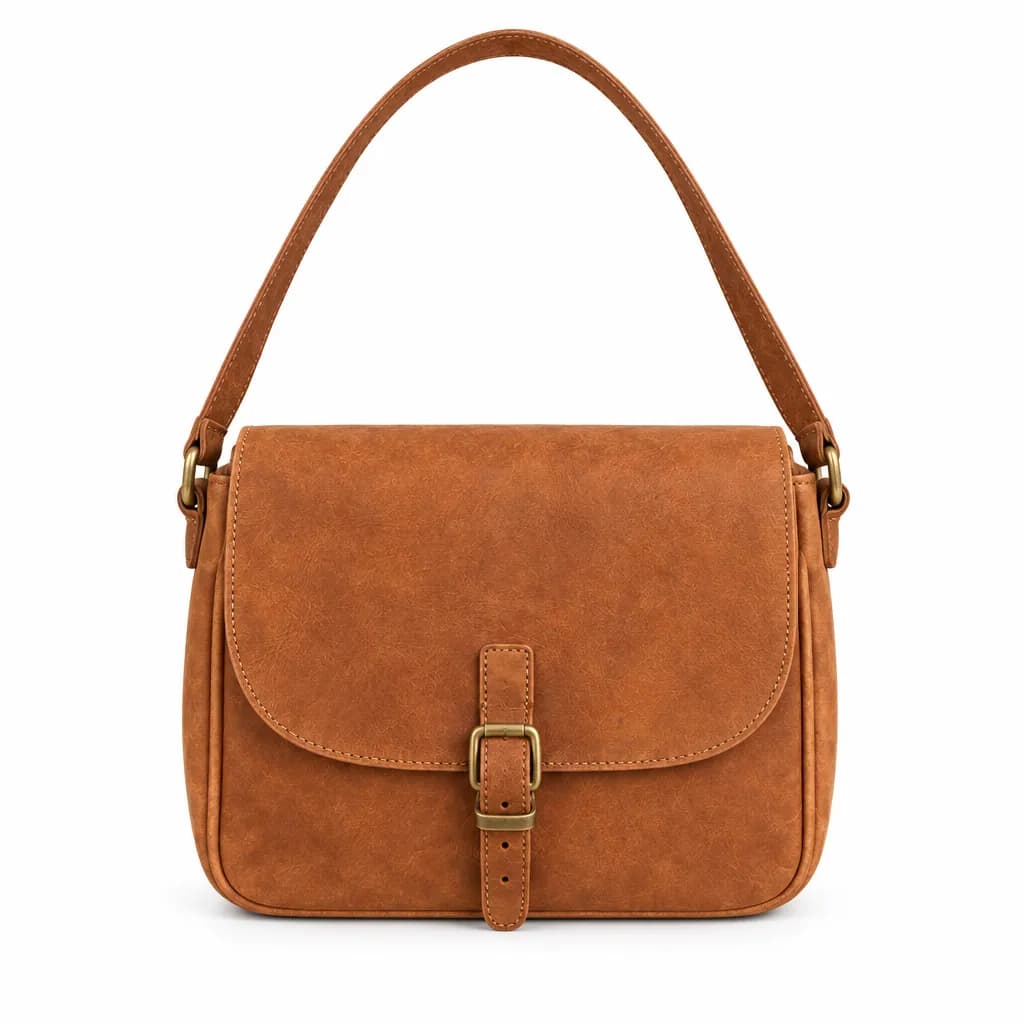
Using this product photo, make a product page set with FLORA. Keep the bag identical in every shot: color, leather grain, stitching, brass buckle and proportions.
1. Main image: straight-on front view on pure white, 1:1, soft contact shadow.
2. Angle: three-quarter view showing the side depth, on white, 1:1.
3. Detail: macro of the buckle and edge stitching, 1:1.
4. Lifestyle: worn crossbody by someone walking on a city sidewalk, overcast light, 3:4.
5. What fits: flat lay from above with phone, card wallet, keys and sunglasses, 1:1.
Step 3: Check each shot against the original
Look at the set next to your photo before anything goes live. Check the logo, the hardware and the color in particular. If one shot drifts, ask for that one again with a specific note, such as "the buckle should be brass, not silver". The agent reruns only that shot.
Step 4: Export for your store
Ask for the sizes your platform wants, or download the images from the links the agent returns. The set also stays on the FLORA canvas, so next season you can swap the background or add shots without reshooting.
What did an AI agent make from one product photo in FLORA?
We started from one casual phone-style photo of a tan leather crossbody bag sitting on a light oak kitchen counter, with a fridge and dishes out of focus behind it. We had no product of our own to shoot, so that source photo was itself generated in FLORA first ($0.055) to stand in for a shop owner's snapshot. It sat on the FLORA canvas, so the agent could reference it by node.
On October 15, 2026, the agent sent all five shots in a single flora_create_generations call: five items, each with model i2i-gpt-image-2-5-flare, quality high, resolution 1k, the aspect ratio from the shot list, and the source photo in reference_node_ids. It then polled flora_list_generations once for the whole batch. Every shot finished in about 30 to 37 seconds, running in parallel, at $0.064 each, so $0.32 for the set.
What came back: a front view on pure white with the strap arranged in an arc above the bag; a three-quarter view showing the side gusset; a macro of the brass buckle and edge stitching; a woman in a cream sweater and dark jeans wearing the bag crossbody on a tree-lined sidewalk, cropped shoulders to knees; and an overhead flat lay of the open bag beside a phone, a card wallet, keys and sunglasses. The color, flap shape, buckle and stitching matched the source in all five.
What went wrong: the leather grain came out smoother in the white-background shots than in the source photo, which shows creases and wear. That is the kind of drift to check for. The fix is one more line in the prompt, such as "keep the worn, creased full-grain texture from the reference", and a rerun of only the shots that drifted.
- Model
- GPT Image 2.5 Flare (image-to-image)
- Tools called
- flora_create_generations, flora_list_generations
- Cost
- $0.32 for 5 shots
- Time
- About 35 s, in parallel
| Shot | Aspect ratio | What to say in the prompt |
|---|---|---|
| Main image | 1:1 | Front view, pure white background, soft contact shadow, no props |
| Angle | 1:1 | Three-quarter view that shows depth or thickness |
| Detail | 1:1 | Macro of the material, hardware or finish buyers ask about |
| Lifestyle | 3:4 or 4:5 | Product in use, with the person cropped so the product leads |
| Scale | 1:1 | Flat lay or in-hand shot with everyday objects for size |
| Banner | 16:9 or 21:9 | Wide scene with empty space for a headline |
Chat agent or coding agent: pros and cons
Pros
- Chat agent (Claude, ChatGPT): paste one photo link and get the set back in the conversation.
- Chat agent: easy to review and rerun one shot at a time.
- Coding agent (Claude Code, Cursor, Codex): uploads local files and works through a whole catalog.
- Coding agent: saves each product's set into its own folder.
Cons
- Chat agent: needs a public link to the photo, or the photo already on the FLORA canvas.
- Coding agent: needs a spreadsheet or folder set up before the run.
- Both: fine marks such as logos and printed text need a human check before the images go live.
How does the agent keep the product the same in every shot?
Each shot is an image-to-image generation with your photo as the reference, not a fresh text-to-image guess. The model sees the real product every time. Naming the details that must not change in your prompt (the exact color, the material, the hardware) tightens it further.
Check small marks closely. Logos, printed text and fine patterns are where any model is most likely to drift. If a shot gets them wrong, rerun that one shot with a specific correction.
Can I do this for my whole catalog?
Yes, with a coding agent. Give Claude Code, Cursor or Codex a spreadsheet or folder with one photo per product and the same shot list. The agent loops over every row, sends up to 20 generations per batch to FLORA and saves the results into one folder per product. At $0.064 per shot on GPT Image 2.5, a five-shot set costs about $0.32 per product.
What makes a good source photo?
The background does not matter much, since the agent replaces it.
- The whole product in frame, nothing cropped.
- In focus, with even light and no heavy shadow across the product.
- The true color, without filters.
- A second photo of the back or the inside if you want shots of those sides.
Frequently asked questions
Do I need a studio photo to start?
No. Our run started from a casual snapshot on a kitchen counter. A clean, in-focus photo of the whole product is enough.
Which agents can do this?
Any agent with the FLORA MCP: Claude, ChatGPT, Claude Code, Cursor, Codex and other MCP clients. Agents with file access can upload local photos directly.
Can it make product videos too?
Yes. Ask the agent to animate the main image or the lifestyle shot with a video model such as Seedance 2.5 or Kling, for a slow turn or a short clip for the product page.
How much does a product page set cost?
Our five-shot set cost $0.32 on GPT Image 2.5 Flare. The agent can quote the price in dollars before it runs.