
How do I generate images in Claude?
Add the FLORA MCP to Claude as a custom connector, sign in to FLORA, and ask Claude for the image in plain words. Claude picks a model such as GPT Image 2.5, writes the prompt, runs the generation and shows you the result in the chat. Every image also lands on a FLORA canvas, so you can keep editing it there.
Key takeaways
- Claude makes images once you add the FLORA MCP as a custom connector, at https://agents.flora.ai/mcp.
- You describe the image in plain words; Claude picks a model such as GPT Image 2.5, writes the prompt and runs it.
- One GPT Image 2.5 Flare image cost $0.055 and took about 25 seconds in our run.
- Edits keep the scene: Claude passes the last image back to FLORA as a reference.
- Every image is saved on a FLORA canvas with the prompt and model that made it.
At a glance
| What it does | Generates and edits images from a Claude chat |
|---|---|
| Works in | Claude on the web and Claude Desktop |
| Models | Every image model in FLORA, including GPT Image 2.5, Krea 2, Nano Banana and Ideogram |
| Inputs | A plain-language request, plus optional reference images |
| Outputs | PNG images at 1K, 2K or 4K, saved to a FLORA canvas |
| Typical cost | $0.055 to $0.064 per GPT Image 2.5 image |
| Typical time | 25 to 35 seconds per image |
| Setup time | About 2 minutes, once |
What you need
- Claude on the web or Claude Desktop, on any plan with custom connectors
- A FLORA account. Your first generation through the MCP is free.
- The FLORA connector URL, https://agents.flora.ai/mcp. Full setup steps are in the Claude install guide.
Key features
- Model choice: Claude can call any image model in FLORA, or you name one in the chat.
- Prices before you spend: FLORA quotes every run in dollars before it starts.
- Reference-based edits: Follow-up requests reuse the last image, so the subject and light stay put.
- Batches of up to 20: Ask for a set and Claude sends every variation in one call.
- Any aspect ratio: From 1:1 and 4:5 for social to 16:9 and 21:9 for banners.
- A canvas behind the chat: Every result lands on a FLORA canvas, ready to upscale, resize or animate.
Best for
- Blog headers, social posts and slide images made without leaving Claude
- Marketers who want image options inside the doc or plan they are already writing
- Teams that want every generated image saved in one shared place
- Anyone testing several models on the same brief before committing
Step by step
Step 1: Add FLORA as a custom connector
In Claude, open Settings, then Connectors, then Add custom connector. Name it FLORA and paste the connector URL. Leave the OAuth fields empty: FLORA handles sign-in on its own. On a Team or Enterprise plan, an owner adds the connector once for the whole organization and each member connects to it.
https://agents.flora.ai/mcpStep 2: Connect your FLORA account
Click Connect on the new FLORA connector, sign in with your FLORA account and approve. Then open a chat, click the + button, choose Connectors and switch FLORA on. Claude can now see the FLORA tools for generating images, video, audio and 3D.
Step 3: Ask for the image
Describe what you want the way you would brief a photographer: the subject, the setting, the light, the aspect ratio and what the image is for. You don't need to name a model. Claude reads the model list from FLORA and picks one, and you can override it by naming a model yourself.
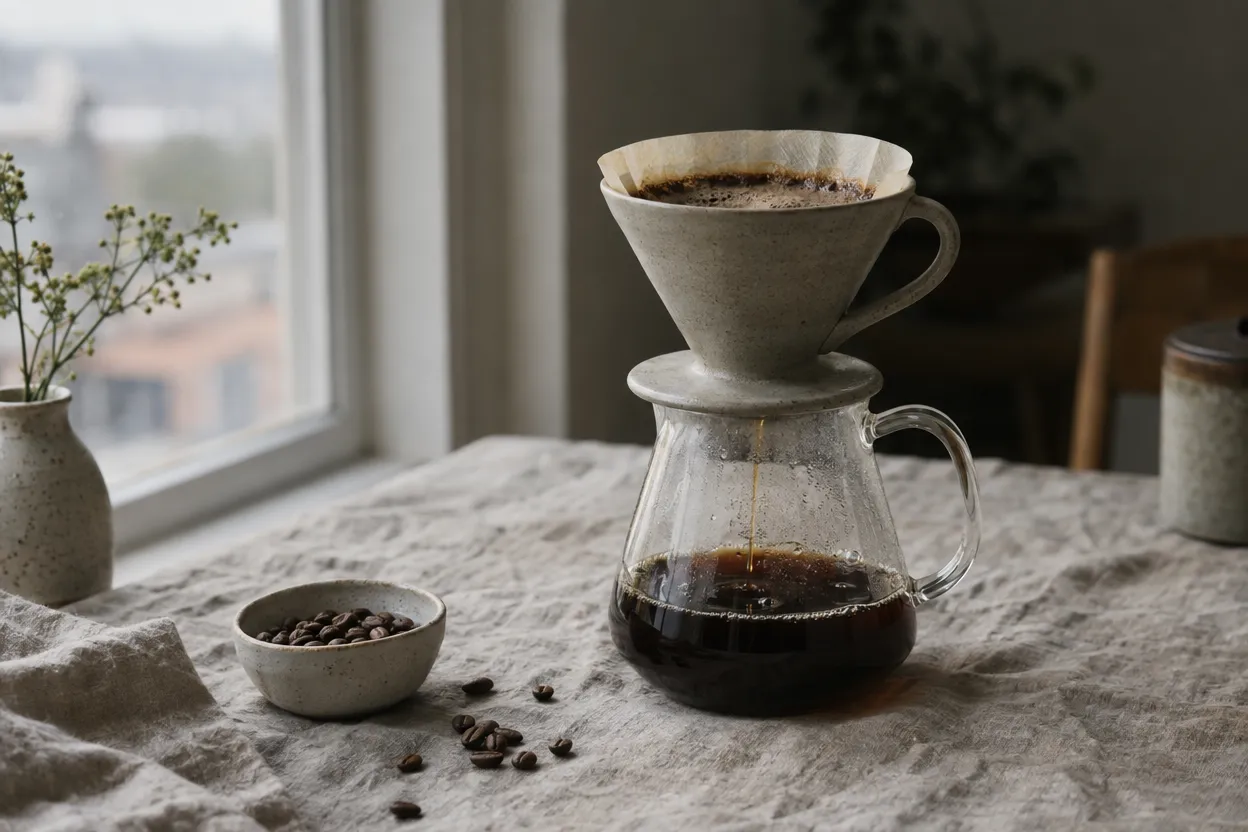
Use FLORA to make a 3:2 blog header for a coffee roaster: a stone-colored ceramic pour-over dripper on a glass carafe, on a creased linen tablecloth by a window, soft overcast morning light, a few spilled beans, muted natural color, shallow depth of field. No text.Step 4: Refine it in the same chat
Ask for changes in plain words. Claude passes the first image back to FLORA as a reference, so the scene, objects and light stay the same while the framing or details change. Each version is saved on the FLORA canvas next to the one before it.
Same scene, but a tighter vertical crop for Instagram, 3:4. Show a thin stream of coffee falling into the carafe and a little steam.Step 5: Use the files
Claude returns a link to each image. Download it, drop it into your doc or CMS, or open the FLORA canvas from the link Claude gives you to upscale it, change the aspect ratio or turn it into a video.
What happened when we generated images in Claude with FLORA?
We ran both requests above through the FLORA MCP from a Claude session on October 15, 2026. The agent made one call to flora_create_generations for the header, with model t2i-gpt-image-2-5-flare, aspect_ratio 3:2, quality high and resolution 1k, generating into a FLORA project. It then polled flora_list_generations until the run finished and returned the image URL.
The header took about 25 seconds and cost $0.055. It came back at 1248 x 832 pixels: the stone-colored dripper and glass carafe sit on creased linen by the window, coffee mid-pour, a small bowl of beans and a few loose beans in front, with muted natural color and no oversaturation.
For the follow-up, the agent called flora_create_generations again with model i2i-gpt-image-2-5-flare and the first image passed in reference_node_ids, so the dripper, carafe, tablecloth and light carried over. That 3:4 version took about 35 seconds and cost $0.064, at 864 x 1152 pixels.
What went wrong: nothing. Both runs succeeded on the first try and neither image was rerun or retouched. Total for the run: $0.119 and two prompts.
- Model
- GPT Image 2.5 Flare
- Tools called
- flora_create_generations, flora_list_generations
- Cost
- $0.119 for two images
- Time
- 25 s and 35 s
| Option | What you can set | Example |
|---|---|---|
| Model | Any image model in FLORA, or let Claude choose | GPT Image 2.5 Flare, Krea 2, Nano Banana |
| Aspect ratio | 1:1, 4:3, 3:2, 16:9, 21:9, 9:16, 3:4, 2:3 | 3:2 for a blog header |
| Resolution | 1K, 2K or 4K on GPT Image 2.5 | 1K for drafts, 4K for print |
| References | Earlier results or images on the canvas | Keep a product identical across shots |
| Batch size | Up to 20 generations in one call | Ten ad variations at once |
| Cost | Quoted in dollars before it runs | $0.055 for one GPT Image 2.5 image |
Claude chat or the FLORA canvas: pros and cons
Pros
- Claude chat: no new tool to learn, and the image sits next to the writing it is for.
- Claude chat: Claude writes the model prompt from a plain-language brief.
- Claude chat: a set of variations is one message.
- FLORA canvas: you see every version side by side and branch from any of them.
Cons
- Claude chat: Claude on the web needs a public link or a canvas image to edit your own photo; Claude Code and Cursor can upload local files.
- Claude chat: you review results one message at a time, so large sets are easier to compare on the canvas.
- FLORA canvas: you write prompts yourself instead of handing a brief to an agent.
Which image model should Claude use?
Let Claude choose for a first pass, then name a model when you know what you want. All of them sit behind one FLORA connector, so switching models is one sentence in the chat, not a new account.
If you care about cost, ask Claude to quote the run first. FLORA returns the price in dollars before anything is spent, so you can try a cheaper model on drafts and save the expensive one for finals.
- GPT Image 2.5: photographic scenes, products and layouts. Our default.
- Ideogram: images that carry readable text, such as posters, labels and packaging.
- Krea 2: stylized, art-directed looks.
- Nano Banana: edits to an existing image, such as swapping a background.
Can Claude generate images from my own photo?
Yes. Give Claude a public link to the photo, or an image that is already on your FLORA canvas, and ask for the edit. Claude passes it to an image-to-image model as a reference, which keeps the subject while changing the setting, angle or light.
To work from files on your computer, use Claude Code or Cursor with the FLORA MCP. Both can upload local files to FLORA directly.
How do I make many images at once?
Ask for the set in one message: "Make six versions of this header, one per season." Claude sends them to FLORA as one batch of up to 20 generations, waits for all of them and shows the results together. For long lists, such as one image per product in a spreadsheet, a coding agent like Claude Code is faster because it can read the file and loop over every row.
Where do the images go after Claude makes them?
Each image is saved in a project on your FLORA canvas, next to the prompt and model that made it. That is the difference from a one-off chat image: you can open the canvas later, branch a new direction from any version, upscale it, resize it for other placements or animate it into video without starting over.
Frequently asked questions
Is it free to generate images in Claude with FLORA?
Your first generation through the FLORA MCP is free. After that, each image is billed to your FLORA workspace at the model's price. GPT Image 2.5 Flare cost $0.055 per image in our run.
Does this work in Claude Desktop?
Yes. Claude Desktop and Claude on the web use the same custom connector. Add it once and switch it on in any chat.
Can Claude make videos too?
Yes. The same connector gives Claude video models such as Seedance 2.5 and Kling. Ask Claude to animate an image it just made, or describe the clip you want.
Do I need to write prompts in a special format?
No. Describe the image in plain words. Claude turns your request into a prompt for the model it picks, and you can ask to see or edit that prompt.