
How do I turn a moodboard into campaign concepts with AI?
Put the moodboard on a FLORA canvas and ask an agent connected to the FLORA MCP for a few campaign concepts that use it as the art direction. The agent sends the board as a reference image with one written concept per generation, so every key visual shares its palette and feel. Our three concepts for a grapefruit soda cost $0.192 and took about 33 seconds.
Key takeaways
- The moodboard goes in as a reference image, so palette, texture and light carry into every concept.
- Each concept needs its own written idea: a name, a scene and one line on the feeling.
- Our three key visuals cost $0.064 each, $0.192 in total, and ran in parallel in 32 to 34 seconds.
- All three put the brand name on the can correctly and kept the board's coral, sage and cream.
- Pick a direction from the set, then build it out into sizes and placements from the same canvas.
At a glance
| What it does | Turns a moodboard into distinct campaign key visuals |
|---|---|
| Works in | Claude, ChatGPT, Claude Code, Cursor, Codex and other MCP clients |
| Model | GPT Image 2.5 Flare, image-to-image |
| Inputs | One moodboard image and two to five written concept ideas |
| Outputs | One key visual per concept, here 864 x 1152 (3:4) |
| Typical cost | $0.064 per concept |
| Typical time | About 35 seconds for the set |
What you need
- An agent with the FLORA MCP installed. Install steps are in the FLORA MCP docs.
- A moodboard as one image: a photo of a pinned board, an exported collage or a board you generate in FLORA.
- The product and brand name, and any copy that must appear in the image.
Best for
- Agencies taking two or three routes into a first client meeting
- Brand teams testing directions before a shoot is planned
- Designers turning a board into something a stakeholder can react to
- Founders exploring how a new product could be advertised
Step by step
Step 1: Get the board onto the canvas
Give the agent a link to the board, or in Claude Code, Cursor or Codex point it at the file and it uploads it. One flattened image works better than a dozen loose references, because the model reads the board as one art direction.
Step 2: Write two to five concepts in a line each
Give each concept a name, the scene, and what it should feel like. Let the board carry the look, so the concepts can differ in story while sharing a palette.
Use this moodboard as the art direction for three campaign key visuals for Siesta, a sparkling grapefruit soda, 3:4, through FLORA. Take the palette, film grain and sun-faded feel from the board. The only text is SIESTA on the can.
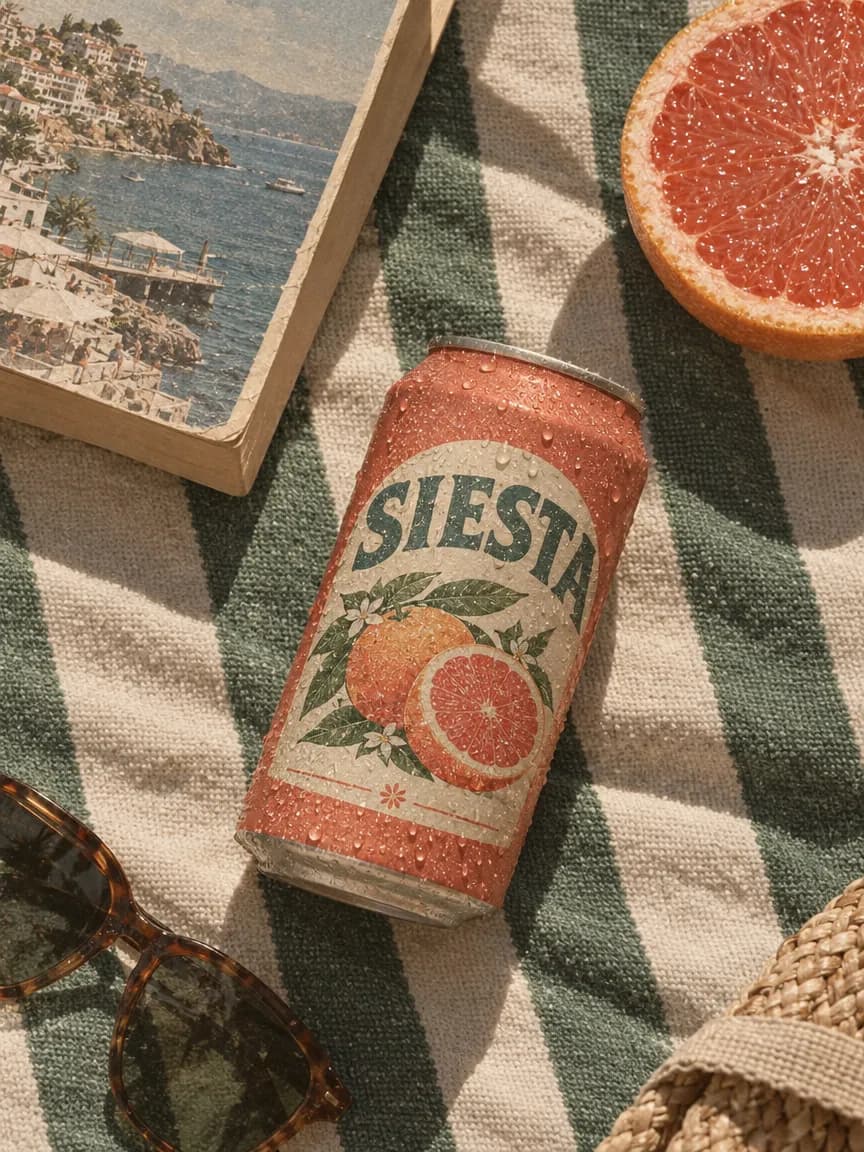
1. Slow Afternoons: a sweating can on a striped beach towel with a paperback and half a grapefruit, overhead.
2. Beach Club: a waiter's tray with two glasses of grapefruit soda and a can under a striped umbrella, sea behind.
3. From the Grove: a can on an old crate full of grapefruits in a grove.
Step 3: Review the set side by side
Judge the concepts against each other and against the board. Check the product, the brand name on pack, and whether the palette held. Push back on one concept at a time.
Step 4: Develop the winner
Ask for variations of the chosen concept, then the ad sizes and placements. The board and the concept stay on the same canvas, so every later image can use both as references.
What happened when we turned a moodboard into concepts in FLORA?
On October 16, 2026, we generated the moodboard itself first with t2i-gpt-image-2-5-flare at 4:3 for $0.055: an overhead photo of a cork board for a grapefruit soda, pinned with faded beach club photos, coral, sage and cream paper swatches, a scrap of striped awning canvas, a grapefruit photo, a vintage citrus crate label and two handwritten cards reading "sun-faded" and "slow afternoons".
The agent then sent three items in one flora_create_generations call to i2i-gpt-image-2-5-flare at 3:4, quality high, 1k, each with the board's canvas node in reference_node_ids and one written concept: Slow Afternoons, Beach Club and From the Grove. They finished in 32 to 34 seconds and cost $0.064 each, $0.192 for the set.
All three came back at 864 x 1152 with a coral can reading SIESTA, spelled correctly, with a grapefruit illustration on the label. Slow Afternoons is an overhead of the can on a green and cream striped towel beside a paperback, half a grapefruit and sunglasses. Beach Club shows a waiter's hand holding a tray with two glasses and the can under a striped umbrella above a cliffside cove. From the Grove puts the can on a crate of grapefruits with a crate label echoing the board's.
What went wrong: From the Grove came back warmer and more saturated than the board, with golden backlight and orange fruit, because "golden hour" in the prompt overrode the sun-faded look. The other two held the board's muted palette. The fix is to drop time-of-day words that carry their own color, or to restate "faded, low contrast, dusty coral" in that concept's line.
- Model
- GPT Image 2.5 Flare (image-to-image)
- Tools called
- flora_create_generations, flora_list_generations
- Cost
- $0.192 for 3 concepts, $0.055 for the board
- Time
- 32 to 34 s, in parallel
| Concept | Scene | What it took from the board |
|---|---|---|
| Slow Afternoons | Can on a striped towel with a paperback, overhead | Striped awning canvas, coral swatch, grapefruit photo |
| Beach Club | Tray of soda under an umbrella above the sea | Beach club photos, striped umbrellas |
| From the Grove | Can on a crate of grapefruits in a grove | Vintage crate label, paper texture |
Board as a reference or board described in words: pros and cons
Pros
- Board as a reference image: the model sees the actual palette, grain and textures.
- Board as a reference image: every concept shares one look without repeating style words.
- Board in words: easier to steer one element, such as a single color.
Cons
- Board as a reference image: the model can copy objects off the board too literally, such as a crate label.
- Board in words: the palette and texture drift between concepts.
- Both: strong light words in a concept line can override the board's mood.
How many concepts should I ask for?
Three is a good first round: enough to compare, few enough to judge properly. Make them differ in idea, such as setting, moment or who is in it, not in color, since the board already fixes the color.
Can I use more than one moodboard?
Yes. Put each board on the canvas and give each concept the board it should follow. To blend two boards into one direction, use an images-to-image model that takes several references at once.
What comes after the concepts?
Once a route is picked, the same canvas carries it into production without starting again.
- Variations of the chosen key visual, with the concept image as the new reference.
- Every ad size from the chosen visual with a generative reframe.
- Out-of-home and social placements to show the client the campaign in the world.
- A short video clip from the key visual with an image-to-video model.
Frequently asked questions
How much does it cost to turn a moodboard into concepts with FLORA?
Our three concepts cost $0.064 each on GPT Image 2.5 Flare, $0.192 in total. The board itself, generated in FLORA, cost $0.055.
Will the brand name appear correctly?
In our run, SIESTA was spelled correctly on all three cans. Name the exact text in the prompt and say it is the only text, then check every image before it goes further.
Can I use a Pinterest board or a PDF moodboard?
Flatten it into one image first, such as a screenshot or an exported page, and give the agent that image.