
Can AI keep a brand consistent across every asset?
Yes. In FLORA you make one approved reference image, then generate every other asset from it with an image-to-image model, so the product, label, palette and light carry over. In our run, three new formats made from one reference kept the same tin and label; the same request without the reference came back as a green tin with invented copy.
Key takeaways
- A reference image does the work: our three reference-based images all kept the terracotta tin and cream label.
- Without the reference, the same request returned a dark green tin labelled Earl Grey.
- Each reference-based image cost $0.064 and took 35 to 39 seconds with GPT Image 2.5 Flare.
- A banner, a story and a flat lay came back from one batch call, all in parallel.
- The flora-brand-consistency-audit skill checks the set against your written rules afterwards.
At a glance
| What it does | Generates new formats and scenes that match one approved brand image |
|---|---|
| Works in | The FLORA canvas, or Claude, ChatGPT, Cursor and Codex through the FLORA MCP |
| Models | Image-to-image models such as GPT Image 2.5 Flare and Nano Banana 2.1 |
| Inputs | One approved reference image plus a short description of each new asset |
| Outputs | PNG images in any aspect ratio the model offers, 1:1 to 21:9 |
| Typical cost | $0.064 per reference-based GPT Image 2.5 Flare image |
| Typical time | 35 to 39 seconds per image, run in parallel |
Key features
- Reference images: Every new asset is generated from the approved image, not from words alone.
- Batch formats: Up to 20 formats or scenes go to FLORA in one call and finish together.
- Canvas lineage: Each asset sits on the canvas wired to the reference it came from.
- Audit skill: flora-brand-consistency-audit judges a set against written rules and names the image that broke one.
Best for
- Turning one approved hero shot into banners, stories and social posts
- Small brands without a studio that still need a set that hangs together
- Seasonal refreshes where the product must not change
- Agencies producing many formats for one client at once
Step by step
Step 1: Approve one reference image
Generate or upload the image that defines the brand: the product as it really looks, the palette, the light. Everything after is judged against it, so check the label, color and proportions before you move on.
Step 2: Write the rules down
Name what must hold in every asset: product identity, palette, lighting direction, allowed surfaces. Put those words in every prompt and keep them for the audit later.
Step 3: Generate every format from the reference
Ask for all the formats in one message. The agent sends each one to an image-to-image model with the reference attached.
Using the reference image as the brand standard, make three new assets with FLORA, GPT Image 2.5 Flare:
1. 16:9 web banner, tin on the right third, empty linen-toned space on the left.
2. 9:16 story, the tin held in two hands over a wool blanket.
3. 1:1 flat lay, lid off, loose tea visible, brass scoop beside it.
Keep the same tin, label, single soft window light from camera left and warm palette of terracotta, cream and oat.
Step 4: Audit the set before anyone sees it
Run the flora-brand-consistency-audit skill on the finished set with your written rules. Rerun only the images it flags.
What happened when we held one brand across assets in FLORA?
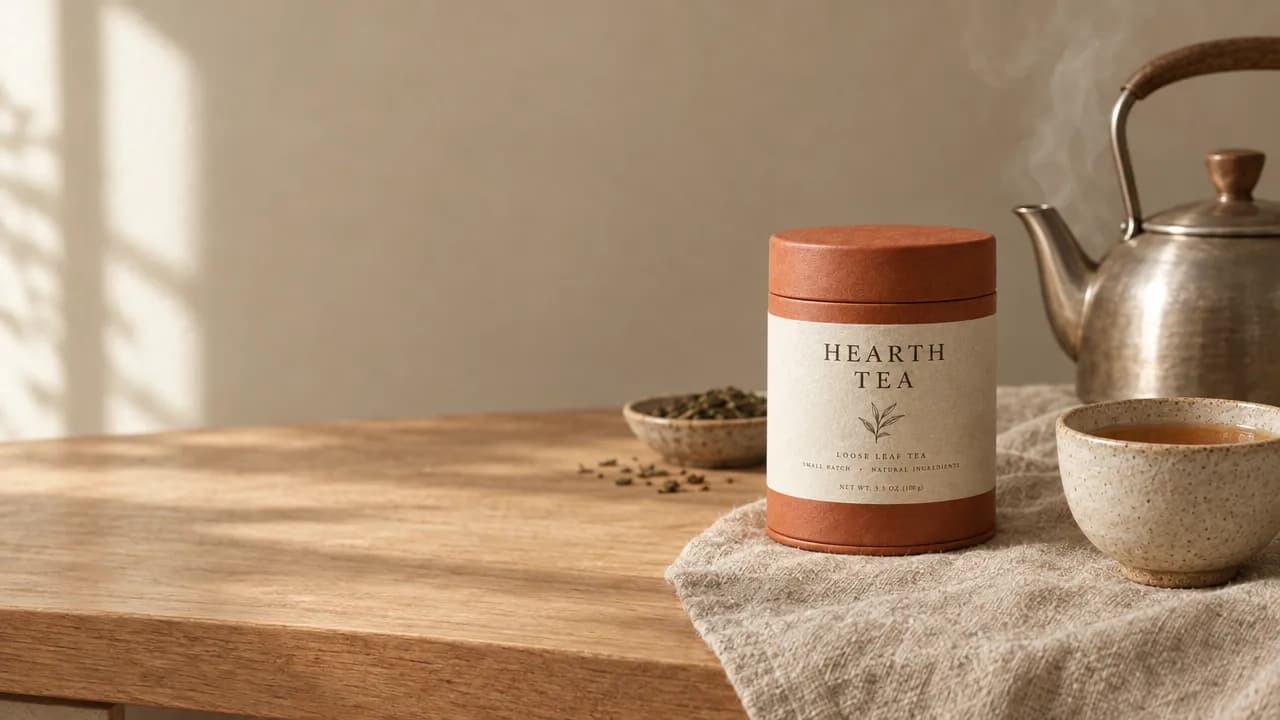
On October 16, 2026, we made a reference plate for a made-up tea brand with t2i-gpt-image-2-5-flare at 1:1: a round terracotta tin with a cream label reading HEARTH TEA, a ceramic cup beside it, undyed linen, soft window light from the left. It took 34 seconds and cost $0.055. We had no real brand to use, so the plate stands in for a client's approved product shot.
The agent then sent three generations in one flora_create_generations call with model is2i-gpt-image-2-5-flare, the plate in params.image_urls, and aspect ratios of 16:9, 9:16 and 1:1. Each took 35 to 39 seconds and cost $0.064. The banner put the tin on an oak counter beside a steaming kettle, the story put it in two hands over a knit blanket, and the flat lay showed it open with a brass scoop. Tin shape, color and label matched the plate in all three.
As a control, we sent the flat lay request with no reference to t2i-gpt-image-2-5-flare ($0.055). It returned a dark forest green tin with a green lid and a label reading EARL GREY and BOTANICALS · HERITAGE · WELLNESS. It kept the brand name and changed the product.
What went wrong: the reference plate had small label lines we never asked for, LOOSE LEAF TEA, SMALL BATCH • NATURAL INGREDIENTS and a net weight. Every reference-based image copied them faithfully. The fix is to put the exact label copy in the reference prompt, or correct the plate, before generating the set.
- Models
- t2i-gpt-image-2-5-flare, is2i-gpt-image-2-5-flare
- Cost
- $0.055 plate, $0.064 per reference-based image, $0.247 for the set
- Time
- 35 to 39 s per image, parallel
- Images
- 1 reference, 3 formats, 1 control without reference
| Image | Tin and label | Palette | Light |
|---|---|---|---|
| 16:9 banner (reference) | Matched the plate | Terracotta, cream, oat | Soft, from the left |
| 9:16 story (reference) | Matched the plate | Terracotta, cream, oat | Soft, from the left |
| 1:1 flat lay (reference) | Matched the plate | Terracotta, cream, oat, brass | Soft, from the left |
| 1:1 flat lay (no reference) | Green tin, Earl Grey label | Forest green dominant | Soft, from the left |
Reference image or prompt only: pros and cons
Pros
- Reference image: the product, label and palette carried over in all three of our formats.
- Reference image: you describe only what changes, such as the scene or the crop.
- Prompt only: cheaper per image, $0.055 against $0.064 for GPT Image 2.5 Flare.
- Prompt only: useful for exploring new directions before anything is approved.
Cons
- Reference image: a flaw in the reference repeats in every asset, so approve it carefully.
- Reference image: invented label copy in the reference carries over too.
- Prompt only: our run changed the tin color and invented a product name.
Why does a reference image beat a longer prompt?
Words leave room. "A terracotta tea tin with a cream label" describes thousands of tins, and a model picks a new one every time. A reference image fixes the exact tin, so the prompt only has to describe what changes: the scene, the crop, the hands holding it.
What should the written rules cover?
Write rules that two people would apply the same way. They go into every prompt and into the audit afterwards.
- Product identity: shape, color, label wording and mark.
- Palette: the colors allowed to dominate, and the ones that are not.
- Lighting: direction, softness, no flash.
- Surfaces and settings that are allowed.
- Output spec: aspect ratios and sizes each channel needs.
How do I check a whole set at once?
Ask your agent to run the flora-brand-consistency-audit skill with your rules. It describes each image, transcribes its text and judges every rule with evidence, at about $0.01 per image in our run. The audit guide covers it step by step.
Frequently asked questions
How much does a consistent set cost?
Our reference plate cost $0.055 and each reference-based image cost $0.064 with GPT Image 2.5 Flare, so a plate and three formats came to $0.247.
Can I use a real product photo as the reference?
Yes. Upload the photo or paste a public link, and the agent attaches it to each generation the same way it attached our generated plate.
Does it keep text on the label?
It did in our run: HEARTH TEA and the smaller label lines matched the plate in all three formats. Check small print before publishing, since models can garble fine text.
Where do the images end up?
On your FLORA canvas, each one wired to the reference it came from, plus a link the agent returns in the chat.