
What are the best AI tools for product photography?
FLORA is the best AI tool for product photography when you need a full set from one product. Make or upload one hero shot, then generate the white-background packshot and lifestyle shots from it as a reference, so the product, label and color stay the same. Our three-shot serum set cost $0.183 and each shot took 30 to 42 seconds.
Key takeaways
- Our hero shot cost $0.055; each reference-based follow-up cost $0.064.
- A three-shot set, hero plus white packshot plus in-hand lifestyle, cost $0.183.
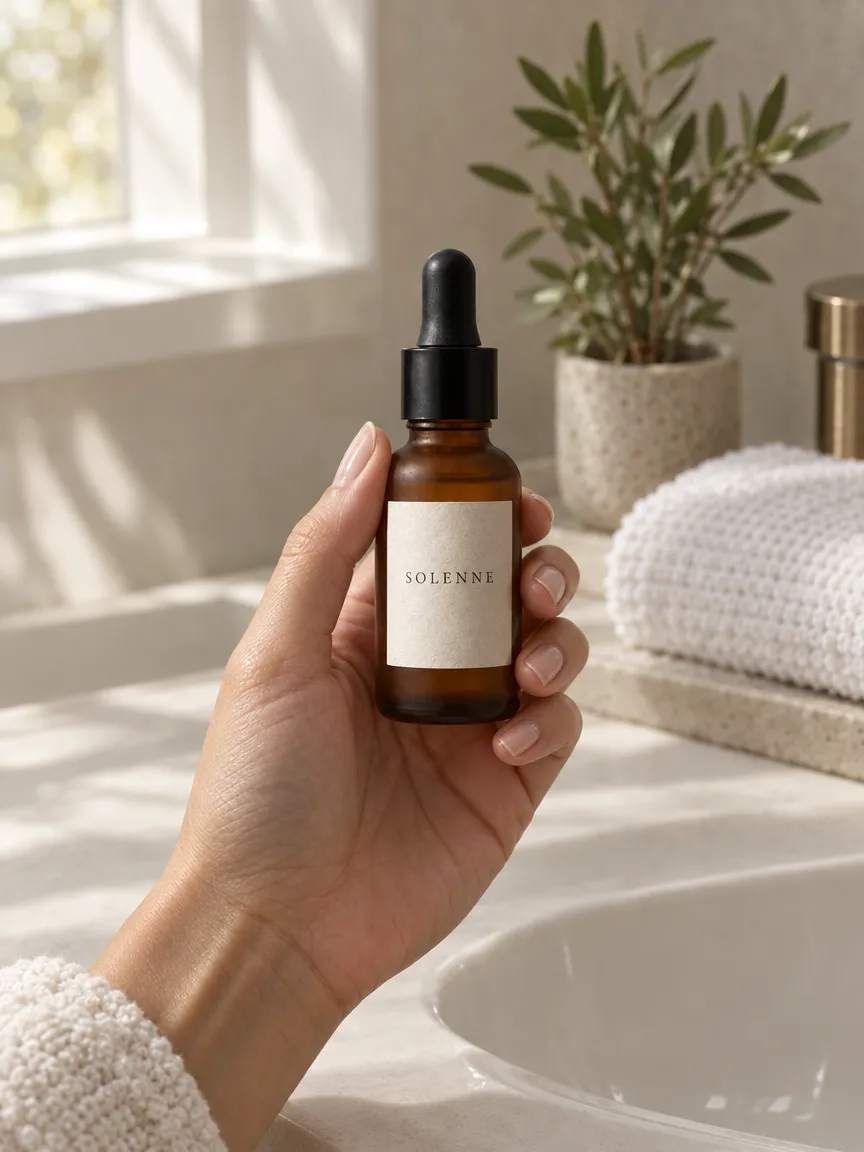
- The label text "SOLENNE" stayed readable in all three shots.
- Shots run in parallel: the two follow-ups finished in 30.5 and 32.1 seconds.
- Every shot stays on a FLORA canvas, ready to resize, upscale or animate.
At a glance
| What it does | Makes packshots and lifestyle shots that keep one product consistent |
|---|---|
| Works in | The FLORA app, plus Claude, ChatGPT, Cursor and other MCP clients |
| Model | GPT Image 2.5 Flare, text-to-image and image-to-image |
| Inputs | A product photo, or a written description of the product |
| Outputs | PNG shots at 1K, 2K or 4K, in 1:1, 3:4, 4:5, 16:9 and more |
| Typical cost | $0.055 per new shot, $0.064 per reference-based shot |
| Typical time | 30 to 42 seconds per shot |
Key features
- Reference-locked product: Every follow-up shot is generated from the hero image, so the bottle, cap and label match.
- Readable labels: Short label text held its spelling across all three shots in our run.
- Whole set in one call: Up to 20 shots go to FLORA together and run in parallel.
- Upscale and animate: The same canvas holds upscalers and video models for a product clip.
Best for
- Ecommerce teams that need packshots and lifestyle shots for every product
- Brands testing new backgrounds and seasons without a reshoot
- Agencies building launch sets before the product is photographed
- Marketplace sellers who need a consistent shot list
The options
FLORA
A visual AI canvas that builds a product photo set from one hero image, with image, video and upscaling models in one place. Agents such as Claude can run it through the FLORA MCP.
Best for: Full product sets, from packshot to lifestyle to video, where the product must stay identical
Pros
- Reference-locked shots: in our run the SOLENNE label held its spelling across hero, packshot and lifestyle.
- Model choice per shot: GPT Image 2.5, Nano Banana, FLUX and more, plus Seedance 2.5 or Kling for a product clip on the same canvas.
- Up to 20 shots per call, each priced in dollars before it runs ($0.055 to $0.064 per shot in our run).
Cons
- Every shot is generated, so labels and small hardware need a check against the real product before they go live.
- MCP and API access start on the Starter plan ($18 per seat a month as of October 2026); the free plan covers the canvas.
Photoroom
An AI photo editor and API for product visuals, on mobile, web and API, with tools such as background removal, ghost mannequin, flat lay and virtual model.
Best for: Ecommerce teams automating background and cleanup edits across a large catalog
Pros
- More than 20 editing tools exposed as API endpoints, plus an official MCP server.
- A Shopify app and Brand Kit on higher plans, with up to 50 seats.
- Covers catalog-specific jobs such as ghost mannequin, flat lay and virtual model as ready-made tools.
Cons
- The free plan is for personal, non-commercial use and has no API access.
- Video generation and the Shopify app need the Max plan or above (as of October 2026).
Claid.ai
An AI product photography and fashion photo editor with an API, cloud storage connectors and short product animations.
Best for: Developer-led ecommerce teams building an image pipeline through an API
Pros
- API-first, with storage connectors for automated pipelines.
- Clear credit plans: Essential at $15 a month for 500 credits, Pro at $49 for 2,000 (as of October 2026).
Cons
- Claid's own blog positions the web app for small-scale work and points bulk jobs to the API.
- API credits do not roll over month to month.
Pebblely
A template app that places a product photo into AI-generated lifestyle scenes, with more than 100 themes and marketplace sizes.
Best for: Solo sellers who want low-cost lifestyle backgrounds without prompting
Pros
- Low entry price: Lite at $9 a month for 30 images (as of October 2026).
- Themes do the prompting, so there is little to learn.
Cons
- Images only, no product video.
- No team features listed on its pricing page.
| Tool | Pricing | Models | Outputs | Workflow | Team features | API and MCP |
|---|---|---|---|---|---|---|
| FLORA | Free plan; Starter $18, Pro $50, Max $200 per seat a month, usage at model rates | GPT Image 2.5, Nano Banana, FLUX, Seedream and more, plus video models | Images up to 4K, video, upscales | Canvas, plus agents through the MCP | Shared projects, shared assets, usage caps per member | API and MCP from Starter |
| Photoroom | Free (non-commercial), Pro, Max, Ultra, Enterprise | Photoroom's own models | Images; video from Max | Editor and templates on mobile and web | Up to 50 seats, Brand Kit; SSO on Enterprise | API and MCP |
| Claid.ai | Essential $15, Pro $49 a month; Enterprise custom | Not named | Images, short product clips | Web editor and API | Not listed | API |
| Pebblely | Lite $9, Basic $19, Pro $39 a month | Not named | Images | Theme templates | Not listed | API, priced separately |
What happened when we made product photos in FLORA?
On October 16, 2026, we made a hero shot for a fictional serum with model t2i-gpt-image-2-5-flare, quality high, 1K, 1:1: "Studio product photo of a frosted amber glass serum bottle with a black dropper cap and a plain cream paper label reading SOLENNE in small serif capitals, standing on a slab of pale travertine, soft diffused daylight from the left, gentle shadow, neutral warm grey background." It cost $0.055 and took 42.3 seconds.
Next, one flora_create_generations call with two items on model i2i-gpt-image-2-5-flare, each with the hero node in reference_node_ids: a straight-on packshot on a white pedestal against pure white (1:1), and the bottle held in a hand above a bathroom sink with a folded towel and a plant (3:4). They took 32.1 and 30.5 seconds at $0.064 each. Total: $0.183.
The bottle shape, amber glass, black dropper and cream label matched in all three shots, and "SOLENNE" read cleanly every time, even at the smaller size in the hand.
What went wrong: the hero came back with a hard streak of window light across the wall, though the prompt asked for diffused light. It looks good, but it is not a studio look. The fix is a sharper line, "flat diffused studio light, no visible light beams or window shapes", and a rerun of the hero before the follow-ups.
- Model
- GPT Image 2.5 Flare (text-to-image, then image-to-image)
- Tools called
- flora_create_generations, flora_list_generations
- Cost
- $0.183 for 3 shots
- Time
- 30.5 to 42.3 s per shot
| Shot | Aspect ratio | Model id | Cost | Time |
|---|---|---|---|---|
| Hero on travertine | 1:1 | t2i-gpt-image-2-5-flare | $0.055 | 42.3 s |
| White packshot | 1:1 | i2i-gpt-image-2-5-flare | $0.064 | 32.1 s |
| In-hand lifestyle | 3:4 | i2i-gpt-image-2-5-flare | $0.064 | 30.5 s |
Can I start from a real product photo?
Yes, and for a real product you should. Upload the photo to the FLORA canvas, or paste a link in Claude or ChatGPT, and use it as the reference for every shot. A clean phone photo with the whole product in frame is enough. Our guide to product detail page images walks through a five-shot set from one snapshot.
What should I check before the shots go live?
Compare each shot to the real product, side by side.
- Label text and logos, letter by letter.
- Color, especially glass, metal and fabric.
- Proportions and scale against a hand or common object.
- Caps, buttons, zips and other small hardware.
Can the same set become a product video?
Yes. Wire the hero to a video model on the canvas, such as Seedance 2.5 or Kling, for a slow push-in or a turn. Video costs more than images, so settle the stills first.
Which AI product photography tool should you pick?
Pick by the job. Most product teams need more than one kind of image, so a canvas that holds every model and the video step saves the most time.
- A full launch set, packshot to lifestyle to product video, with the product locked: FLORA.
- Shots built by an agent from a folder of product photos: FLORA through the MCP.
- Background removal and cleanup across thousands of existing photos: Photoroom.
- An image pipeline run by developers through an API: Claid.ai or Photoroom.
- A handful of lifestyle backgrounds on a small budget: Pebblely.
Frequently asked questions
How much does an AI product photo set cost?
Our three-shot set cost $0.183: $0.055 for the hero and $0.064 for each follow-up.
Will the product stay the same in every shot?
It held in our run because each follow-up used the hero as a reference. Check labels and hardware closely and rerun only the shot that drifts.
Can I do a whole catalog?
Yes, with a coding agent such as Claude Code or Cursor. It loops over a folder of product photos and sends up to 20 shots per call.