
What are the best AI image generators for professional creative work?
FLORA is the strongest pick for professional image work because it puts every major image model on one canvas: GPT Image 2.5, Nano Banana 2.1, FLUX 3, Ideogram 4.5, Seedream and more. You run one brief through several models, compare the results side by side, and keep the winner on a canvas where it can be edited, resized or animated.
Key takeaways
- Professional work needs model choice: in our run, one brief through three models cost $0.157 in total.
- GPT Image 2.5 Flare, Nano Banana 2.1 and FLUX 3 each finished the same 3:4 still life in 28 to 35 seconds.
- The three models read the same prompt differently: one added props we never asked for.
- Every result lands on a FLORA canvas with its prompt, model and cost, so a team can review and reuse it.
- FLORA quotes the price of a run in dollars before it starts.
At a glance
| What it does | Runs one brief through many image models and keeps the results on a shared canvas |
|---|---|
| Works in | The FLORA app, plus Claude, ChatGPT, Cursor and other MCP clients |
| Models | GPT Image 2.5, Nano Banana 2.1, Nano Banana Pro, FLUX 3, Ideogram 4.5, Seedream 5 Pro, Recraft V4 and more |
| Inputs | A text brief, plus optional reference images |
| Outputs | PNG images at 1K, 2K or 4K in any common aspect ratio |
| Typical cost | $0.05 to $0.06 per image on the models we ran |
| Typical time | 28 to 35 seconds per image |
Key features
- Every model, one place: The FLORA model list returned 237 image model ids on October 16, 2026, across text-to-image and image-to-image.
- Side-by-side runs: Send the same prompt to several models in one call and compare the outputs on one canvas.
- Dollar quotes: Every run is priced in dollars before it starts, so a model test has a known cost.
- Reference edits: Pick a winner and edit it image-to-image, so the subject and light carry into the next version.
- Shared canvas: Each image keeps its prompt, model and settings, so anyone on the team can rerun or branch it.
Best for
- Art directors testing one brief across several models before committing
- Studios that need images, video and edits in one workspace
- Brand teams who want every final image traceable to its prompt and model
- Freelancers who bill clients for model costs and need a quote first
The options
FLORA
A visual AI canvas that runs image, video, audio, text and 3D models side by side. Briefs, references and results stay on one canvas, and agents such as Claude can drive it through the FLORA MCP.
Best for: Professional teams that compare models, keep work on a shared canvas and carry stills into edits and video
Pros
- The leading image models in one place: GPT Image 2.5, Nano Banana 2.1, FLUX 3, Ideogram 4.5, Seedream, Recraft V4 and more, 237 image model ids in all.
- Side-by-side runs: our one-brief, three-model test cost $0.157 and finished in under 35 seconds.
- Each image keeps its prompt, model and cost on a shared canvas, ready to edit, resize, upscale or animate.
Cons
- With so many models, the first choice takes a moment; start with GPT Image 2.5 Flare, the default, and compare from there.
- Generations are billed at each model's rate on top of the seat price, so quote large batches first.
Midjourney
An image generator with its own models, used on the web and in Discord, known for a distinctive aesthetic. It also makes 5-second image-to-video clips.
Best for: Artists and art directors chasing a strong look for individual images
Pros
- A distinctive house look from its own models (V8.2 is the default as of October 2026).
- Simple plans from $10 a month.
Cons
- No official public API or MCP, so agents and pipelines can't drive it.
- Private (stealth) generation needs the Pro or Mega plan, and companies over $1M in gross revenue must buy one of those plans.
Adobe Firefly
Adobe's AI app for images, video, audio and speech, running Adobe's own Firefly models and partner models such as GPT Image, Nano Banana and FLUX.
Best for: Brand and enterprise teams already working in Creative Cloud
Pros
- Adobe says its Firefly models are trained on licensed content and are commercially safe, with Content Credentials attached automatically.
- Partner models and Firefly Boards, a collaborative canvas, in one plan, connected to Photoshop and the rest of Creative Cloud.
- A free tier, and paid plans from $9.99 a month (as of October 2026).
Cons
- IP indemnification covers select outputs on enterprise plans only, and Adobe leaves partner-model outputs to the user's judgment.
Krea
A creative AI suite for images, video and 3D, with its own Krea models, many third-party models, realtime generation, nodes and LoRA training.
Best for: Power users and small studios who want realtime generation and many models
Pros
- A large model catalog, including Krea's own models, FLUX, GPT Image, Nano Banana, Seedream, Ideogram and Recraft.
- Realtime canvas and upscaling up to 22K for images.
- A public API and a hosted MCP server.
Cons
- The free and Basic plans limit which models you can use (as of October 2026).
Ideogram
A text-to-image app from a company known for typography, with its own models and a canvas for Magic Fill, Extend and Remix.
Best for: Posters, packaging and other type-heavy graphics
Pros
- Strong text rendering; Ideogram 4.0 was released with open weights in June 2026.
- An API priced per image, and team plans from $30 per user a month (as of October 2026).
Cons
- Images only, no video.
- On the free plan, all generations are public.
| Tool | Pricing | Models | Outputs | Workflow | Team features | API and MCP |
|---|---|---|---|---|---|---|
| FLORA | Free plan; Starter $18, Pro $50, Max $200 per seat a month, usage at model rates | GPT Image 2.5, Nano Banana 2.1, FLUX 3, Ideogram 4.5, Seedream, Recraft V4 and more | Images up to 4K, plus video, audio and 3D | Canvas, plus agents through the MCP | Real-time collaboration, shared assets, usage caps per member | API and MCP from Starter |
| Midjourney | Basic $10, Standard $30, Pro $60, Mega $120 a month | Midjourney's own (V8.2) | Images, 5-second video | Prompt box on web and Discord | No team plan found | No official API or MCP |
| Adobe Firefly | Free tier; $9.99 to $199.99 a month | Firefly models plus GPT Image, Nano Banana, FLUX and others | Images, video, audio, speech | Web app, Boards canvas, Creative Cloud | Team licences, admin tools; custom models on Enterprise | Firefly API; Adobe connector for Claude |
| Krea | Free daily units; Basic $9 to Business $200 a month | Krea models plus FLUX, GPT Image, Nano Banana, Seedream and more | Images, video, 3D, upscales | Realtime canvas, nodes, editor | Up to 50 seats on Business, SSO | API and MCP |
| Ideogram | Free; Plus $20, Pro $60 a month; Team $30 per user | Ideogram's own plus partner models | Images | Prompt box and canvas | Team plan, minimum 2 users | API |
What happened when we generated a professional image in FLORA?
On October 16, 2026, we sent one catalog brief to three image models in a single flora_create_generations call: "Editorial catalog photo for a ceramics studio: a hand-thrown stoneware pitcher in a matte oatmeal glaze on a weathered oak table, soft north window light from the left, gentle long shadow, a sprig of dried eucalyptus beside it, muted earthy palette, medium format film look, true-to-life color." All three ran at 3:4 and 1K.
Model ids and results: t2i-gpt-image-2-5-flare (quality high) cost $0.055 and took 34.5 seconds; t2i-elote-gateway, which is Nano Banana 2.1, cost $0.052 and took 27.7 seconds; t2i-flux-3-image-t2i, FLUX 3 Image, cost $0.05 and took 34.1 seconds. We read all three with one flora_list_generations call. Total: $0.157.
All three drew a believable pitcher with the eucalyptus on the left. GPT Image 2.5 kept the window and the side light the brief asked for. FLUX 3 dropped the window and lit the scene from a plain wall. Nano Banana 2.1 built a whole kitchen around the pitcher, with shelves, cups and a hanging bunch of herbs.
What went wrong: the extra props from Nano Banana 2.1 would break a clean catalog page. The fix is a stricter line in the prompt, such as "plain plaster wall, nothing else in frame", or simply keeping the GPT Image 2.5 result. Our first attempt, a batch of 16 images for several guides at once, also timed out in the client. We checked flora_list_generations, saw nothing had started, and resent in batches of six.
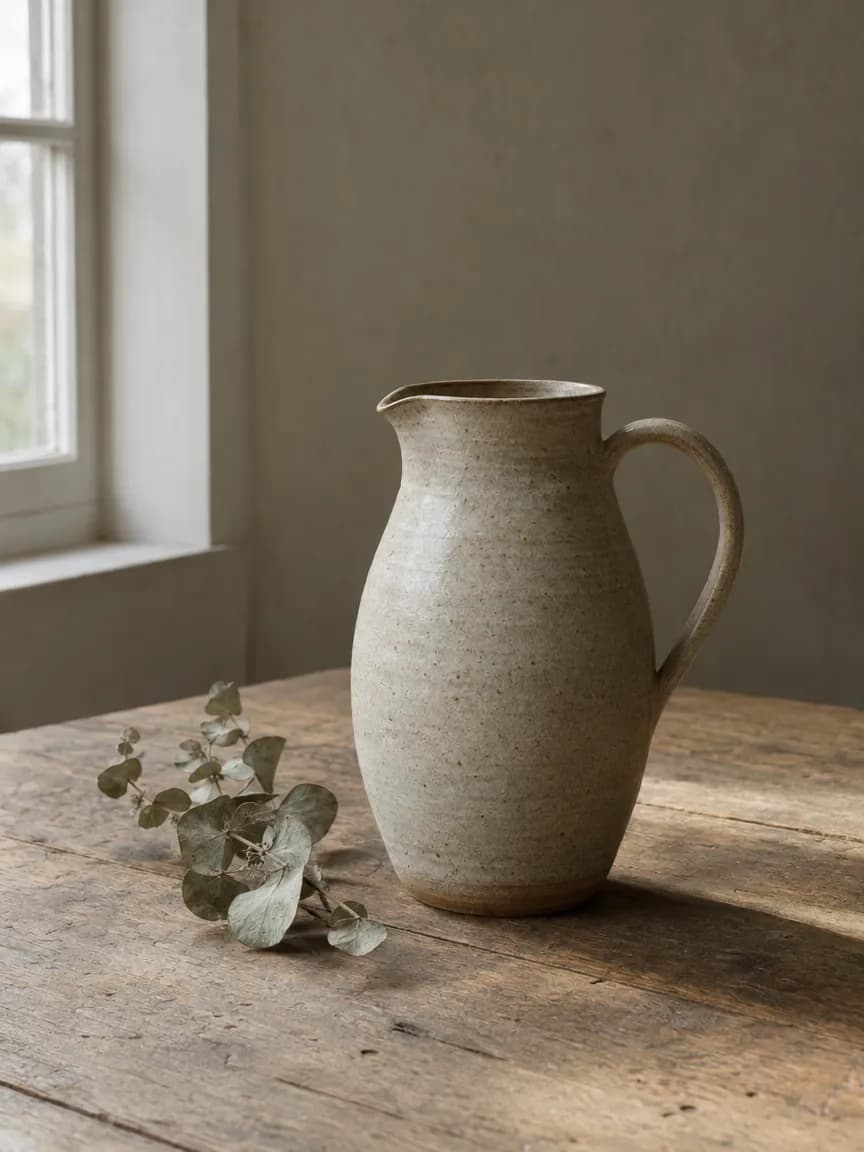
- Models
- GPT Image 2.5 Flare, Nano Banana 2.1, FLUX 3 Image
- Tools called
- flora_create_generations, flora_list_generations
- Cost
- $0.157 for 3 images
- Time
- 27.7 to 34.5 s, in parallel
| Model in FLORA | Model id | Cost | Time | What it did with the brief |
|---|---|---|---|---|
| GPT Image 2.5 Flare | t2i-gpt-image-2-5-flare | $0.055 | 34.5 s | Kept the window and side light as written |
| Nano Banana 2.1 | t2i-elote-gateway | $0.052 | 27.7 s | Added shelves, cups and herbs to the scene |
| FLUX 3 Image | t2i-flux-3-image-t2i | $0.05 | 34.1 s | Dropped the window, plain wall behind |
Why does model choice matter for professional work?
Each model reads a brief its own way. In our test, the same sentence gave a clean catalog shot, a styled kitchen and a studio still. A professional workflow needs to see those options before a client does, and paying about five cents per try makes that cheap.
Running the comparison on one canvas also keeps the record: which model, which prompt, what it cost. That matters when a client asks for the same look six months later.
What should a professional image tool let me do after generation?
Generation is the first step. In FLORA, the result stays on the canvas, ready for the next one.
- Edit the image with a reference-based model, so the subject and light hold.
- Resize it for every placement, from 1:1 to 21:9.
- Upscale it for print.
- Animate it with a video model such as Seedance 2.5 or Kling.
Can I run these comparisons from Claude or Cursor?
Yes. With the FLORA MCP connected, ask the agent to run your brief on three models and it sends them in one call. The results come back in the chat and on the canvas. For a fuller side-by-side, see flora.ai/compare/adobe-firefly-alternative and flora.ai/compare/krea-ai-alternative.
Which AI image generator should a professional creative pick?
Pick by how the image will be used. Professional work rarely stops at one image from one model, which is why FLORA covers the most needs.
- Comparing models on a brief, then editing, resizing or animating the winner with a team: FLORA.
- Images made by Claude, ChatGPT or Cursor and saved where designers can open them: FLORA through the MCP.
- A signature look for individual images: Midjourney.
- Commercially safe models inside Creative Cloud: Adobe Firefly.
- Realtime sketching and LoRA training: Krea.
- Type-heavy posters and packaging: Ideogram.
Frequently asked questions
Which image model should I start with?
GPT Image 2.5 Flare is FLORA's default and followed our brief closely for $0.055. Run one or two others next to it when the look matters.
How much does a three-model comparison cost?
Ours cost $0.157 for three 1K images. FLORA quotes the cost in dollars before each run.
Can I use my own reference images?
Yes. Add them to the canvas or pass a link, and image-to-image models use them as references for subject, product or style.
Do the images stay private?
They stay in your FLORA project, which you control and can share with your team.