
What are the best AI tools for fashion design?
FLORA is the best AI tool for fashion design when you need to go from a flat sketch to photographed garments and colorways. Draw or generate the technical flat, then render it image-to-image as a garment on a model or a flat lay, keeping the pockets, collar and fit. Our sketch plus two renders cost $0.183 and each step took about 30 seconds.
Key takeaways
- A technical flat sketch of a chore jacket cost $0.055 and took 28.6 seconds.
- Rendering that sketch as a real garment cost $0.064 per render, in 29.5 and 35.6 seconds.
- Both renders kept the boxy crop, three patch pockets and corduroy collar from the sketch.
- One sketch gave two colorways in one call: ecru canvas on a model, faded indigo denim as a flat lay.
- Sketch, renders and any video stay together on one FLORA canvas.
At a glance
| What it does | Turns fashion sketches into garment renders, colorways, on-model shots and flat lays |
|---|---|
| Works in | The FLORA app, plus Claude, ChatGPT, Cursor and other MCP clients |
| Model | GPT Image 2.5 Flare, text-to-image and image-to-image |
| Inputs | A flat sketch, mood images or a written design brief |
| Outputs | PNG renders at 1K, 2K or 4K: on-model, flat lay, detail shots |
| Typical cost | $0.055 per sketch, $0.064 per render |
| Typical time | About 30 to 36 seconds per image |
Key features
- Sketch to render: Your flat goes in as the reference, so the construction details carry into the render.
- Colorways in one call: Send several fabric and color variants of one sketch together, up to 20 per call.
- On-model and flat lay: The same sketch renders as a worn garment or a product flat lay by changing one line.
- Motion for lookbooks: Wire any render to a video model such as Seedance 2.5 or Kling for a short walk or turn.
Best for
- Designers checking a silhouette or colorway before sampling
- Small labels building line sheets and lookbooks
- Merchandisers who need colorway options fast
- Students and freelancers presenting concepts
The options
FLORA
A visual AI canvas that takes a design from sketch to render to lookbook video, with every image and video model in one place, plus a Fashion Studio included on all plans. Agents such as Claude can run it through the FLORA MCP.
Best for: Taking one sketch to renders, colorways, on-model shots and motion on a single canvas
Pros
- Sketch-referenced renders: our flat became an ecru on-model shot and an indigo flat lay for $0.183 in total, each render in about 30 seconds.
- Colorways in one call, up to 20, each with the sketch as the reference.
- Lookbook motion on the same canvas: wire a render to Seedance 2.5 or Kling for a walk or turn.
Cons
- Renders can drift on small construction details such as button count, so check each one against the sketch before it goes to a factory.
- Generations are billed at each model's rate on top of the seat price, so quote a large colorway run before sending it.
Raspberry AI
An agentic platform built for fashion teams, from first sketch to final campaign: sketch to render, try-on, prints and design editing.
Best for: Apparel design teams at mid-size and large brands
Pros
- Fashion-specific tools: seamless prints, multi-view renders and SVG export from 2D sketches.
- Integrations with Browzwear, Adobe, Pantone and Miro, plus SOC 2 Type II.
- Used by brands such as Adidas, Levi's and Kate Spade.
Cons
- Per-seat pricing runs from $49 to $298 per user a month (as of October 2026).
- API access is on Enterprise only.
Vizcom
An AI design platform for product designers that turns sketches into renders and 3D models, with pages for apparel, footwear and industrial design.
Best for: Footwear and industrial designers who go from sketch to 3D
Pros
- Real 3D export in GLB, STL, USDZ, OBJ and FBX.
- Renders up to 8K, with a layered sketch canvas.
- Free Starter plan with 800 credits; Professional is $49 per user a month (as of October 2026).
Cons
- Generations on the free plan may be used for training.
- 3D meshes are edited in other software.
Botika
An AI tool for fashion ecommerce content: upload a flat lay or ghost mannequin shot, then pick an AI model, pose and background.
Best for: Fashion ecommerce brands that need on-model product page shots without a photoshoot
Pros
- More than 150 AI human models and 4K on-model photos.
- A Shopify app and bulk collection processing.
Cons
- Built for on-model photos of finished garments, not for design development from a sketch.
- Credits are counted per year and run from 600 to 1,000 on standard plans (as of October 2026).
| Tool | Pricing | Models | Outputs | Workflow | Team features | API and MCP |
|---|---|---|---|---|---|---|
| FLORA | Free plan; Starter $18, Pro $50, Max $200 per seat a month, usage at model rates | GPT Image 2.5, Nano Banana, FLUX and more; Seedance, Kling, Veo for video | Renders, on-model and flat lay images, video | Canvas and Fashion Studio, plus agents through the MCP | Real-time collaboration, shared projects and assets | API and MCP from Starter |
| Raspberry AI | Free credits; $49 to $298 per user a month | Not named; brand-trained models on Enterprise | Renders, prints, video, SVG | Sketch to render, try-on, editing | Shared workspace, permissions | API on Enterprise |
| Vizcom | Free Starter; Professional $49 per user a month | Not named | Renders up to 8K, animations, 3D files | Layered sketch canvas | Admin, editor and viewer roles; SSO on Enterprise | Not stated |
| Botika | Paid plans with a free trial; Enterprise custom | Not named; 150+ AI human models | On-model photos up to 4K, video | Upload, then pick model, pose and background | Collaboration on higher plans | Shopify app; API not stated |
What happened when we made fashion imagery in FLORA?
On October 16, 2026, we generated a technical flat with model t2i-gpt-image-2-5-flare, 4:3, quality high, 1K: "Fashion technical flat sketch of a cropped chore jacket, front and back views side by side, clean black line drawing on white, boxy fit, dropped shoulders, three patch pockets, corduroy collar, five front buttons, topstitching marked with dashed lines, small callout labels." It cost $0.055 and took 28.6 seconds.
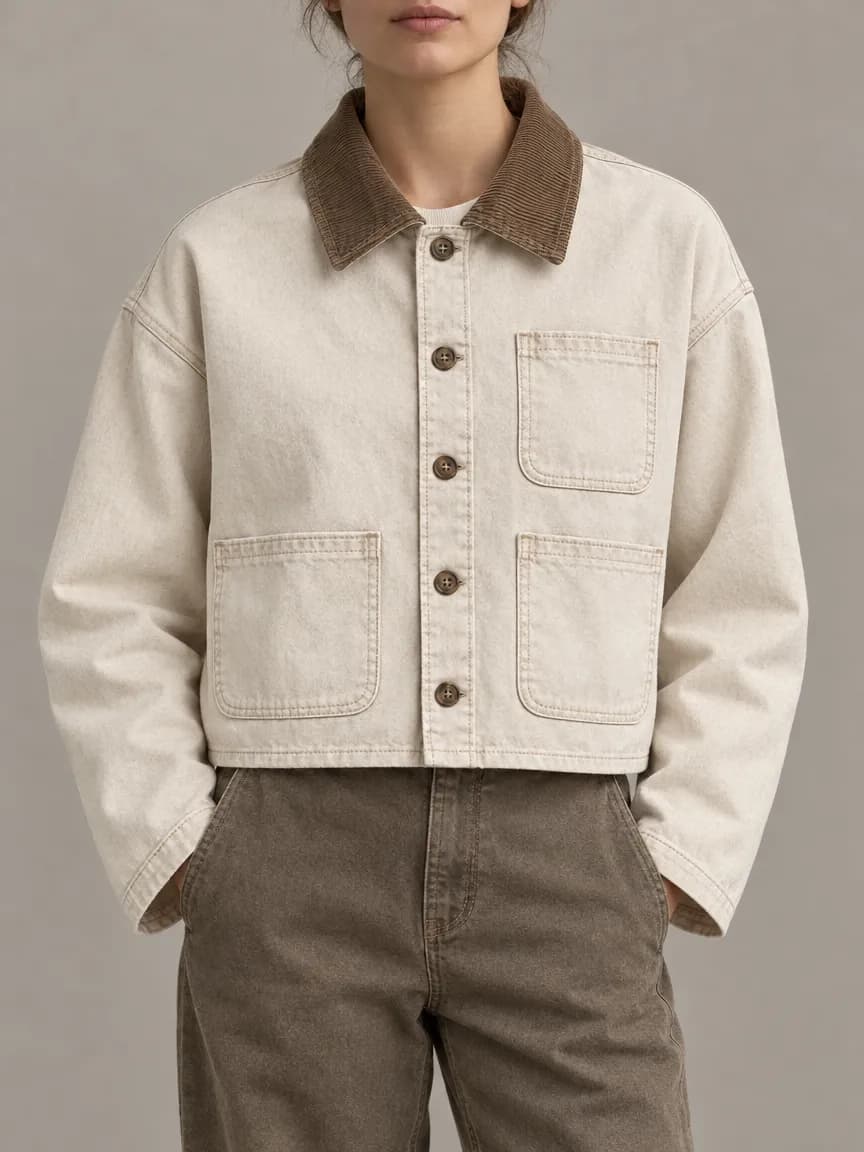
Then one flora_create_generations call with two items on model i2i-gpt-image-2-5-flare, each with the sketch in reference_node_ids. The first: the same jacket in washed ecru cotton canvas with a brown corduroy collar and horn buttons, worn by a model against a warm grey wall, 3:4. The second: faded indigo denim with a navy corduroy collar and metal buttons, as an overhead flat lay on pale concrete, 1:1. They took 29.5 and 35.6 seconds at $0.064 each. Total: $0.183.
Both renders kept the cropped boxy body, dropped shoulders, one chest pocket and two lower pockets on the same sides as the sketch, and the contrast corduroy collar. The topstitching from the flat showed up as visible stitching on both fabrics.
What went wrong: the sketch came back with extras we did not ask for, a key features panel and three detail boxes for the collar, pocket and button. That is handy for a tech pack, but noisy as a render reference. The fix is "front and back views only, no detail boxes or text", or crop the flat before using it as the reference.
- Model
- GPT Image 2.5 Flare (text-to-image, then image-to-image)
- Tools called
- flora_create_generations, flora_list_generations
- Cost
- $0.183 for 1 sketch and 2 renders
- Time
- 28.6 to 35.6 s per image
| Step | Model id | Output | Cost | Time |
|---|---|---|---|---|
| Technical flat | t2i-gpt-image-2-5-flare | Front and back line drawing, 4:3 | $0.055 | 28.6 s |
| Ecru canvas, on model | i2i-gpt-image-2-5-flare | 3:4 studio shot | $0.064 | 29.5 s |
| Indigo denim, flat lay | i2i-gpt-image-2-5-flare | 1:1 overhead shot | $0.064 | 35.6 s |
Can I use my own sketches?
Yes. Upload a scan or photo of your flat to the FLORA canvas, or point a coding agent at the file, and use it as the reference. Clean line work with front and back views gives the model the most to hold on to.
What should a render prompt say?
Name what must carry over, then what changes.
- Carry over: fit, length, pocket count and placement, collar, closures.
- Change: fabric, color, trims and hardware.
- Set the shot: on model, on hanger, flat lay, or detail close-up.
- Keep the light natural so fabric texture reads true.
What should I check in each render?
Count the buttons, pockets and seams against the sketch. Small construction details such as button count are where renders drift, and they matter once the design goes to a factory. Fix one with an image-to-image edit that names the detail.
Which AI tool should a fashion designer pick?
Most fashion teams need concepts, colorways, on-model shots and some motion. FLORA covers all four on one canvas; the specialist tools go deeper on one step.
- Sketch to renders, colorways, lookbook images and video in one place: FLORA.
- An agent that builds a line sheet from a folder of flats: FLORA through the MCP.
- A large apparel team that wants fashion-only tools and Browzwear integration: Raspberry AI.
- Sketch to 3D model for footwear or hard goods: Vizcom.
- On-model product page photos of finished garments: Botika.
Frequently asked questions
How much does a sketch-to-render test cost?
Our sketch and two colorway renders cost $0.183 on GPT Image 2.5 Flare.
Can I make many colorways at once?
Yes. Send one item per colorway in the same call, up to 20, each with the sketch as the reference.
Can it make lookbook video?
Yes. Wire an on-model render to Seedance 2.5 or Kling on the canvas for a short walk or turn.
How does FLORA compare with Raspberry AI or Vizcom?
See flora.ai/compare/raspberry-ai-alternative and flora.ai/compare/vizcom-alternatives for the side-by-side pages.