
How should I use AI when teaching creative work?
Use AI to make controlled studies that isolate one craft decision, then have students judge what changed and why. In FLORA, one still life can be re-lit three ways with everything else held fixed. Our lighting study, a flat base image plus three lighting versions, cost $0.247 in total, and its two misses gave students something specific to critique.
Key takeaways
- AI is most useful in class for studies that change one variable, such as light, lens or palette, while the rest holds still.
- Our lighting study cost $0.247: $0.055 for the base still life and $0.064 for each of three lighting versions.
- Two lighting versions finished in 34 seconds; one took 137 seconds, so plan for the slowest run, not the average.
- The model sometimes changes the set to explain the light, which gives students something concrete to critique.
- FLORA for Education gives professors 3 months of Max with unlimited editor seats for the class, and students 3 months of Pro.
At a glance
| What it does | Makes controlled visual studies that change one variable |
|---|---|
| Works in | The FLORA canvas, or any agent with the FLORA MCP |
| Model | GPT Image 2.5 Flare, text-to-image and image-to-image |
| Inputs | A base image and one prompt per variation |
| Outputs | A set of images that differ in one craft decision |
| Typical cost | $0.064 per variation |
| Typical time | About 35 seconds per batch, with occasional slower runs |
What you need
- A FLORA account. FLORA for Education offers free access for professors and students.
- A base image: a photo the class shot, or one made in FLORA.
- One variable to study and three or four settings of it.
Key features
- Shared class canvas: Students and instructors open one FLORA project and see every version with its prompt.
- Visible process: Each image is a node wired to its source, so the path from base to variation stays on the canvas.
- Reference-based edits: Image-to-image runs keep the base composition while one variable changes.
- Many mediums: Image, video, audio and 3D models are on the same canvas for cross-medium exercises.
Best for
- Lighting, lens and composition studies in photography and film courses
- Color and palette exercises in design and illustration classes
- Critique sessions where students compare versions side by side
- Briefs where students direct a model and defend their choices
- Showing the same idea across mediums: still, motion and sound
Step by step
Step 1: Make or upload a neutral base image
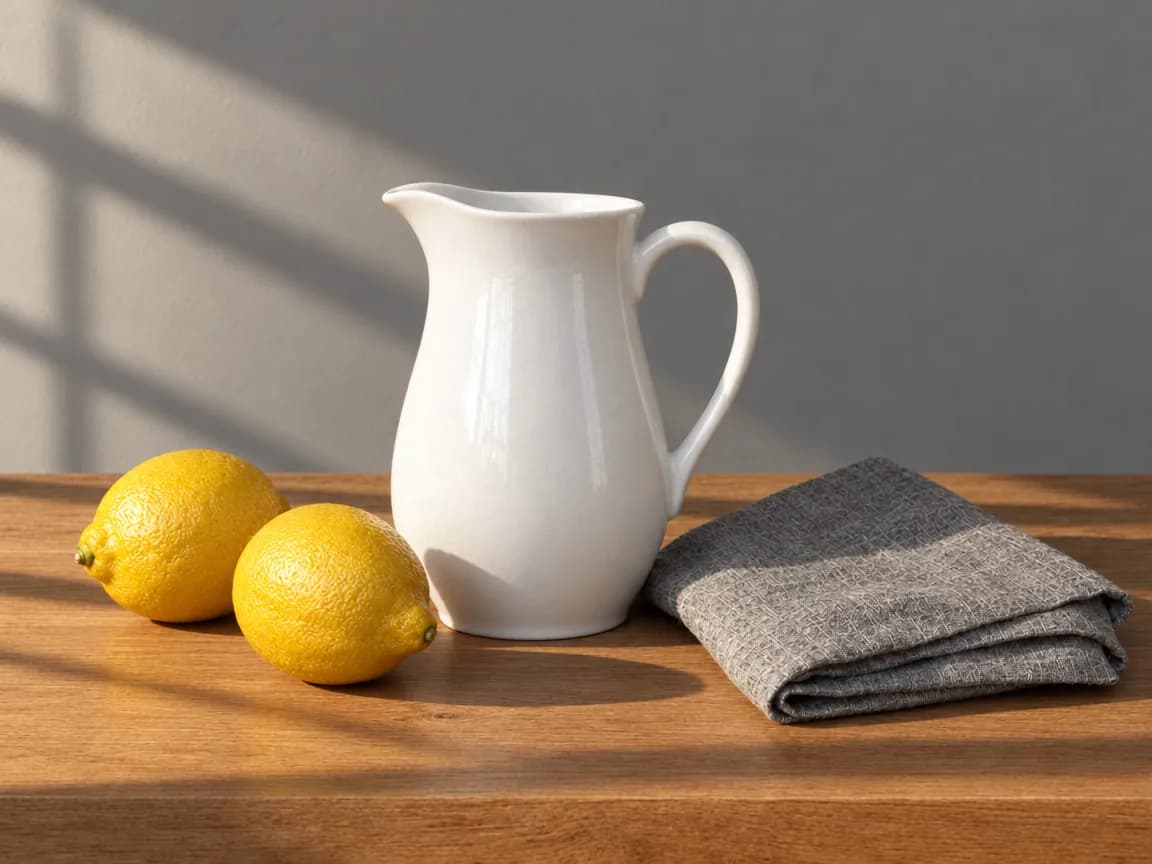
Start from flat, even light so every later version shows a clear change. Our base was a white pitcher, two lemons and a grey linen cloth on a wooden table against a grey wall.
Classroom still life for a lighting exercise: a white ceramic pitcher, two lemons and a folded grey linen cloth on a plain wooden table against a neutral grey wall. Even, flat, shadowless light from the front, true-to-life color, straight-on camera at table height, 50mm, photographic, no text.Step 2: Write one prompt per setting of the variable
Repeat the objects, arrangement and camera word for word, and change only the light line. Students can write these themselves; the wording is part of the exercise.
Same still life, same camera position, same objects and arrangement as the reference: white ceramic pitcher, two lemons, folded grey linen cloth, wooden table, grey wall. Change only the light: low late-afternoon sun from a window at the left, hard light with long crisp shadows falling to the right. True-to-life color, photographic, no text.Step 3: Run the versions together from the base
Wire the base into one image-to-image node per setting and run them at once, so the whole set is ready for the same critique.
Step 4: Critique the set side by side
Ask students what changed, what should have changed and did not, and what changed that nobody asked for. Then have them rewrite one prompt and rerun only that version.
What did a controlled study for a class look like in FLORA?
On October 16, 2026, we made the base still life with t2i-gpt-image-2-5-flare at 4:3, quality high, resolution 1k. It took 25 seconds and cost $0.055, and came back as asked: flat light, almost no shadows, true color.
One flora_create_generations call then sent three lighting versions with i2i-gpt-image-2-5-flare at 4:3, each with the base wired in through reference_node_ids: low hard sun from the left, soft overcast light from above, and backlight from a window behind the table. Each cost $0.064, so $0.192 for the three and $0.247 for the study.
The hard side light worked best: a window-frame shadow across the wall, long shadows to the right of the lemons and pitcher, and the same objects in the same places. That version and the backlit one finished 34 seconds after submission. The overhead version took 137 seconds.
What went wrong: the overhead version looks close to the flat base, with only short soft shadows under the objects, so the change is too subtle to teach from. The backlit version added a window to the back wall that was not in the base. Both make good critique material. The fixes: ask for "a clearly darker room with a single soft source directly overhead" for the first, and add "keep the plain grey wall, no window" to the second, then rerun only those two.
- Model
- GPT Image 2.5 Flare (text-to-image, then image-to-image)
- Tools called
- flora_create_generations, flora_list_generations
- Cost
- $0.055 base, $0.192 for 3 lighting versions
- Time
- 25 s base; 34 s, 34 s and 137 s for the versions
| Study | Variable | Held fixed |
|---|---|---|
| Lighting | Direction, hardness and color of light | Objects, arrangement, camera |
| Lens | Focal length and camera distance | Subject, light, setting |
| Palette | Color scheme of the set and wardrobe | Composition, light |
| Composition | Subject position and crop | Subject, light, palette |
| Time of day | Dawn, noon, dusk, night | Location, camera |
Does AI take the craft out of the assignment?
Not when the assignment is about judgment. A student who has to name why one lighting version works and another does not is practicing the same eye they use on set. Pair the AI study with a real shoot of the same setup so students can compare the two.
How do I set FLORA up for a class?
Through FLORA for Education. Professors apply with their institution and course details for 3 months of the Max plan and a team workspace with unlimited editor seats for the class. Students apply with a .edu email or proof of bootcamp enrollment for 3 months of Pro. An optional 30-minute faculty onboarding call is available.
What should students hand in?
Ask for the set and the reasoning, not only the best image.
- Every version, with its prompt.
- One paragraph on what changed and what should have changed.
- One rewritten prompt and the rerun it produced.
Frequently asked questions
Is FLORA free for students and educators?
FLORA for Education gives students 3 months of Pro and professors 3 months of Max with unlimited editor seats for their class. Apply at flora.ai/edu.
How much does a classroom study cost to run?
Our lighting study cost $0.247 on GPT Image 2.5 Flare: $0.055 for the base and $0.064 for each of three versions.
Can students use their own photos as the base?
Yes. Upload a photo to the FLORA canvas and wire it into the image-to-image node as the reference.
Which subjects does this fit?
Photography, film, design, illustration, advertising and architecture courses, anywhere one visual decision can be isolated and compared.