
How do I turn a script into a storyboard with AI?
Paste the script into an agent connected to the FLORA MCP and ask for a storyboard. The agent breaks the script into numbered shots, draws the first frame, gets your approval, then draws every other shot with that frame as the style reference. Our five-frame pencil storyboard cost $0.31 and the frames came back in about 45 seconds.
Key takeaways
- A storyboard is a shot list first: one frame per camera setup, each with framing, camera move and rough duration.
- Draw frame 1 alone, approve it, then use it as the reference for every other frame so the style holds.
- Our five frames cost $0.311: $0.055 for frame 1 and $0.064 for each of the four reference-locked frames.
- The four reference-locked frames ran in parallel and finished in 40 to 44 seconds.
- The frames stay on a FLORA canvas, ready to cut into an animatic or animate shot by shot.
At a glance
| What it does | Turns a written script into numbered storyboard frames |
|---|---|
| Works in | Claude, ChatGPT, Claude Code, Cursor, Codex and other MCP clients |
| Models | GPT Image 2.5 Flare: text-to-image for frame 1, image-to-image for the rest |
| Inputs | A script or scene description, and a drawing style |
| Outputs | One 16:9 frame per shot, 1280 x 720, on a FLORA canvas |
| Typical cost | $0.055 for the first frame, $0.064 for each frame after it |
| Typical time | About 30 seconds for frame 1, about 45 seconds for the rest |
What you need
- An agent with the FLORA MCP installed. Install steps are in the FLORA MCP docs.
- A script, even a rough one. Five lines of action are enough for a 30-second spot.
- A drawing style in words: pencil sketch, ink and wash, or photographic frames.
Best for
- Directors and agencies pitching a spot before a shoot is booked
- Marketers who need to show a video idea to a client or a boss
- Planning which shots to generate as video, and in what order
- Writers testing whether a script works as pictures
Step by step
Step 1: Ask for the shot list before any pictures
Paste the script and ask the agent to break it into shots. One shot is one camera setup: when the camera cuts or the subject changes, it is a new shot. Each shot gets an id, what is in frame, what the camera does and a rough length. This step is free, so argue about shot 4 here.
Here is my script. Break it into a numbered shot list for a storyboard: for each shot give what is in frame, the camera angle and move, and a rough duration. Don't draw anything yet.

6am. A baker pulls the first loaves from the oven. She wipes the fogged window. A cyclist stops outside. She hands him a paper bag across the counter. The street wakes up.
Step 2: Draw frame 1 and approve the style
Ask for the first frame only, in the style you want. Look at it closely: line weight, shading, how faces and hands read. This frame becomes the reference for the whole board, so fix it now rather than five frames later.
Draw shot 1 with FLORA as a storyboard frame: loose graphite pencil with soft grey wash on off-white paper, 16:9, no text. Use GPT Image 2.5 Flare.Step 3: Draw the rest from frame 1
Once frame 1 is right, ask for every remaining shot in one message, each using frame 1 as the reference. The agent sends them to FLORA together, so the wait is the length of one frame, not five.
Frame 1 is approved. Draw shots 2 to 5 in one batch, each with frame 1 as the reference image so the drawing style, the baker and the bakery stay the same. Same 16:9 format, no text.Step 4: Review the set in order
Read the frames left to right as a sequence. Check that characters, props and time of day carry across. Redraw only the frame that drifts, with one specific correction in the prompt.
What happened when we turned a script into a storyboard in FLORA?
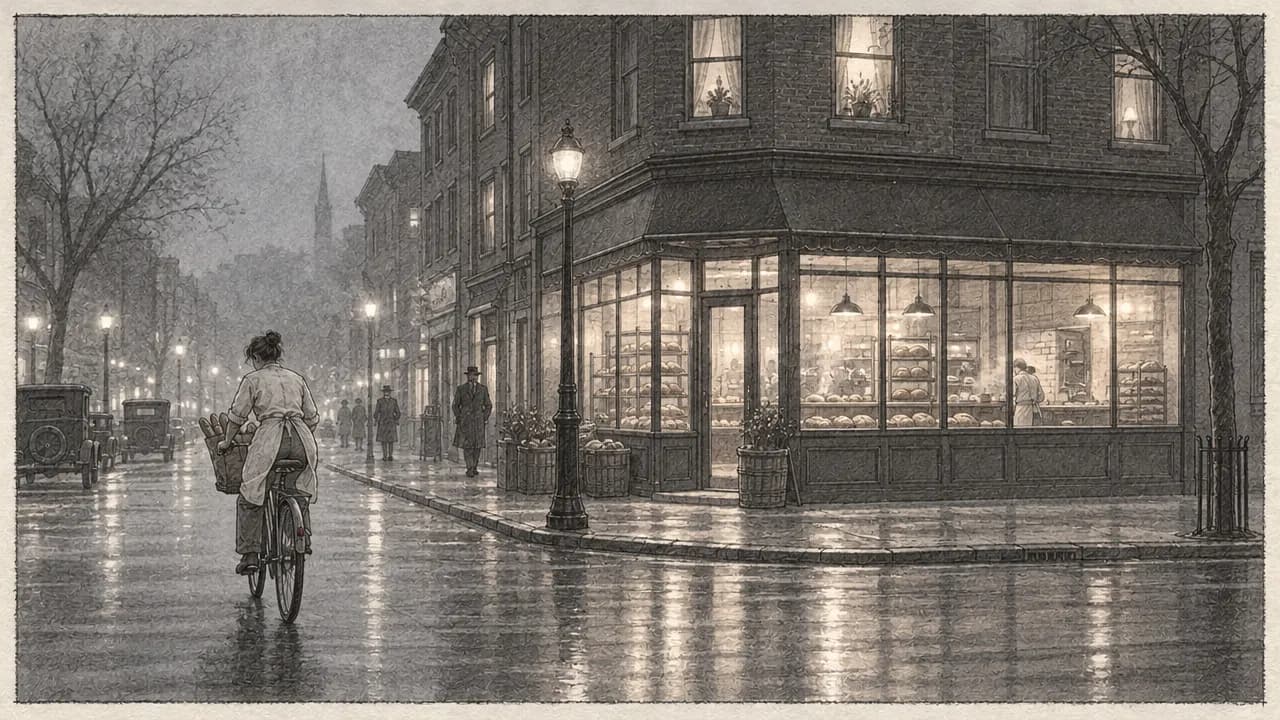
On October 16, 2026, we storyboarded a five-line script for a 30-second bakery spot. The agent turned it into five shots: the baker pulling loaves from a deck oven, her hand wiping a circle in the fogged window, a cyclist stopping outside, a paper bag passed across the counter, and a wide of the street waking up.
Frame 1 was one flora_create_generations call to t2i-gpt-image-2-5-flare at 16:9, quality high, 1k, asking for a loose graphite sketch with grey wash. It finished in 26 seconds and cost $0.055. We approved it, then the agent sent shots 2 to 5 in a single flora_create_generations call to i2i-gpt-image-2-5-flare, each with frame 1's canvas node in reference_node_ids. All four finished in 40 to 44 seconds and cost $0.064 each. One flora_list_generations call read the whole batch.
The style held across all five frames: the same pencil texture, the same grey wash, the same baker in the same apron and the same shop front. Every frame came back at 1280 x 720.
What went wrong: we asked for a "loose" sketch and got a tight, heavily rendered drawing, closer to an illustration than a quick board. The script says 6am, but shots 3 and 5 read as a wet night street under lit lamps rather than dawn. The fix for both is in the frame 1 prompt, before the batch: ask for "quick, gestural lines, minimal shading" and "first light, sky brightening", since every later frame copies frame 1.
- Models
- t2i-gpt-image-2-5-flare, i2i-gpt-image-2-5-flare
- Tools called
- flora_create_generations, flora_list_generations
- Cost
- $0.311 for 5 frames
- Time
- 26 s for frame 1, 40 to 44 s for frames 2 to 5
| Script line | Shot | Camera |
|---|---|---|
| A baker pulls the first loaves from the oven | 1: wide, baker at the deck oven | Eye level, static |
| She wipes the fogged window | 2: close-up, hand clearing a circle | Static, from inside |
| A cyclist stops outside | 3: medium exterior, bike at the curb | Pan left with the bike |
| She hands him a paper bag | 4: insert, hands over the counter | Static, tight |
| The street wakes up | 5: wide exterior from across the street | Slow push in |
Sketch frames or photographic frames: pros and cons
Pros
- Sketch frames: read clearly as a plan, so nobody mistakes them for the final look.
- Sketch frames: small drift between frames matters less in pencil.
- Photographic frames: show light, color and wardrobe, and can be animated straight into video.
- Both: same models, same price and the same reference-locked batch.
Cons
- Sketch frames: cannot become the final video; you redraw them in the final style later.
- Photographic frames: a face or product that drifts between frames is obvious and needs a rerun.
- Both: the model needs time of day and mood named in frame 1, or every frame inherits the wrong one.
How do I keep characters the same from frame to frame?
Lock one reference before the batch. Frame 1, once approved, goes into every other frame as the reference image, so the model sees the same character, setting and drawing style each time. Name what must not change in each prompt: the apron, the shop front, the hair. Changing the reference halfway through splits the board into two looks.
How many frames does a storyboard need?
One per shot, where a shot is one continuous camera setup. A 30-second spot is usually 5 to 10 shots. Inserts and cutaways count as their own shots. If a shot has a big camera move, draw its start and its end as two frames.
What do I do with the storyboard next?
Cut the frames into an animatic to check timing, or animate the approved frames into video clips one shot at a time. Both start from the frames already on your FLORA canvas, so nothing is redrawn.
- Animatic: lay the frames on a FLORA timeline with a duration each and render a rough cut.
- Video: animate each approved frame with an image-to-video model such as Seedance 2.5.
- Pitch: export the frames into a deck with the shot list beside each one.
Frequently asked questions
Can AI write the shot list from my script?
Yes. The agent reads the script and proposes shots with framing, camera move and duration. Edit the list in chat before any frame is drawn, since that step costs nothing.
How much does an AI storyboard cost in FLORA?
Our five-frame board cost $0.311 on GPT Image 2.5 Flare: $0.055 for the first frame and $0.064 for each frame drawn from it.
Can I use my own drawing style?
Yes. Give the agent one of your own frames as the reference instead of generating frame 1, and every frame follows it.
Can the storyboard include dialogue or captions?
Keep text out of the frames and put dialogue and notes in the shot list beside them. Text drawn inside generated frames is harder to edit later.