
How do I make a product launch video with AI?
Connect an agent to the FLORA MCP and build the video in three passes: product stills, short clips animated from the stills, then a cut on a FLORA timeline with an end title. Our 9-second launch cut for a fictional speaker used two stills, one Seedance 2.5 clip and one timeline render, and cost $2.604 in total.
Key takeaways
- Lock the product in a hero still first; every clip and shot is built from it.
- The video clip is the expensive step: $2.447 of our $2.604 total went to one 5-second Seedance 2.5 clip.
- A second shot came from the hero still as an image-to-image close-up for $0.064, with no video run.
- The FLORA timeline cut the clip, the close-up and an end title into a 9.05-second MP4 for $0.038.
- Default title text is white; on a light end card, set the color before you render.
At a glance
| What it does | Builds a short launch video from stills, clips and titles |
|---|---|
| Works in | Claude, ChatGPT, Claude Code, Cursor, Codex and other MCP clients |
| Models | GPT Image 2.5 Flare for stills, Seedance 2.5 for video, FLORA timeline for the cut |
| Inputs | The product (a photo or a description) and a short shot list |
| Outputs | MP4, here 9.05 seconds at 1280 x 720, 24 fps |
| Typical cost | $2.604 for our 3-shot cut |
| Typical time | About 6 minutes, most of it the video clip |
What you need
- An agent with the FLORA MCP installed. Install steps are in the FLORA MCP docs.
- A FLORA workspace with video generation.
- A clear photo of the product, or a precise description if it only exists as a render.
- The launch line for the end card.
Key features
- Stills before motion: Images cost cents and take seconds, so the look is settled before a video run.
- Reference-locked shots: Close-ups and angles use the hero still as their reference, so the product stays the same.
- Timeline cut: The agent writes the edit as a FLORA timeline and renders an MP4 without an editor.
- Read-back before render: The saved timeline can be read back to check every item, color and timing.
- One canvas: Stills, clips and the cut sit together, so a new shot slots into the same edit.
Best for
- Small teams launching a physical product without a video shoot
- Teasers and social cuts for a product page or launch post
- Testing a launch film idea before booking production
- Founders who need a first launch video this week
Step by step
Step 1: Write a three to five shot list
A short launch video needs a hero shot, a detail or use shot, and an end card with the name and the line. Keep each shot to one idea. Ask the agent to draft it if you have only the product.
Plan a 10-second launch video for Orla, a compact speaker in oat woven fabric with a walnut top. Three shots: a slow push in on the speaker in a living room, a close-up of a hand pressing the walnut top, and an end card that reads "Orla. Out now." Don't generate anything yet.Step 2: Make the hero still and the detail still
Generate the hero shot first and approve it. Then make the detail shot as image-to-image with the hero as the reference, so the product matches. Fix the product here, while each try costs cents.
Step 3: Animate only the shots that need motion
Video runs cost dollars and take minutes. Animate the hero shot, where camera motion sells the product, and let the detail shot hold as a still in the cut.
Animate the hero still with Seedance 2.5 through FLORA, 5 seconds, 720p, 16:9: slow, smooth push in toward the speaker, sunlight drifting across the wall. The speaker stays identical. Quote the cost first.Step 4: Cut it on a FLORA timeline
Ask the agent to lay the clip, the still and an end card on a FLORA timeline, read it back, then render. Give it the durations and the title text and color.
Cut a 9-second launch video on a FLORA timeline at 1280 x 720, 24 fps: the hero clip for 5 seconds, the hand close-up for 2 seconds, then 2 seconds of a warm cream card with "Orla. Out now." centered in dark brown. Read the timeline back to me before you render.Step 5: Add sound and versions
Put a music track on the timeline as an audio item, then make the 9:16 and 1:1 versions for social. Render each version from the same timeline.
What happened when we made a product launch video in FLORA?
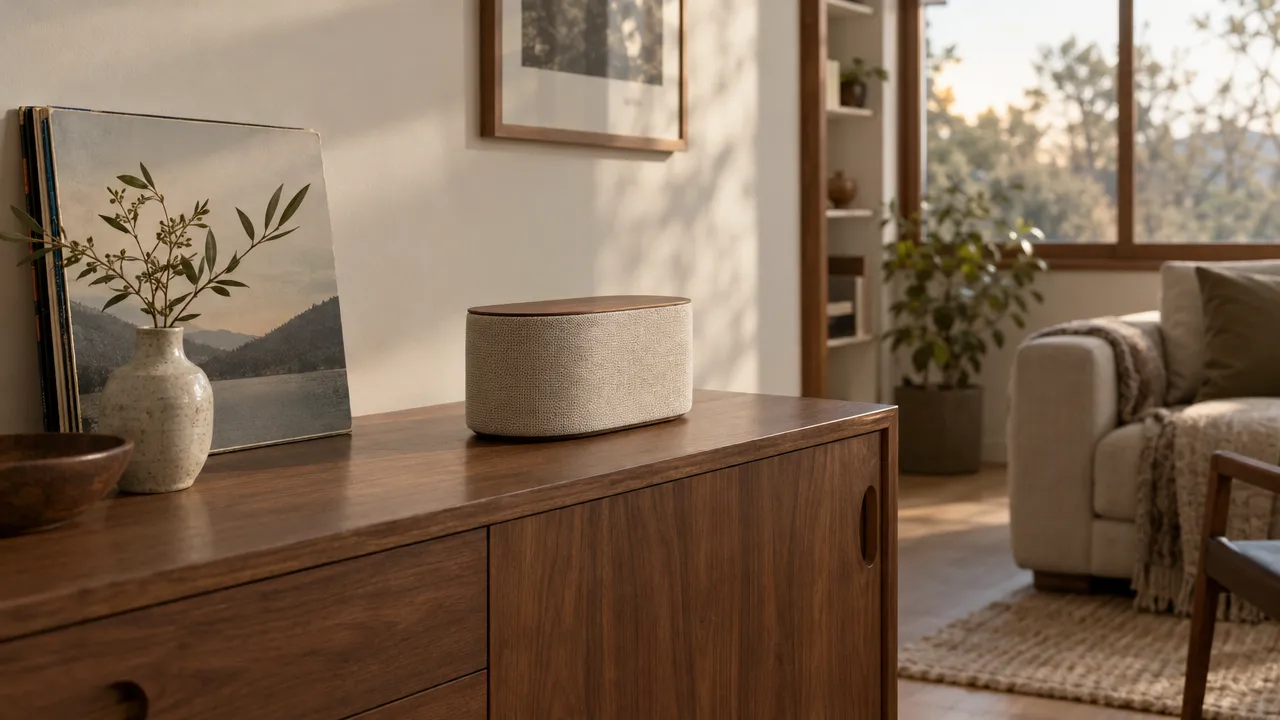
On October 16, 2026, we made a launch video for Orla, a fictional compact speaker. The hero still came from t2i-gpt-image-2-5-flare at 16:9 in 25 seconds for $0.055: the speaker in oat woven fabric with a walnut top, on a walnut sideboard beside a framed landscape print and a stoneware vase, in late afternoon window light. The close-up came from i2i-gpt-image-2-5-flare with the hero in reference_node_ids, in 28 seconds for $0.064: a hand resting one finger on the walnut top.
For the motion, the agent called flora_add_to_canvas to add a video node with model i2v-gengateway-seedance-2-5-i2v, duration 5, 16:9, 720p, wired to the hero still, then flora_run_canvas_nodes. The clip finished after 5 minutes 12 seconds and cost $2.447: a smooth push in from the wide room to the speaker filling the right of frame, with the light holding steady.
The cut was a timeline node from flora_add_to_canvas: 24 fps, 1280 x 720, a picture track with the clip (120 frames), the close-up still (48 frames) and a cream solid (48 frames), and a title track with "Orla. Out now." over the solid. Reading it back with flora_get_canvas_node_document showed FLORA had filled in the title's defaults: Roboto, 80 px, centered, and white. The agent rewrote the document with dark brown text through flora_update_canvas_node_document, then rendered it with flora_run_canvas_nodes. The render cost $0.038 and came back as a 9.05-second, 1280 x 720, 24 fps MP4.
What went wrong: the first timeline would have rendered white text on a cream card, unreadable; the read-back caught it before any render was paid for. In the Seedance clip, the speaker reads slightly longer and flatter as the camera gets close than in the still. The fix is a smaller push ("push in no more than 10 percent") or a locked-off camera with only the light moving.
- Models
- GPT Image 2.5 Flare, Seedance 2.5, FLORA timeline
- Tools called
- flora_create_generations, flora_add_to_canvas, flora_run_canvas_nodes, flora_get_canvas_node_document, flora_update_canvas_node_document, flora_list_generations
- Cost
- $2.604 in total
- Output
- 9.05 s, 1280 x 720, 24 fps MP4
| Shot | Made with | Length | Cost |
|---|---|---|---|
| Hero push in | Seedance 2.5 from the hero still | 5 s | $2.447 (+ $0.055 still) |
| Hand on the walnut top | GPT Image 2.5 Flare, image-to-image | 2 s (still) | $0.064 |
| End card: Orla. Out now. | Timeline solid and text | 2 s | Included in render |
| Render | FLORA timeline | 9.05 s | $0.038 |
Animated shots or held stills in the cut: pros and cons
Pros
- Animated shots: camera motion and light make the product feel real.
- Held stills: cost cents, finish in seconds and never warp the product.
- Mixing both: motion where it matters, stills for detail, at a fraction of an all-video cut.
Cons
- Animated shots: $2.447 and about 5 minutes each at 720p, with some drift in the product's shape.
- Held stills: a cut of only stills reads as a slideshow.
- Both: no sound until you add a music or voiceover track.
How long should a product launch video be?
For social and product pages, 6 to 15 seconds. Lead with the product in the first second, show one detail or use, and end on the name and the line. A longer film is the same shots plus more of them, cut on the same timeline.
How do I keep the product looking the same in every shot?
Make every shot from the approved hero still: image-to-image for new angles and details, image-to-video for motion. Name the product's materials and colors in every prompt and say it stays identical. Check close-ups hardest, since that is where shape drift shows.
Can I add my logo, music and voiceover?
Yes. The FLORA timeline takes image items for a logo, audio items for music or voiceover, and text items for titles. Ask the agent to read the timeline back before rendering so you can check colors, timing and layer order.
Frequently asked questions
How much does an AI product launch video cost in FLORA?
Our 9-second, three-shot cut cost $2.604: $0.119 for two stills, $2.447 for one 5-second Seedance 2.5 clip and $0.038 for the timeline render.
How long does it take to make?
About 6 minutes of generation in our run. The video clip took 5 minutes 12 seconds; the stills and the render took under a minute together.
Do I need a photo of the real product?
For a real launch, yes: give the agent a clear photo and it uses it as the reference for every shot. We used a fictional product described in words for this guide.
Can I make vertical versions?
Yes. Set the timeline to 1080 x 1920 and reframe the shots to 9:16, or generate the stills at 9:16 from the start.