
How do I turn a still image into a video with AI?
Give an agent connected to the FLORA MCP the image and a short description of what should move. The agent wires the image into an image-to-video model such as Seedance 2.5 on your FLORA canvas, runs it and returns an MP4. Our 5-second 720p clip of a potter at the wheel cost $2.457 and took 3 minutes 27 seconds.
Key takeaways
- Image-to-video keeps the subject, light and framing of your still, so get the still right before you animate it.
- Describe only the motion and the camera; the image already says what is in the frame.
- Our 5-second 720p Seedance 2.5 clip cost $2.457 and finished in 3 minutes 27 seconds.
- The clip came back at 1280 x 720, 24 fps, with an audio track.
- A video run costs about 45 times our $0.055 still, so fix problems in the image first.
At a glance
| What it does | Animates one still image into a short video clip |
|---|---|
| Works in | Claude, ChatGPT, Claude Code, Cursor, Codex and other MCP clients |
| Model | Seedance 2.5 image-to-video, id i2v-gengateway-seedance-2-5-i2v |
| Inputs | One image on the canvas or at a public link, plus a motion prompt |
| Outputs | MP4, 4 to 30 seconds, 480p to 1080p |
| Typical cost | $2.457 for 5 seconds at 720p |
| Typical time | 3 to 5 minutes for a 5-second clip |
What you need
- An agent with the FLORA MCP installed. Install steps are in the FLORA MCP docs.
- A FLORA workspace with video generation.
- One still image: a photo, a render or a frame you generated in FLORA. Match its aspect ratio to the video you want.
Best for
- Social clips and loops from a photo you already approved
- Adding motion to a product or campaign image without a shoot
- Turning storyboard frames into shots for an edit
- Testing a camera move before committing to a longer clip
Step by step
Step 1: Pick or make the still
The clip inherits everything in the still: the subject, the light, the crop. Generate it at the aspect ratio you want the video in, usually 16:9 or 9:16, so the model does not have to invent extra picture at the edges.
Step 2: Describe the motion and the camera
Say what moves, how fast, and what the camera does. One action and one camera move hold together best in a 5-second clip. Ask for a quote before it runs.
Animate this image with Seedance 2.5 through FLORA, 5 seconds, 720p, 16:9. The potter's wheel spins steadily and the wet clay cylinder rises slowly between her hands. Camera holds still with a very slow push in. Light stays constant. Quote the cost first.Step 3: Let it render
The agent adds a video node wired to your image on the FLORA canvas and starts it. Video takes minutes, so let the agent poll in the background. It returns the MP4 link when the run completes.
Step 4: Check the clip and change one thing at a time
Watch for hands, faces and edges that warp, and for camera moves you did not ask for. If the motion is wrong, change only the motion words. If the framing is wrong, fix the still and run again.
What happened when we turned a still into a video in FLORA?
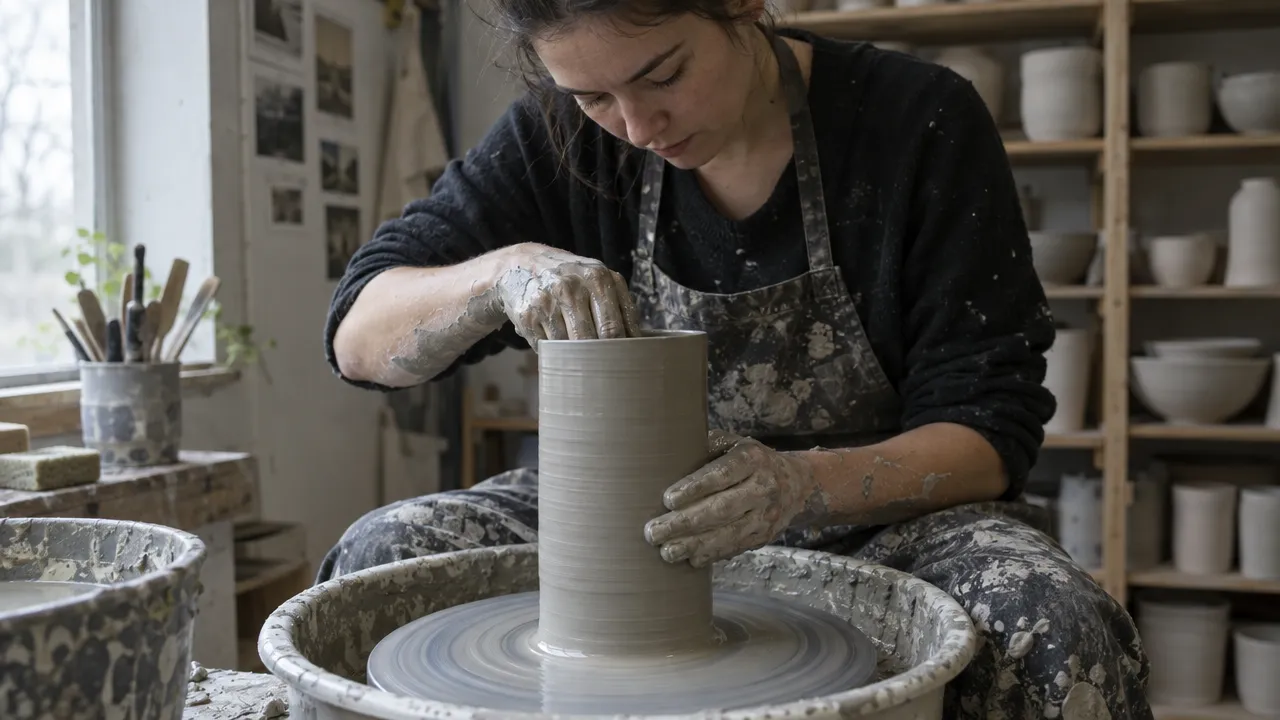
On October 16, 2026, we started from a still we generated with GPT Image 2.5 Flare for $0.055: a ceramicist's hands shaping a tall cylinder of wet grey clay on a wheel, in a small studio with soft overcast window light and shelves of unglazed pots behind her. It was 1280 x 720, already 16:9.
The agent called flora_add_to_canvas to add a video node with model i2v-gengateway-seedance-2-5-i2v, duration 5, aspect_ratio 16:9 and resolution 720p, wired by an edge to the still. It started the node with flora_run_canvas_nodes and polled flora_list_generations. The run completed in 3 minutes 27 seconds and was charged $2.457.
The clip is 5.06 seconds, 1280 x 720 at 24 fps, with an audio track. The wheel spins, the clay cylinder grows taller and smoother as her hands draw it up, and slip streaks along the clay. Her hands, the apron and the shelves hold their shape. The light matches the still from start to end.
What went wrong: we asked for "a very slow push in" and got a strong one. By the last second the frame has moved in so far that her face is out of the top of frame and the clay fills the middle. The fix is to ask for a locked-off camera, or to say "push in no more than 5 percent" when the subject must stay whole.
- Model
- Seedance 2.5 (image-to-video)
- Tools called
- flora_add_to_canvas, flora_run_canvas_nodes, flora_list_generations
- Cost
- $2.457 for the clip, $0.055 for the still
- Time
- 3 min 27 s for the clip
| Still | Motion to ask for | Camera |
|---|---|---|
| Person at work | One repeated action: hands shaping, pouring, typing | Locked off or a slight push in |
| Product shot | Light moving across the surface, a slow turn | Slow orbit or push in |
| Landscape | Clouds, water, leaves moving | Slow pan or locked off |
| Portrait | A blink, a breath, hair in the wind | Locked off |
| Storyboard frame | The action written in the shot list | The move in the shot list |
Short clip or long clip: pros and cons
Pros
- 4 to 6 seconds: one clear action that holds its shape, and the lowest cost.
- 4 to 6 seconds: quick to rerun with a different motion prompt.
- Longer clips (up to 30 seconds on Seedance 2.5): room for more than one beat in a single shot.
Cons
- 4 to 6 seconds: a longer scene needs several clips cut together.
- Longer clips: cost more per run and drift further from the still by the end.
- Both: a video run takes minutes, not seconds.
Which video model should I use?
We used Seedance 2.5, which handles realistic motion from a photo well. Kling and other image-to-video models sit behind the same FLORA MCP, so you can run the same still through two models and compare. Ask the agent to quote each first, since prices differ by model, length and resolution.
How do I stop the image from warping?
Keep the motion small and physical, and name what must not change. Hands, faces, logos and text are where drift shows first.
- Ask for one action, not three.
- Say "the product stays identical" or "her face does not change".
- Use a locked-off camera when the subject must stay whole.
- Generate the still at the video's aspect ratio so nothing is invented at the edges.
Can I animate several stills at once?
Yes. Ask the agent to add one video node per still and start them together. They render in parallel, so five clips take about as long as one. Quote the batch first.
Frequently asked questions
How much does it cost to turn an image into a video in FLORA?
Our 5-second 720p Seedance 2.5 clip was charged $2.457. Longer clips and 1080p cost more. The agent can quote the price in dollars before it runs.
How long does it take?
Our 5-second clip took 3 minutes 27 seconds from start to finished file.
Does the clip have sound?
Our Seedance 2.5 clip came back with an audio track. For a finished piece, add your own music or voiceover in the edit.
Can I use my own photo?
Yes. Give the agent a public link, or in Claude Code, Cursor or Codex point it at the file on your computer and it uploads the photo to FLORA first.