
What are the best Midjourney alternatives for creative teams?
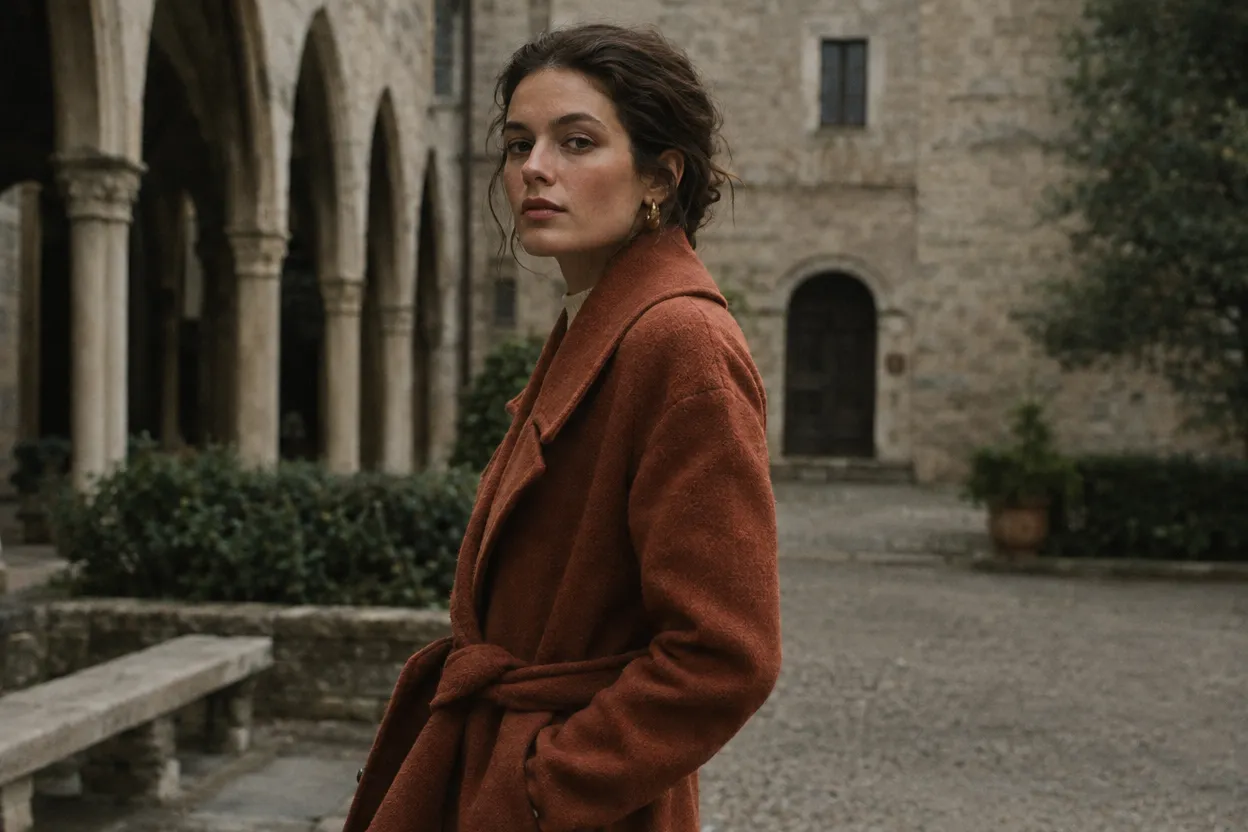
FLORA is the Midjourney alternative built for creative teams: a shared canvas where 50+ image and video models run side by side and every result stays next to the prompt that made it. In our run, an editorial portrait made with GPT Image 2.5 Flare through the FLORA MCP cost $0.055 and took 32 seconds, and it landed on the team's project canvas.
Key takeaways
- FLORA runs 50+ image and video models on one canvas, so a team picks the model for each shot.
- An editorial portrait with GPT Image 2.5 Flare cost $0.055 and took 32 seconds in our run.
- Every image is saved on a shared project canvas with its prompt and model, ready for a teammate to branch.
- FLORA quotes the cost of a run in dollars before anything is spent.
- The same tools work in the FLORA app and from Claude or Cursor through the FLORA MCP.
At a glance
| What it does | Generates and edits images and video for a team on one canvas |
|---|---|
| Works in | The FLORA app, Claude and Cursor through the FLORA MCP |
| Models | 50+ image and video models, including GPT Image 2.5 and Seedance 2.5 |
| Inputs | Text prompts, reference images, canvas nodes |
| Outputs | PNG images up to 4K, MP4 video |
| Typical cost | $0.055 per GPT Image 2.5 Flare image |
| Typical time | About 30 seconds per image |
Key features
- Model choice per shot: Pick GPT Image 2.5, Nano Banana 2.1, FLUX 3 or another model for each node in the same project.
- Shared history: Every image keeps the prompt and model that made it, visible to everyone on the project.
- Quotes before runs: Ask for a quote and FLORA returns the price in dollars with nothing reserved.
- Image and video together: Animate an approved still with Seedance 2.5 next to the image it came from.
Best for
- Art directors who need several people working from the same images
- Campaign stills that later become video, resizes and edits
- Teams that want to compare models on one brief before choosing
- Agencies that hand a repeatable look to the next person on the account
The options
FLORA
A visual canvas where a team generates, compares and edits images and video with 50+ models. Each node keeps its prompt, model and settings, so anyone on the project can rerun or branch it. The same models run from Claude or Cursor through the FLORA MCP.
Best for: Creative teams that need model choice, shared history and a path from still to edit to video in one project
- GPT Image 2.5, Nano Banana 2.1, FLUX 3, Ideogram 4.5, Krea 3 and Seedance 2.5 in one project
- Image-to-image edits, reframes and upscales on the same canvas
- Techniques: saved workflows a teammate can run on new inputs
Pros
- Model choice per shot: a portrait model, a text model and a video model can sit side by side on one brief.
- Shared projects with pooled team usage on paid plans, from $18 per seat a month as of October 2026.
- Every run is quoted in dollars first; our editorial portrait cost $0.055 and took 32 seconds.
Cons
- Each model has its own look, so expect to compare a few before locking a series to one.
- A node canvas takes a few minutes to learn next to a single prompt box; the FLORA MCP lets you ask in plain words instead.
Midjourney
An image generator with its own models, used in its web app at midjourney.com or through Discord. V8.2, released in July 2026, is the default model, and V1 Video animates images.
Best for: Solo artists and art directors chasing a distinctive look, image by image
Pros
- Known for its aesthetic quality; V8.2 focuses on aesthetics, quality and personalization.
- The V8 Edit model takes up to four reference images for edits and restyles.
- Image-to-video clips start at 5 seconds and extend to about 21 seconds.
Cons
- No API; Midjourney's community guidelines prohibit automating the service.
- Images are public by default; Stealth mode is limited to the Pro and Mega plans.
- The four published plans (Basic, Standard, Pro, Mega) are individual; there is no team plan.
Adobe Firefly
Adobe's generative app, with Firefly Image 5 plus partner models such as GPT Image, Gemini and FLUX for images and Runway, Kling and Luma for video.
Best for: Teams that live in Creative Cloud and want Adobe's commercially safe models first
Pros
- Adobe says Firefly models are trained on licensed and public-domain content, and outputs carry Content Credentials.
- Partner models sit next to Adobe's own in one app.
- Plans start at $9.99 a month for 2,000 credits, as of October 2026.
Cons
- Credits reset monthly with no rollover, and video and partner models draw on them.
- Adobe's commercial-safety position covers its own models; for partner models the user judges commercial use, and IP indemnity is for eligible enterprise customers.
Ideogram
An image generator known for legible text in images, with a Canvas for inpainting (Magic Fill) and outpainting (Extend). Ideogram 4.0 is its current model.
Best for: Posters, logos and social graphics where the words must be spelled right
Pros
- Text rendering is its specialty, with JSON prompting to place text in boxes.
- A Team plan at $30 per user a month, minimum two users, as of October 2026.
Cons
- Free-plan images are public; private generation starts on Plus.
- Ideogram's docs say text is most accurate in English and less predictable in non-Latin scripts.
Krea
A generative app with real-time image generation, many third-party image and video models, and its own Krea 3 model for natural-language edits.
Best for: Fast visual exploration across many models
Pros
- Real-time generation for quick sketch-to-image iteration.
- A Business plan for up to 50 seats with a shared pool and per-member spend limits.
- A REST API for developers.
Cons
- Usage is billed in compute units that vary by model, so cost per image takes checking.
- Units do not roll over except on Business and Enterprise.
Leonardo.ai
A Canva-owned image and video generator built around its Phoenix model, sold with monthly token plans.
Best for: Budget-minded creators and Canva teams who want predictable monthly tokens
Pros
- Unused tokens roll over for up to three months.
- Canva Business and Enterprise users get Leonardo's Essential plan at no extra cost.
- Paid plans start at $12 a month, as of October 2026.
Cons
- Tokens burn at different rates per model.
- Unlimited relaxed generation on higher plans starts only after the monthly tokens run out.
What happened when we made an editorial portrait in FLORA?
On October 16, 2026, we asked for an editorial lookbook portrait from Claude Code through the FLORA MCP. The agent called flora_create_generations with model t2i-gpt-image-2-5-flare, aspect_ratio 3:2 and the default quality (high) and resolution (1k), into a private project on our team workspace.
The prompt: "Editorial fashion portrait for a spring lookbook: a woman in a rust-colored wool coat standing in a quiet stone courtyard, overcast late-afternoon light, muted earth tones, 35mm film grain, natural skin texture, shallow depth of field." The run finished in 32 seconds and was charged $0.055. The result is a 1248 x 832 PNG with soft, even light, a stone arcade behind her and a muted rust and gray palette.
What went wrong: the 35mm film grain we asked for barely shows, and the model added a tied belt the prompt never mentioned. The fix is one more image-to-image pass on the canvas that names the change (add visible film grain, remove the belt), or setting resolution to 2k when the image needs to hold up in print.
- Model
- GPT Image 2.5 Flare
- Model id
- t2i-gpt-image-2-5-flare
- Settings
- 3:2, quality high, 1k (1248 x 832)
- Cost
- $0.055
- Time
- 32 s
| What it is | Models | Team features | Pricing | |
|---|---|---|---|---|
| FLORA | Shared canvas for image, video, audio and 3D, plus an MCP for agents | 50+ from several model makers | Shared projects, pooled usage, per-member caps on Pro | Dollars per run, quoted first; paid plans from $18 per seat a month |
| Midjourney | Image and video generator, web and Discord | Midjourney V8.2 and V1 Video | No team plan | Four plans from $10 a month |
| Adobe Firefly | Generative app in Creative Cloud | Firefly Image 5 plus partner models | Team licenses | From $9.99 a month for 2,000 credits |
| Ideogram | Image generator focused on text | Ideogram 4.0 | Team plan, 2 users minimum | Free tier; paid from $20 a month |
| Krea | Real-time generator with many models | Krea 3 plus third-party models | Business plan up to 50 seats | Free tier; compute-unit plans |
| Leonardo.ai | Canva-owned image and video generator | Phoenix and others | Included at Essential level in Canva Business | From $12 a month |
What should a creative team look for in a Midjourney alternative?
Midjourney is an image generator used in its web app at midjourney.com or through Discord, sold as subscription plans. A team's needs start where a single person's prompt ends: a shared place for the work, a record of how each image was made, and a way to move from a still to edits, resizes and video without exporting files between tools.
- Shared projects where everyone sees the same images and history.
- A choice of models, since one brief can need a portrait model, a text-rendering model and a video model.
- Edits on the image you already like, instead of rerolling from scratch.
- A known price before each run.
- Access from the tools the team already uses, including AI agents.
Can a team keep a consistent look across people?
Yes. In FLORA, the prompt, model and settings live on each canvas node, so a teammate can duplicate the node and change only the subject. For a look you want to hand over completely, save the chain of nodes as a Technique and anyone on the team can run it on new inputs.
Which Midjourney alternative should you pick?
Pick by how the team works. FLORA covers the broadest set of team needs, and it runs several of the models above, including Ideogram and Krea, on one canvas. Each of the others is strong at one job.
- Several people, several models, edits and video on one brief: FLORA.
- A distinctive aesthetic for one person exploring a look: Midjourney.
- Creative Cloud workflows and Adobe's own commercially safe models: Adobe Firefly.
- Text-heavy graphics such as posters and logos: Ideogram.
- Fast real-time exploration: Krea.
- Predictable monthly tokens for Canva teams: Leonardo.ai.
Frequently asked questions
How much does an image cost in FLORA?
It depends on the model. GPT Image 2.5 Flare cost $0.055 per image in our run. Ask for a quote and FLORA returns the price in dollars before anything runs.
Can I use FLORA from Claude?
Yes. Add the FLORA MCP to Claude as a custom connector at https://agents.flora.ai/mcp, sign in, and ask for images in plain words. Each result is saved to your FLORA project.
Can teammates edit each other's images?
Yes. Images live on a shared project canvas. Anyone on the project can connect an image to a new node and edit, reframe or animate it.
Which image model should I start with?
GPT Image 2.5 Flare is FLORA's default image model and a good first pick for photographic work. Compare it with Nano Banana 2.1 or FLUX 3 Image on the same prompt when the look matters.