
What are the best Canva AI alternatives for professional creatives?
FLORA is the Canva AI alternative for professional creatives who need control over the image itself: pick the model, edit the image you like, and recompose it for every placement on one canvas. In our run, FLORA made a square social post with a clean serif headline and recomposed it as a 9:16 story, both with GPT Image 2.5 Flare, for $0.119 in about 72 seconds.
Key takeaways
- FLORA lets you choose from 50+ image and video models for each image in a project.
- A square post with a correctly spelled headline cost $0.055 and took 37 seconds with GPT Image 2.5 Flare.
- Recomposing it as a 9:16 story with the image-to-image model cost $0.064 and took 35 seconds.
- Both versions sit on the same canvas, wired together, so the team sees which story came from which post.
At a glance
| What it does | Generates, edits and recomposes images for each placement |
|---|---|
| Works in | The FLORA app, Claude and Cursor through the FLORA MCP |
| Models in our run | GPT Image 2.5 Flare, text-to-image and image-to-image |
| Inputs | A text prompt with the headline, then the square image |
| Outputs | 1024 x 1024 post and 720 x 1280 story, PNG |
| Typical cost | $0.055 per new image, $0.064 per image-to-image edit |
| Typical time | About 35 seconds per image |
Best for
- Designers who need to choose the model behind each image
- Social teams producing one idea across feed, story and banner sizes
- Studios that need a record of how each image was made
- Creatives who want an agent to produce the first round of sizes
The options
FLORA
A visual canvas for image and video work. Generate with the model that fits the brief, then edit, reframe, upscale or animate the result in the same project. The same models run from Claude or Cursor through the FLORA MCP.
Best for: Designers and studios who need control over the image itself and every placement made from it
- 50+ image and video models, including GPT Image 2.5, Ideogram 4.5 and Seedance 2.5
- Resizes for each placement, wired to the source image
- Techniques: a saved post-to-story-to-banner chain anyone can rerun
Pros
- Model choice per image: photographic, illustrative and text-heavy work each get the model that suits them.
- Edits keep what was approved; our post-to-story recompose cost $0.064 and kept the headline spelled right.
- Every image keeps its prompt, model and settings on a shared canvas, so the team can see how each size was made.
Cons
- FLORA makes the images, not the full layout system: templates, fonts and print-ready pages still live in your design tool.
- A recompose redraws the frame, so name what must not change; a canvas action extends the frame when pixels must survive exactly.
Canva AI
Canva's online design editor with built-in AI: Canva AI, a chat workspace that sees and edits your design; Dream Lab and Magic Media for images, built on Leonardo's Phoenix model; and Magic Write for copy.
Best for: Marketers and non-designers who want AI inside a template and Brand Kit workflow
Pros
- Templates, Brand Kit, layout, AI images and copy in one editor.
- Canva AI applies the Brand Kit automatically when it edits a design.
- Canva Business costs $20 per person a month with no seat minimum, as of October 2026.
Cons
- AI use is capped monthly: Canva's help center lists up to 200 Premium uses or 20 Ultra uses on Pro.
- Image model choice is limited to Canva's tools plus marketplace apps such as DALL-E and Imagen, which Canva lists with limited usage.
Adobe Express
Adobe's template-based design app, with Firefly-powered image generation, brand kits and Adobe Stock assets.
Best for: Marketers who want quick templated design with Adobe's commercially safe models
Pros
- Adobe says Firefly output is designed to be safe for commercial use.
- Premium is $9.99 a month with no annual commitment and adds brand kits, as of October 2026.
Cons
- Premium includes 250 generative credits a month, and partner models draw more from that pool.
- The free plan has no monthly credits, only limited daily generations.
Kittl
An AI design platform built around typography and vectors, with an AI image generator, an AI vector generator, a vectorizer and Kittl Flows for chained artboards and mockups.
Best for: Merch, logos and type-led illustration
Pros
- Strong typography tools and vector export on paid plans.
- Paid plans include a commercial license.
Cons
- The free plan is for personal use only.
- AI runs on monthly tokens that do not roll over.
Figma Weave
Figma's node-based platform for AI image and video models, formerly Weavy, with its own credit system separate from Figma's.
Best for: Designers in Figma who want chained image and video workflows
Pros
- Many image and video models in one node workflow.
- A free plan with 150 credits a month and a commercial license, as of October 2026.
Cons
- Credits are separate from Figma's and cannot be shared between the two.
- Credit cost varies by model; Weave's pricing page estimates about 13 Nano Banana Pro runs on the free plan.
Microsoft Designer
Microsoft's free design app for social posts, collages and images, with generative erase, upscaling to 4K and brand kits. It also works inside Word and PowerPoint.
Best for: Quick, free graphics for personal use
Pros
- Free to use with a Microsoft account.
- Built into Microsoft's Office apps.
Cons
- Microsoft's FAQ describes it as licensed for personal, non-commercial use.
- Saves only one brand kit.
What happened when we made a social post in FLORA?
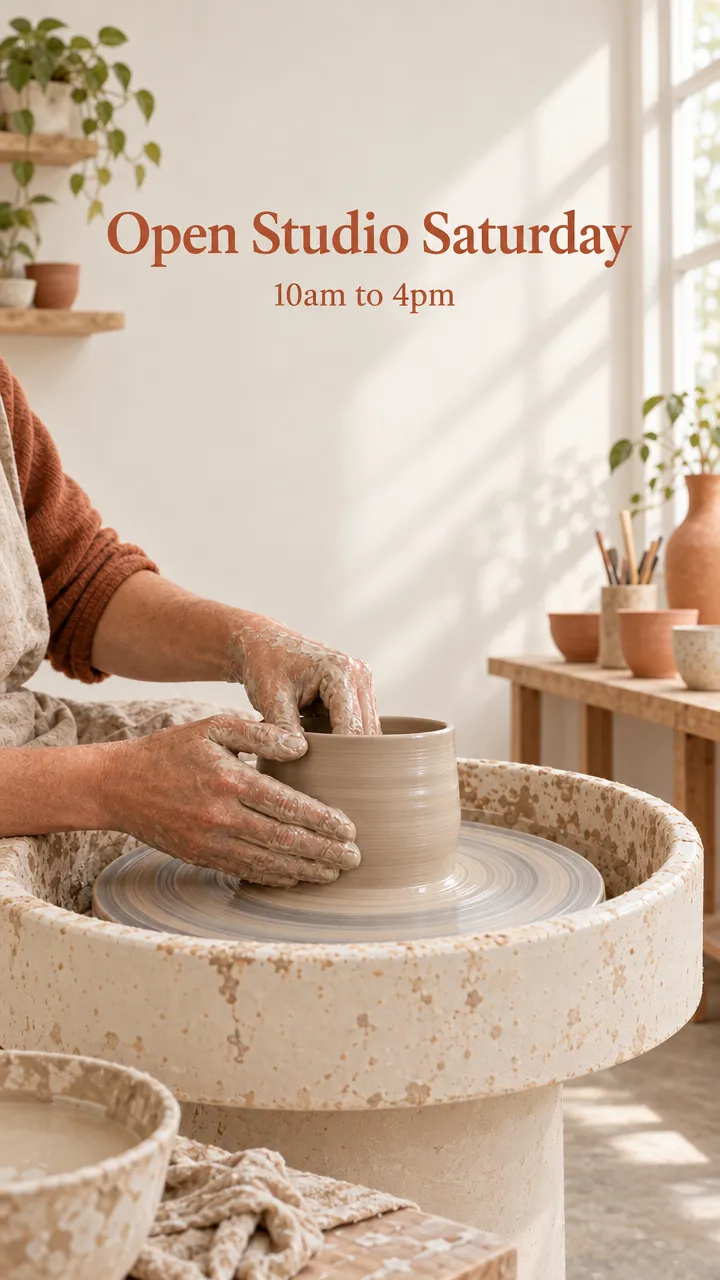
On October 16, 2026, we made a social post for a neighborhood ceramics studio from Claude Code through the FLORA MCP. The agent called flora_create_generations with model t2i-gpt-image-2-5-flare at aspect_ratio 1:1. The prompt described a potter's hands shaping clay on a wheel in soft window light, a muted terracotta and cream palette, and the exact copy: a serif headline 'Open Studio Saturday' with '10am to 4pm' beneath it.
The square post finished in 37 seconds and was charged $0.055. Both lines of text came back spelled correctly in a terracotta serif, with clear space around them.
Next, the agent passed the post's canvas node to flora_create_generations as reference_node_ids, with model i2i-gpt-image-2-5-flare and aspect_ratio 9:16, asking it to recompose the post as a vertical story with the same hands, light, colors and text. That took 35 seconds and was charged $0.064. The result is a 720 x 1280 story with the headline intact and more of the studio shelves above and below.
What went wrong: the recompose redrew the scene rather than extending it. The wheel became a taller pedestal wheel and the headline came back smaller. The fix is to name the details that must not change (the wheel's shape, the headline size) in the edit prompt. When the original pixels must survive exactly, change the aspect ratio with a canvas action that extends the frame instead of regenerating it.
- Models
- GPT Image 2.5 Flare (text-to-image, image-to-image)
- Model ids
- t2i-gpt-image-2-5-flare, i2i-gpt-image-2-5-flare
- Cost
- $0.055 + $0.064 = $0.119
- Time
- 37 s + 35 s
| What it is | Image models | Pricing | |
|---|---|---|---|
| FLORA | Canvas for generating, editing and resizing images and video | 50+ models from several model makers | Dollars per run, quoted first; paid plans from $18 per seat a month |
| Canva AI | Template design editor with AI | Phoenix-based Dream Lab plus apps such as DALL-E and Imagen | Business $20 per person a month; AI use capped per plan |
| Adobe Express | Template design app | Firefly plus partner models | Premium $9.99 a month, 250 credits |
| Kittl | Typography and vector design platform | Kittl AI image and vector tools | Free, Pro, Expert, Max |
| Figma Weave | Node-based AI image and video workflows | Many third-party models | Free; paid from $24 a month |
| Microsoft Designer | Free design app | Microsoft's image tools | Free |
Why do professional creatives look for a Canva AI alternative?
Canva is an online design editor, and Magic Media, part of its Magic Studio AI tools, generates images from a text prompt inside a Canva design. Professional work usually asks for more control over the image itself: which model makes it, how an approved image gets edited without starting over, and how one idea becomes every size a campaign needs.
- Model choice: photographic, illustrative and text-heavy images suit different models.
- Edits that keep what was approved and change one thing.
- Recomposition for each placement rather than a crop.
- A record of prompt, model and settings for every image.
Can FLORA put text in an image?
Yes. Write the exact words in quotes in the prompt and say where they go. GPT Image 2.5 Flare spelled both lines correctly in our run. Check every word in every size, since a recompose redraws the text.
How do I make every placement from one post?
Generate the post you like first, then wire it into image-to-image nodes, one per ratio. Name what must stay fixed: the subject, the copy, the palette. From an agent, ask for all sizes in one request and it sends them together.
Which Canva AI alternative should you pick?
Pick by what you need control over. When the image itself matters, FLORA covers the most: model choice, edits that keep what was approved, and every placement on one canvas. When the layout matters most, a template editor fits.
- Model choice, controlled edits and every placement from one image: FLORA.
- Templates and Brand Kit for a whole marketing team: Canva.
- Templated design with Adobe's commercially safe models: Adobe Express.
- Type-led merch and logos with vector export: Kittl.
- Node workflows inside the Figma ecosystem: Figma Weave.
- Free personal graphics: Microsoft Designer.
Frequently asked questions
How much does a social post cost in FLORA?
Our square post cost $0.055 with GPT Image 2.5 Flare, and each recomposed size cost $0.064. FLORA quotes the price in dollars before a run.
Does the text survive a resize?
It did in our run, spelled correctly, though smaller. Recheck the words in every size and name the headline size in the prompt if it matters.
Can I do this from Claude?
Yes. Add the FLORA MCP at https://agents.flora.ai/mcp to Claude, then ask for the post and the sizes in plain words. Every image is saved to your FLORA project.