
How do I batch generate product images from a spreadsheet?
Save the spreadsheet as a CSV, write one prompt template with a slot for each column, and ask a coding agent with the FLORA MCP to fill the template for every row. FLORA runs up to 20 images in one call. Our five-row run of stoneware mugs finished in 44 seconds and cost $0.275.
Key takeaways
- One flora_create_generations call takes up to 20 rows, and every row runs at the same time.
- Five product images from a five-row CSV cost $0.275 with GPT Image 2.5 Flare, $0.055 each.
- The whole batch finished 44 seconds after it was sent, about as long as a single image.
- A fixed template keeps light, background and framing the same, so the set reads as one shoot.
- FLORA's flora-batch-generate skill handles the loop, polling and per-row failures for you.
At a glance
| What it does | Turns each spreadsheet row into one product image |
|---|---|
| Works in | Claude Code, Cursor, Codex, or Claude with a pasted list |
| Models | Any FLORA image model; GPT Image 2.5 Flare in our run |
| Inputs | A CSV with one row per product, plus one prompt template |
| Outputs | One PNG per row, saved to a FLORA canvas |
| Typical cost | $0.055 per GPT Image 2.5 Flare image |
| Typical time | About 45 seconds for a batch of up to 20 |
What you need
- Claude Code, Cursor or Codex with the FLORA MCP installed. Claude Code setup is in the Claude Code install guide.
- A spreadsheet exported as CSV, with one product per row
- A FLORA project to generate into
Key features
- Batches of 20: One call submits up to 20 generations, and they run in parallel.
- One status check: flora_list_generations reads every run in the batch in a single call.
- Per-row failures: Each row reports its own result, so one failed row never reruns the whole batch.
- Quotes in dollars: Ask for a quote and FLORA prices every row before anything runs.
- Canvas record: Every image is saved with the exact prompt its row produced.
Best for
- Catalog and marketplace images for a product line
- Color, finish or size variants of one product
- Seasonal refreshes where only the setting changes
- Localized sets where one column holds the market
Step by step
Step 1: Put one product per row
Export the sheet as CSV. Keep a column for each thing that changes between images, such as the product name, the color and the surface it sits on. Add a SKU column so you can match each image back to its row later.
sku,product,glaze,surface
MUG-12-OAT,12 oz stoneware mug,speckled oat,a pale oak shelf
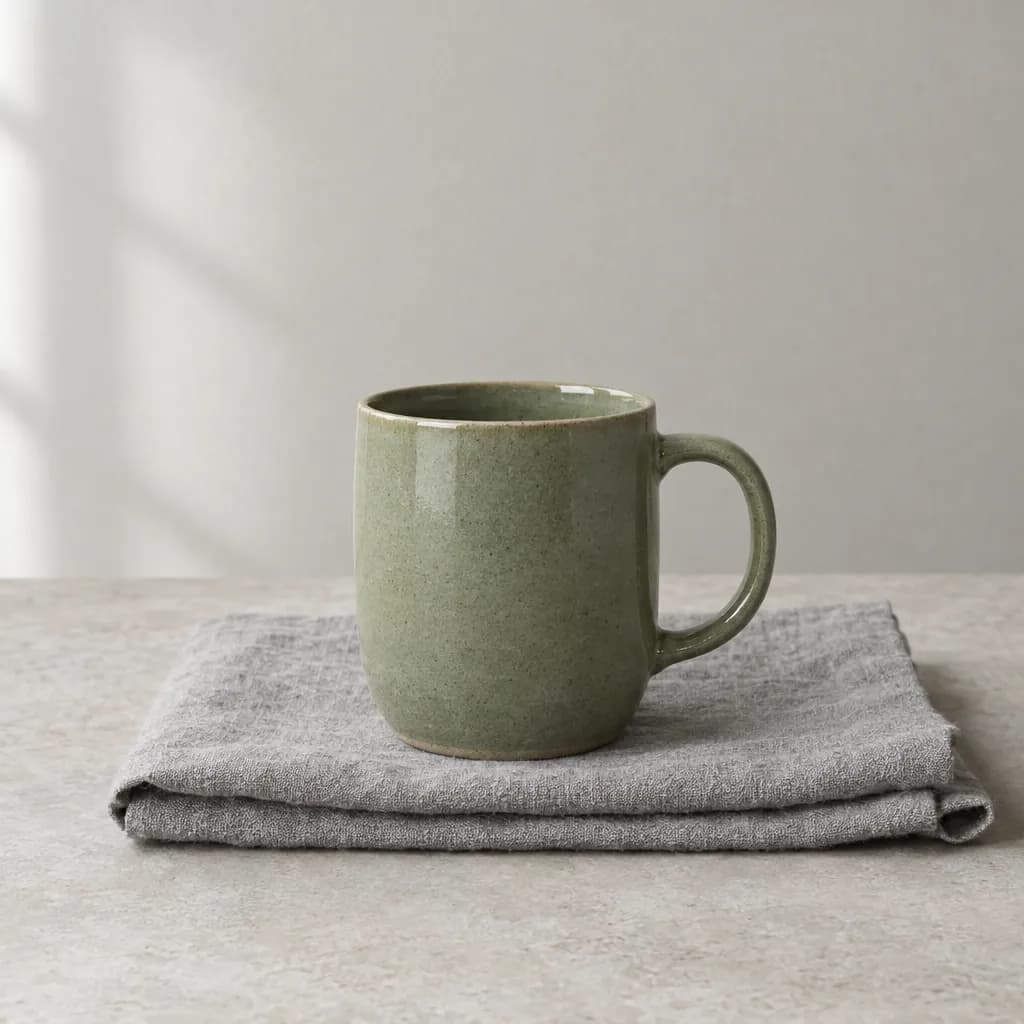
MUG-12-SAGE,12 oz stoneware mug,sage green,folded grey linen
MUG-16-CHAR,16 oz stoneware mug,charcoal matte,a slate tile
POUR-OAT,small ceramic pour-over cone,speckled oat,a pale oak shelf
ESP-8-RUST,8 oz espresso cup,rust red,warm travertine
Step 2: Write one template for the whole set
Fix everything that should match across the set: light direction, color treatment, framing, background space and what to leave out. Put the column names in braces where the row values go.
Product photo of a {product} in a {glaze} glaze, on {surface}. Soft daylight from the left, muted natural color, true-to-life texture, plenty of negative space, centered, no text, no logo.Step 3: Hand both to the agent
Ask the agent to read the CSV, fill the template for each row and send every row to FLORA in one call. Name the model and the settings so they stay the same across the set. If you want a price first, ask for a quote.
Read products.csv. For each row, fill this template and generate one 1:1 image with FLORA using GPT Image 2.5 Flare at 1K, all rows in one batch. Then poll until every row is done and list each SKU with its image URL and cost.Step 4: Check the set together
Open the FLORA canvas and look at the images side by side. Fix a row that drifted by rerunning only that row with a tighter prompt. Write the image URLs back into a new column of the spreadsheet so the sheet stays the source of record.
What happened when we batch generated product images in FLORA?
On October 16, 2026, we ran the five-row CSV above from Claude Code through the FLORA MCP. The agent filled the template once per row and made a single flora_create_generations call with five items, each with model t2i-gpt-image-2-5-flare, aspect_ratio 1:1, quality high and resolution 1k. It tagged the call with the flora-batch-generate skill.
It then read all five run ids with one flora_list_generations call. The fastest image finished in 38 seconds and the last in 44 seconds after the batch went out. Each image cost $0.055, so the set cost $0.275. Every image came back at 1024 x 1024 pixels.
The set holds together: soft daylight from the left on all five, a pale wall behind, and the product centered with room around it. Glazes came out as named, with visible speckle on the oat pieces and a matte surface on the charcoal mug.
What went wrong: the model added small props we did not ask for, a sprig of greenery and a stack of books beside the oat mug. For a strict catalog set, add "no props, nothing else in frame" to the template and rerun only the rows that need it. The espresso cup also reads larger than 8 oz next to the mugs, because each image is framed alone; put the size in a scale cue, such as a hand or a saucer, if size matters.
- Rows
- 5
- Model
- t2i-gpt-image-2-5-flare
- Tools called
- flora_create_generations (once), flora_list_generations
- Cost
- $0.275 for five images
- Time
- 44 seconds for the whole batch
| SKU | Row values | What changed in the image |
|---|---|---|
| MUG-12-OAT | 12 oz mug, speckled oat, pale oak shelf | Cream speckled glaze on a light wood shelf |
| MUG-12-SAGE | 12 oz mug, sage green, folded grey linen | Glossy green glaze on a linen cloth |
| MUG-16-CHAR | 16 oz mug, charcoal matte, slate tile | Dark matte glaze on a rough slate base |
| POUR-OAT | Pour-over cone, speckled oat, pale oak shelf | Ribbed cone shape, same shelf as row one |
| ESP-8-RUST | 8 oz espresso cup, rust red, travertine | Red glaze on warm stone |
Coding agent or chat for batches: pros and cons
Pros
- Coding agent: reads the CSV from disk and writes the image URLs back into it.
- Coding agent: the template and the CSV live in your repo, so the next batch is one command.
- Chat in Claude: no setup beyond the connector; paste a short list and ask for one image per line.
Cons
- Coding agent: needs a one-time MCP install in the editor or terminal.
- Chat in Claude: pasting more than a couple of dozen rows gets slow to review.
- Both: rows past 20 go out as a second call, so a 100-row sheet is five batches.
How many rows can I run at once?
Up to 20 rows go out in one flora_create_generations call. For a longer sheet the agent splits it into batches of 20 and sends them one after another. Each batch ran in about the time of a single image in our test, so a 100-row sheet is roughly five batches of under a minute each with GPT Image 2.5 Flare.
How do I keep the whole set consistent?
Keep everything that should match in the template and only the product facts in the columns. Use the same model, aspect ratio and resolution for every row. If you have a real product photo, put its URL in a column and switch to an image-to-image model so the product stays exact.
- Light: one direction and quality for every row, such as soft daylight from the left.
- Background: name it once in the template, or make it a column if it should change.
- Framing: centered, same aspect ratio, same amount of empty space.
- Exclusions: no text, no logo, no props, written once in the template.
What if one row fails?
Each row comes back with its own status. Rerun only the failed or off rows; the rows that succeeded are already paid for and saved on the canvas. The flora-batch-generate skill does this bookkeeping and reports cost per row. None of our five rows failed.
Frequently asked questions
Can I do this without a coding agent?
Yes. In Claude with the FLORA connector, paste the rows into the chat and ask for one image per row. A coding agent is easier past a few dozen rows because it reads and writes the file.
How much does a batch cost?
The price of each image added together. Our five GPT Image 2.5 Flare images cost $0.055 each, $0.275 in total. Ask the agent for a quote first and FLORA returns the price per row.
Can I use my own product photos as the starting point?
Yes. Add a column with each photo's public URL or upload the files from your computer with Claude Code or Cursor, then use an image-to-image model so the product itself stays the same.
Where do the images end up?
On the FLORA canvas of the project you chose, each with its prompt. The agent also returns a URL per row, which you can write back into the spreadsheet.