
How do I keep a character consistent across AI images and video?
Make one anchor image of the character, then generate every new scene from it as a reference with an image-to-image model in FLORA, repeating the same description each time. Animate the approved stills with an image-to-video model such as Seedance 2.5. Our character held her face across three stills and a 5-second clip for $2.65.
Key takeaways
- One anchor portrait, reused as a reference, kept the same face across three scenes in our run.
- Each new scene cost $0.064 with GPT Image 2.5 Flare image-to-image and took about 29 seconds.
- A 5-second 720p Seedance 2.5 clip from one still cost $2.468 and took 3 minutes 33 seconds.
- Repeat the same identity line in every prompt: hair, one distinctive accessory, clothing.
- The full set, one anchor, two scenes and one clip, cost $2.65.
At a glance
| What it does | Keeps one person or mascot looking the same across new images and clips |
|---|---|
| Works in | Claude, Claude Code, Cursor, Codex and the FLORA canvas |
| Models | GPT Image 2.5 Flare (text and image-to-image), Seedance 2.5 image-to-video |
| Inputs | A written character description, then the anchor image as a reference |
| Outputs | Stills in any aspect ratio and MP4 clips, saved on one canvas |
| Typical cost | $0.064 per new scene; $2.468 per 5-second 720p clip |
| Typical time | About 30 seconds per still, 3 to 5 minutes per clip |
What you need
- The FLORA MCP in your agent, or the FLORA canvas. Setup for Claude is in the Claude install guide.
- A short written description of the character
- One FLORA project that holds the anchor image and every scene made from it
Key features
- Canvas references: reference_node_ids passes an earlier image on the canvas into the next generation.
- Image-to-image models: Most FLORA image models have an i2i version that keeps the reference's subject.
- Multi-image input: Images-to-image models accept several references, such as a face and an outfit.
- Still to video: Image-to-video models animate the approved still, so the clip starts from the face you chose.
- One project: Anchor, scenes and clips sit together on one canvas, wired to their source.
Best for
- A brand mascot or recurring character across a campaign
- Storyboards where one person appears in every frame
- Creator or founder-style content made without a new shoot each time
- Short videos that cut between several shots of the same person
Step by step
Step 1: Write the identity once
Describe the character in one sentence you will paste into every prompt: age, hair, one distinctive accessory and the default outfit. A single accessory, such as one earring, is a quick check that the reference held.
Mara, a ceramicist in her early 30s: short dark curly hair, a small silver hoop in her left ear only, light freckles across her nose, an olive green canvas work apron over a cream linen shirt with rolled sleeves.Step 2: Make the anchor image
Generate a clear, front-facing portrait in even light. This is the reference every later image comes from, so redo it until the face is right before you make anything else.
Portrait photo of Mara, [identity line]. She stands in her pottery studio beside shelves of unglazed bowls, looking at the camera. Soft north window light, muted natural color, true-to-life skin texture, 35mm photo look.Step 3: Make each new scene from the anchor
Use an image-to-image model with the anchor as the reference, and start the prompt with "the same woman from the reference image" followed by the identity line. Change one thing at a time: the setting, the pose or the outfit.
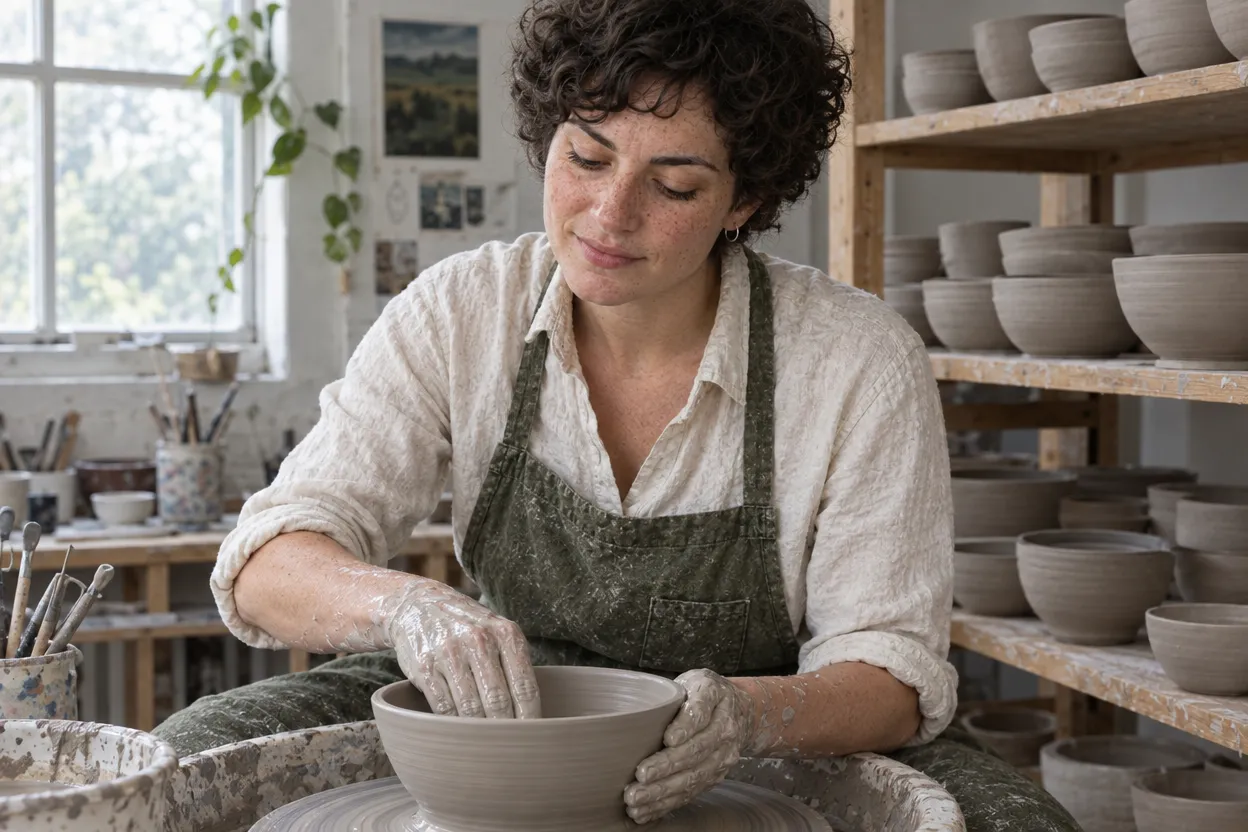
The same woman from the reference image, Mara, with the same face, short dark curly hair, single silver hoop in her left ear, freckles, olive green apron and cream linen shirt. She sits at a pottery wheel shaping a wet clay bowl, hands covered in slip, looking down at her work.Step 4: Animate the stills you approve
Send an approved scene to an image-to-video model. Keep the camera still or slow and describe small, natural motion; big moves and turns are where faces change. Tell the model the face, hair and clothes stay the same.
Locked-off camera, no camera move. The woman keeps shaping the wet clay bowl on the spinning pottery wheel, her hands steady. She glances up briefly and then back down at the bowl. Her face, hair and clothes stay the same throughout.
What happened when we kept one character consistent in FLORA?
On October 16, 2026, we built Mara from Claude Code with the FLORA MCP. The anchor portrait was one flora_create_generations call with model t2i-gpt-image-2-5-flare at 2:3, 1K. It took 28 seconds, cost $0.055 and came back at 832 x 1248 pixels.
We then made two scenes in one call with model i2i-gpt-image-2-5-flare at 3:2, passing the anchor's canvas node in reference_node_ids: Mara at the pottery wheel, and Mara at an outdoor craft market in a rust cardigan instead of the apron. Each took 29 seconds and cost $0.064. Her face, curls and freckles carried over to both.
Last, we animated the pottery-wheel still with i2v-gengateway-seedance-2-5-i2v: duration 5, resolution 720p, aspect_ratio auto, with the still's URL in params.image_url. The clip took 3 minutes 33 seconds and cost $2.468. It is a 5.06-second, 1178 x 786, 24 fps MP4 with an audio track. Her face stays the same in every frame we checked, the bowl keeps its shape and her hands keep working the clay.
What went wrong: the glance we asked for went up and off to the side rather than toward the camera, so say where she looks if it matters. In the market scene the silver hoop is hard to see, which makes the accessory check weaker; pick an accessory that stays visible from most angles. The clip also framed the still slightly tighter than the original.
- Models
- t2i-gpt-image-2-5-flare, i2i-gpt-image-2-5-flare, i2v-gengateway-seedance-2-5-i2v
- Tools called
- flora_create_generations, flora_list_generations
- Cost
- $2.65 for three stills and one clip
- Time
- 28 s anchor, 29 s per scene, 3 min 33 s clip
| Shot | Model | Settings | Cost | Time |
|---|---|---|---|---|
| Anchor portrait | t2i-gpt-image-2-5-flare | 2:3, 1K | $0.055 | 28 s |
| At the wheel | i2i-gpt-image-2-5-flare | 3:2, anchor as reference | $0.064 | 29 s |
| At the market, new outfit | i2i-gpt-image-2-5-flare | 3:2, anchor as reference | $0.064 | 29 s |
| Wheel clip | i2v-gengateway-seedance-2-5-i2v | 5 s, 720p, auto | $2.468 | 3 min 33 s |
Reference images or a trained LoRA: pros and cons
Pros
- Reference images: no training step; the first new scene is about 30 seconds away.
- Reference images: change the anchor and every later scene follows it.
- Trained LoRA: the character is baked into the model, so prompts can be shorter.
Cons
- Reference images: small details such as jewelry can fade in busy scenes.
- Trained LoRA: needs a set of training images and a training run before the first result.
- Both: video adds motion, and large head turns are where a face is most likely to change.
Why does the character drift between images?
A text prompt alone describes a type of person, and the model fills the gaps differently each time. A reference image gives it the actual face. Drift also creeps in when each scene is made from the previous scene instead of the anchor, because small changes add up. Always go back to the anchor.
How do I keep the face the same in video?
Start every clip from an approved still, not from text. Keep the camera locked or slow, ask for small motion and say outright that the face, hair and clothes stay the same. Short clips hold better than long ones; cut several 5-second clips together rather than asking for one long take.
- Use an image-to-video model such as Seedance 2.5 so the first frame is your still.
- Set aspect_ratio to auto so the clip keeps the still's framing.
- Avoid full turns away from camera; the face has to be re-invented when it comes back.
Can I change the outfit and keep the face?
Yes. Keep the face, hair and accessory in the identity line and replace only the clothing words. In our market scene Mara swapped the apron for a rust cardigan and kept the same face and curls. For a specific garment, pass a second reference image with an images-to-image model.
Frequently asked questions
How much does a consistent character set cost?
Ours cost $2.65: $0.055 for the anchor, $0.064 for each of two scenes and $2.468 for a 5-second 720p Seedance 2.5 clip.
Does this work for mascots and illustrated characters?
Yes. The method is the same: one anchor, the same identity line, the anchor as the reference. Name the art style in the identity line too, so it stays fixed.
Can I use a photo of a real person as the anchor?
Only with that person's permission. Upload the photo to FLORA and use it as the reference the same way as a generated anchor.
Which video model should I use?
Any FLORA image-to-video model starts from your still. We used Seedance 2.5; the complete guide to AI video models lists the others with quoted prices.